Windows Command Line
- User: bung3r
- Date: 2nd December 2025
- Description: Learn the essential Windows commands.
Tags: #windows #cmd
Introduction
There are many other advantages to using a CLI besides speed and efficiency. We will mention a few:
- Lower resource usage: CLIs require fewer system resources than graphics-intensive GUIs. In other words, you can run your CLI system on older hardware or systems with limited memory. If you are using cloud computing, your system will require lower resources, which in turn will lower your bill.
- Automation: While you can automate GUI tasks, creating a batch file or script with the commands you need to repeat is much easier.
- Remote management: CLI makes it very convenient to use SSH to manage a remote system such as a server, router, or an IoT device. This approach works well on slow network speeds and systems with limited resources.
Questions
What is the default command line interpreter in the Windows environment?
A: cmd.exe
Basic System Information
Before issuing commands, we should note that we can only issue the commands within the Windows Path. You can issue the command set to check your path from the command line. The terminal output below shows the path where MS Windows will execute commands, as indicated by the line starting with Path=.
C:\>set ALLUSERSPROFILE=C:\ProgramData [...] LOGNAME=strategos NUMBER_OF_PROCESSORS=2 OS=Windows_NT Path=C:\Windows\system32;C:\Windows;C:\Windows\System32\Wbem;C:\Windows\System32\WindowsPowerShell\v1.0\;C:\Windows\System32\OpenSSH\;C:\Windows\system32\config\systemprofile\AppData\Local\Microsoft\WindowsApps;C:\Users\strategos\AppData\Local\Microsoft\WindowsApps; [...]
The ver command determines the operating system (OS) version.
We can run the systeminfo command to list various information about the system such as OS information, system details, processor and memory.
You can pipe it through more if the output is too long. Then, you can view it page after page by pressing the space bar button. To demonstrate this, try running driverquery and compare it with running driverquery | more. In the latter, you can display the output page by page and you can exit it using CTRL + C.
help- Provides help information for a specific commandcls- Clears the Command Prompt screen.
Questions
What is the OS version of the Windows VM?

A: 10.0.20348.2655
What is the hostname of the Windows VM?
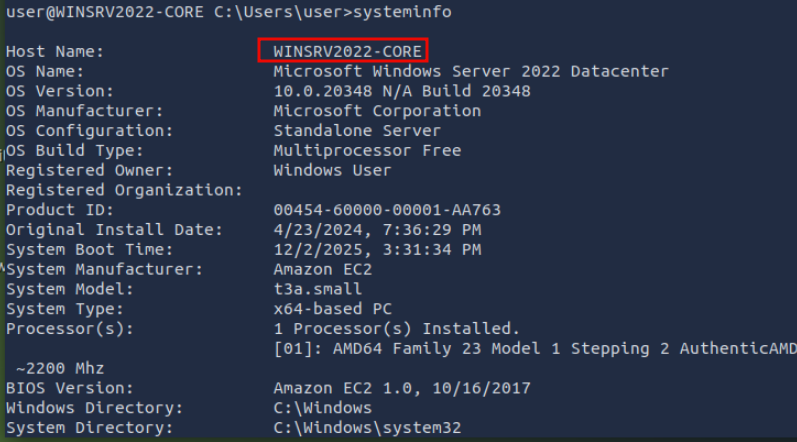
A: WINSRV2022-CORE
Network Troubleshooting
You can check your network information using ipconfig.
You can also use ipconfig /all for more information about your network configuration. As shown in the terminal below, we can view our DNS servers and confirm that DHCP is enabled.
One common troubleshooting task is checking if the server can access a particular server on the Internet. The command syntax is ping target_name. Inspired by ping-pong, we send a specific ICMP packet and listen for a response. If a response is received, we know that we can reach the target and that the target can reach us.
Another valuable tool for troubleshooting is tracert, which stands for trace route. The command tracert target_name traces the network route traversed to reach the target. Without getting into more details, it expects the routers on the path to notify us if they drop a packet because its time-to-live (TTL) has reached zero.
One networking command worth knowing is nslookup. It looks up a host or domain and returns its IP address. The syntax nslookup example.com will look up example.com using the default name server; however, nslookup example.com 1.1.1.1 will use the name server one.one.one.one.
netstat displays current network connections and listening ports. A basic netstat command with no arguments will show you established connections
If you are curious about the other options, you can run netstat -h, where -h displays the help page. We opted for the following options:
-adisplays all established connections and listening ports-bshows the program associated with each listening port and established connection-oreveals the process ID (PID) associated with the connection-nuses a numerical form for addresses and port numbers
We combine these four options and execute the netstat -abon command
Questions
Which command can we use to look up the server’s physical address (MAC address)?
A: ipconfig /all
What is the name of the service listening on port 135?
Do a netstat -abon

A: RpcSs
What is the name of the service listening on port 3389?

A: TermService
File and Disk Management
You can view the child directories using dir.
dir /a- Displays hidden and system files as well.dir /s- Displays files in the current directory and all subdirectories.
You can type tree to visually represent the child directories and subdirectories.
To create a directory, use mkdir directory_name;
view text files with the command type.
for long text files, more will display a single page and wait for you to press Spacebar to move by one page (flip the page) or Enter to move by one line.
The copy command allows you to copy files from one location to another.
you can move files using the move command.
we can delete a file using del or erase
Questions
What are the file’s contents in C:\Treasure\Hunt?

A: THM{CLI_POWER}
Task and Process Management
We can list the running processes using tasklist.
Some filtering is helpful because the output is expected to be very long. You can check all available filters by displaying the help page using tasklist /?. Let’s say that we want to search for tasks related to sshd.exe, we can do that with the command tasklist /FI "imagename eq sshd.exe". Note that /FI is used to set the filter image name equals sshd.exe.
With the process ID (PID) known, we can terminate any task using taskkill /PID target_pid. For example, if we want to kill the process with PID 4567, we would issue the command taskkill /PID 4567.
Questions
What command would you use to find the running processes related to notepad.exe?
A: tasklist /FI "imagename eq notepad.exe"
What command can you use to kill the process with PID 1516?
A: taskkill /PID 1516
Conclusion/Other commands
chkdsk: checks the file system and disk volumes for errors and bad sectors.driverquery: displays a list of installed device drivers.sfc /scannow: scans system files for corruption and repairs them if possible.
Moreover, it is equally important to know that /? can be used with most commands to display a help page.
Questions
The command shutdown /s can shut down a system. What is the command you can use to restart a system?
A: shutdown /r
What command can you use to abort a scheduled system shutdown?
A: shutdown /a