Nmap
Intro
-
port scanning
-
when we open multiple tabs in our web browser, the program must know which tabs connets to which website
- this is done by establishing connections to the remote services using different ports on our machine
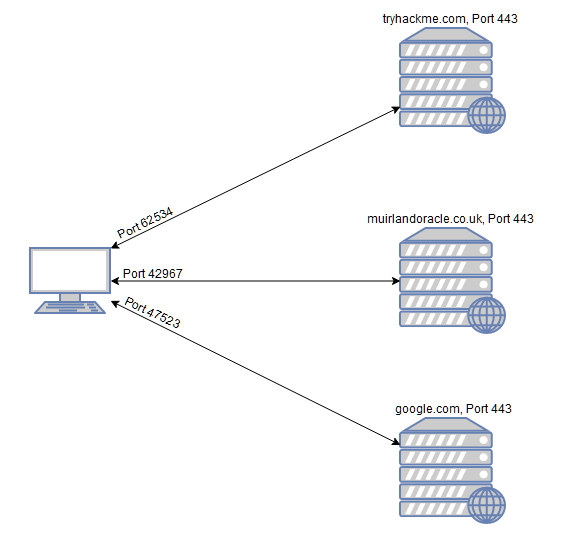
- every computer has a total of 65535 available ports
Questions
- What networking constructs are used to direct traffic to the right application on a server?
A: ports
- How many of these are available on any network-enabled computer?
A: 65535
- How many of these are considered “well-known”? (These are the “standard” numbers mentioned in the task)
A: 1024 (ports 0-1023)
Nmap Switches
Questions
- What is the first switch listed in the help menu for a ‘Syn Scan’ (more on this later!)?
A: -sS
- Which switch would you use for a “UDP scan”?
A: -sU
- If you wanted to detect which operating system the target is running on, which switch would you use?
A: -O
- Nmap provides a switch to detect the version of the services running on the target. What is this switch?
A: -sV
- The default output provided by nmap often does not provide enough information for a pentester. How would you increase the verbosity?
A: -v
- Verbosity level one is good, but verbosity level two is better! How would you set the verbosity level to two? (Note: it’s highly advisable to always use at least this option)
A: -vv
We should always save the output of our scans – this means that we only need to run the scan once (reducing network traffic and thus chance of detection), and gives us a reference to use when writing reports for clients.
- What switch would you use to save the nmap results in three major formats?
A: -oA
- What switch would you use to save the nmap results in a “normal” format?
A: -oN
- A very useful output format: how would you save results in a “grepable” format?
A: -oG
Sometimes the results we’re getting just aren’t enough. If we don’t care about how loud we are, we can enable “aggressive” mode. This is a shorthand switch that activates service detection, operating system detection, a traceroute and common script scanning.
- How would you activate this setting?
A: -A
Nmap offers five levels of “timing” template. These are essentially used to increase the speed your scan runs at. Be careful though: higher speeds are noisier, and can incur errors!
- How would you set the timing template to level 5?
A: -T5
We can also choose which port(s) to scan.
- How would you tell nmap to only scan port 80?
A: -p 80
- How would you tell nmap to scan ports 1000-1500?
A: -p 1000-1500
A very useful option that should not be ignored:
- How would you tell nmap to scan all ports?
A: -p-
- How would you activate a script from the nmap scripting library (lots more on this later!)?
A: –script
- How would you activate all of the scripts in the “vuln” category?
A: –script=vuln
Scan Types Overview
-
three basic scans:
-
TCP Connect Scans (-sT)
-
SYN “Half-open” scans (-sS)
-
UDP Scans (-sU)
-
-
Less common port scans:
-
TCP Null Scans (-sN)
-
TCP FIN Scans (-sF)
-
TCP Xmas Scans (-sX)
-
TCP Connect Scans
-
nmap tries to connect to each specified port by performing the three-way handshake
< “… If the connection does not exist (CLOSED) then a reset is sent in response to any incoming segment except another reset. In particular, SYNs addressed to a non-existent connection are rejected by this means.”
-
if the port responds with RST, we know it is closed.
-
if the ports responds with a SYN/ACK, it is open.
-
however, there is a third possibility:
- what if the port is open but hidden behind a firewall?
-
in this case, nmap will not get any response back when it sends a TCP SYN Request.
- this indicates the port is filtered
-
because we can easily configure a firewall to respond with a RST TCP packet to SYN TCP packets, it gets difficult to accurately scan the target (
iptables -I INPUT -p tcp --dport -j REJECT --reject-with tcp-reset)
Questions
- Which RFC defines the appropriate behaviour for the TCP protocol?
A: RFC 793
- If a port is closed, which flag should the server send back to indicate this?
A: RST
SYN Scans
-
reffered to as ‘half-open scans’ or ‘stealth scans’
-
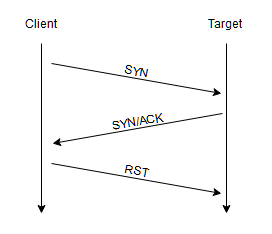
it works similar to a TCP Scan but with a twist:
- when it receives a TCP packet with SYN/ACK flags set, it sends a RST TCP packet (preventing the server from repeatedly trying to make a request).
-
Advantages:
-
bypasses older Intrusion Detection Systems (IDS) as they are looking out for a full three way handshake (nowadays, modern IDS solutions take care of this problem)
-
SYN scans are often not logged by applications listening on open ports, as they usually do that when a full connection has been established.
-
SYN scans, as they do not complete the handshake, are significantly faster than a standard TCP scan.
-
-
Disadvantages:
-
requires sudo permissions, as only the root user has the permissio to create raw packets (as opposed to the full TCP handshake)
-
unstable services are sometimes brought down by SYN scans, which could be problematic if a client has provided a production environment for the test.
-
-
if nmap is run with sudo permission, it does a SYN Scan by default.
- without sudo permission, by default it does a TCP Scan
-
it acts the as the TCP Scan regarding the closed and filtered ports
- the difference is on handling the open ports
Questions
- There are two other names for a SYN scan, what are they?
A: half-open, stealth
- Can Nmap use a SYN scan without Sudo permissions (Y/N)?
A: N
UDP Scans
-
when there is no response to UDP packets, nmap refers to the port as being
open|filtered.- in the rare case that it gets a response, it marks it as
open
- in the rare case that it gets a response, it marks it as
-
when there is no response, nmap sends a packet one more time to double-check
- if it gets no response this time as well, it moves on, marking the port as
open|filtered
- if it gets no response this time as well, it moves on, marking the port as
-
if the ports responds with an ICMP (ping) packet (port unreachable), it means that the port is closed.
-
as we expect, UDP scans are slow (around 20 minutes to scan the first 1000 ports)
- hence, a common practice is to only scan a number of top ports:
nmap -sU --top-ports 20 <TARGET_IP>
- usually, nmap sends raw UDP packets, but in case for some well-known services, these packets get specific payload so that the chance of getting a response is higher.
Questions
- If a UDP port doesn’t respond to an Nmap scan, what will it be marked as?
| A: open | filtered |
- When a UDP port is closed, by convention the target should send back a “port unreachable” message. Which protocol would it use to do so?
A: ICMP
NULL, FIN and Xmas
-
usually stealthier than the other, though not as frequently used
-
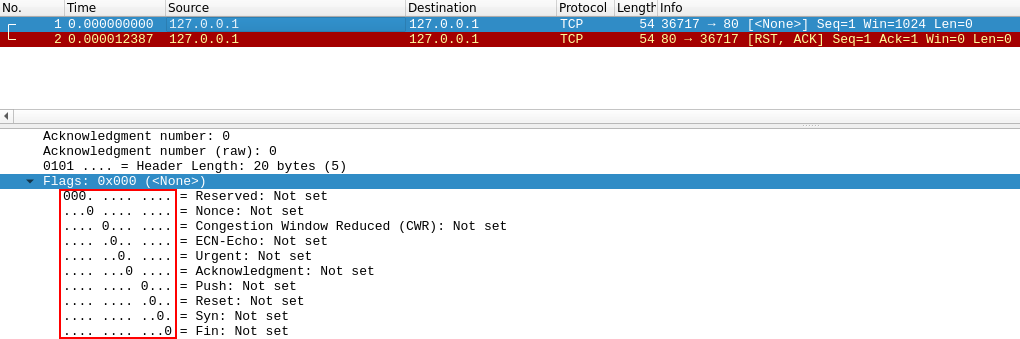
The Null Scan (-sN) sends a TCP request without any flags set.
- if the port is closed, it gets a TCP RST as a response.
-
The FIN Scan (-sF) sends a TCP Request with the FIN flag set, which is usually used to “gracefuly close an active connection”
- nmap expects an RST if the port is closed.
-
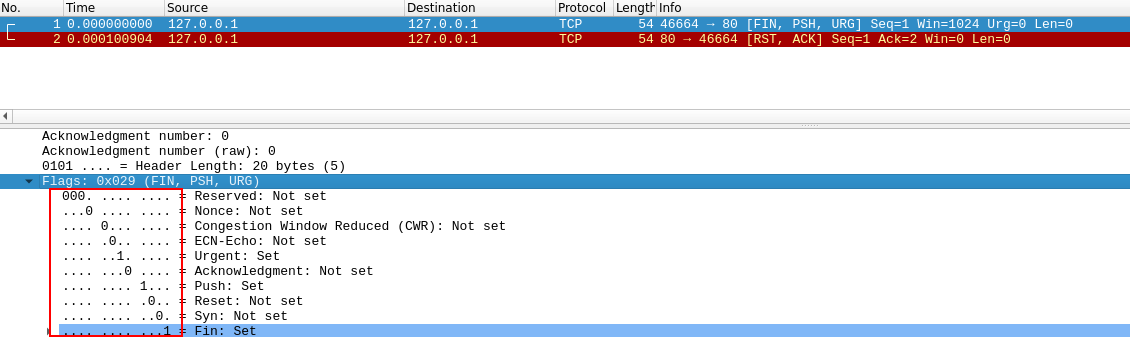
The XMAS scan (-sX) works the same as the other two
- It’s referred to as an xmas scan as the flags that it sets (PSH, URG and FIN) give it the appearance of a blinking christmas tree when viewed as a packet capture in Wireshark.
-
The expected response for open ports with these scans is also identical, and is very similar to that of a UDP scan.
-
If the port is open then there is no response to the malformed packet.
-
Unfortunately (as with open UDP ports), that is also an expected behaviour if the port is protected by a firewall, so NULL, FIN and Xmas scans will only ever identify ports as being open filtered, closed, or filtered. If a port is identified as filtered with one of these scans then it is usually because the target has responded with an ICMP unreachable packet.
-
-
It’s also worth noting that while RFC 793 mandates that network hosts respond to malformed packets with a RST TCP packet for closed ports, and don’t respond at all for open ports; this is not always the case in practice.
-
In particular Microsoft Windows (and a lot of Cisco network devices) are known to respond with a RST to any malformed TCP packet – regardless of whether the port is actually open or not.
- This results in all ports showing up as being closed.
-
-
That said, the goal here is, of course, firewall evasion.
-
Many firewalls are configured to drop incoming TCP packets to blocked ports which have the SYN flag set (thus blocking new connection initiation requests).
-
By sending requests which do not contain the SYN flag, we effectively bypass this kind of firewall.
-
Whilst this is good in theory, most modern IDS solutions are savvy to these scan types, so don’t rely on them to be 100% effective when dealing with modern systems.
-
Questions
- Which of the three shown scan types uses the URG flag?
A: XMAS
- Why are NULL, FIN and Xmas scans generally used?
A: firewall evasion
- Which common OS may respond to a NULL, FIN or Xmas scan with a RST for every port?
A: Microsoft Windows
ICMP Network Scanning
-
when we first connect to a target network, we want to check which IP addresses contain active hosts and which do not.
-
we can do this using “ping sweep”
-
nmap sends ICMP packets and if it gets a response, it marks the IP as alive
- though, this is not allways accurate
-
-
we can perform the “ping sweep” by using the flag -sn in conjunction with IP ranges either using a hyphen or using CIDR notation:
-
nmap -sn 192.168.0.1-254 -
nmap -sn 192.168.0.0/24
-
-
the -sn switch tells nmap not to scan for any ports, forcing it to rely on ICMP echo requests (or ARP requests on a local network if run with sudo privileges)
- nmap also sends a TCP SYN packet to port 443 and a TCP ACK (or TCP SYN if not run as root) packet to port 80 of the target.
Questions
- How would you perform a ping sweep on the 172.16.x.x network (Netmask: 255.255.0.0) using Nmap? (CIDR notation)
A: nmap -sn 172.16.0.0/16
NSE Scripts Overview
-
The Nmap Scripting Engine is a powerful addition to nmap; its scripts are written in Lua programming language and be used from scanning for vulnerabilities, to automating exploits for them
- primarily used for reconnaisance
-
Categories:
-
safe- won’t affect the target -
intrusive- likely to affect the target -
vuln- scan for vulnerabilities -
exploit- attempt to exploit a vuln. -
auth- attempt to bypass authentication for running services (e.g: log into an FTP server anonymously) -
brute- attempt to bruteforce credentials for running services -
discovery- attempt to query running services for further information about the network (e.g: query an SNMP server)
-
-
A more exhaustive list
Questions
- What language are NSE scripts written in?
A: Lua
- Which category of scripts would be a very bad idea to run in a production environment?
A: intrusive
NSE Scripts - Working with the NSE
-
use:
--script=safe -
use a specific script:
--script=http-fileupload-exploiter -
use multiple scripts:
--script=smb-enum-users,smb-enum-shares -
some scripts need arguments, hence we use
--script-args-
an example of this is
http-putscript which uploads a file on a website using PUT Requests-
nmap -p 80 --script http-put --script-args http-put.url='/dav/shell.php',http-put.file='./shell.php' -
Note: script’s arguments are separated by commas and connected to the script with periods (
<script-name>.<argument>)
-
-
-
List of scripts and their arguments
-
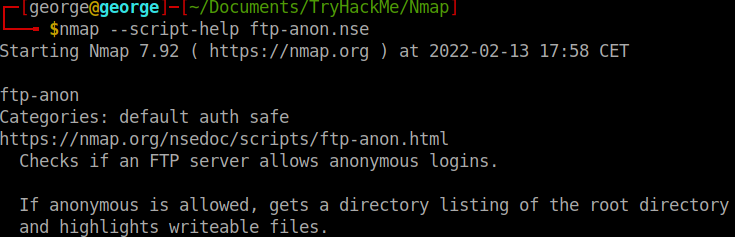
Nmap scripts come with built in help menus:
nmap --script-help <script_name>
Questions
- What optional argument can the ftp-anon.nse script take?
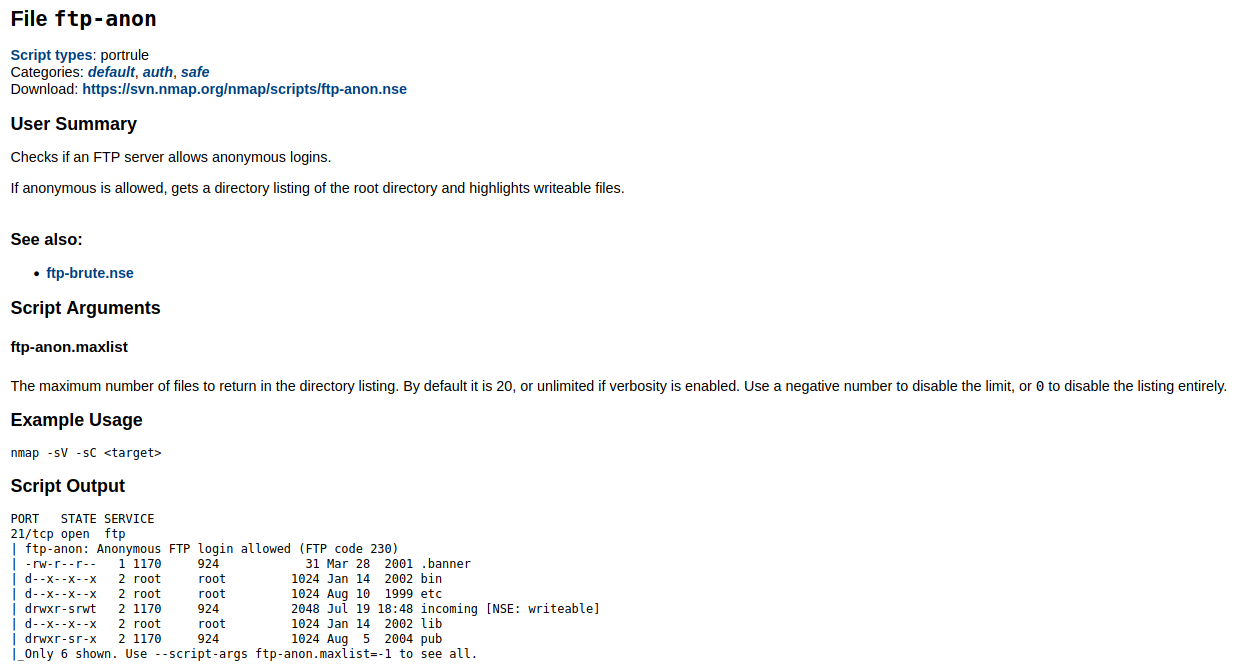
A: maxlist
NSE Scripts - Searching for Scripts
-
How to find nmap scripts?
-
Using the website
-
using your local machine by accessing the directory
/usr/share/nmap/scripts
-
-
searching for installed scripts:
-
using the file
usr/share/nmap/scripts/script.db- this is not a database file, but a formatted text file containing the filenames and categories
-
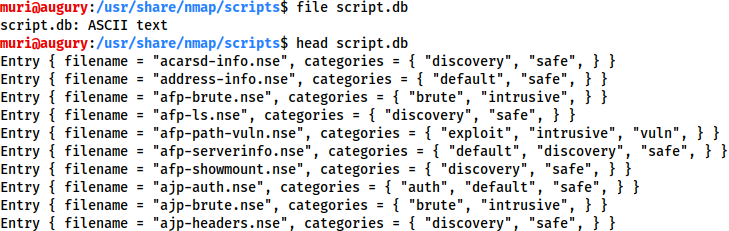
- We can use grep on this file to find what we are looking for:

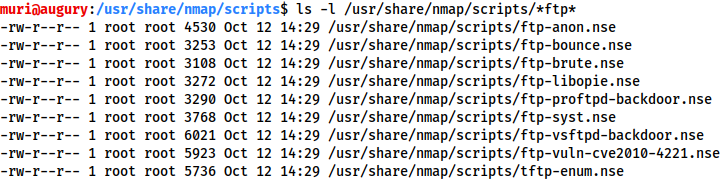
- or we can just use the
lscommand:
- if we want to install a script, we can do this from the nmap website:
sudo wget -O /usr/share/nmap/scripts/<script-name>.nse https://svn.nmap.org/nmap/scripts/<script-name>.nse

nmap --script-updatedb # updates the script.db file
Questions
- Search for “smb” scripts in the /usr/share/nmap/scripts/ directory using either of the demonstrated methods. What is the filename of the script which determines the underlying OS of the SMB server?
A: smb-os-discovery.nse
- Read through this script. What does it depend on? (Hint: look for “dependencies”)
A: smb-brute
Firewall Evasion
-
unfortunately, Windows blocks ICMP packets and hence, our ping results may induce nmap in registering the host as down.
-
what we can do is use
-Pnto tell nmap to treat every host as if it is alive, and not bother pinging them- this comes with the price of a long and slow scan, but at least it bypasses the ICMP block.
-
Note: if the target is on the local network, we can use ARP requests.
-
Switches that we can use to evade the firewall
-
Examples:
-
-f: splits the packets into smaller pieces, making it less likely to be detected by a firewall or IDS -
--mtu <number>: alternative to-f, but provides more control over the size of the packets, accepting a maximum transmission unit size to use for the packets sent (this must be a multiple of 8) -
--scan-delay <time>ms: adds delay between packets - useful when the network is unstable and evading time-based firewal/IDS triggers -
--badsum: generates invalid checksum for packets - TCP/IP stack would drop this packet, but firewalls may respond automatically without bothering to check the checksum of the packets -> this switch can be used to determine the presence of a firewall / IDS
-
Questions
- Which simple (and frequently relied upon) protocol is often blocked, requiring the use of the -Pn switch?
A: ICMP
- [Research] Which Nmap switch allows you to append an arbitrary length of random data to the end of packets?
A: –data-length
Practical
- Does the target (10.10.32.158)respond to ICMP (ping) requests (Y/N)?
A: N (did a ping -c 5 <IP>)
- Perform an Xmas scan on the first 999 ports of the target – how many ports are shown to be open or filtered?
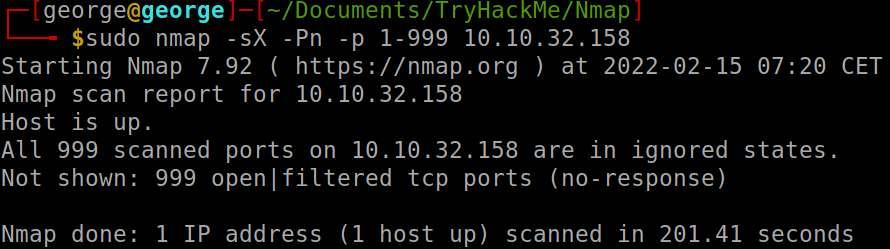
A: 999
There is a reason given for this – what is it?
- Note: The answer will be in your scan results. Think carefully about which switches to use – and read the hint before asking for help!
A: no response (you could try -vv)
- Perform a TCP SYN scan on the first 5000 ports of the target – how many ports are shown to be open?
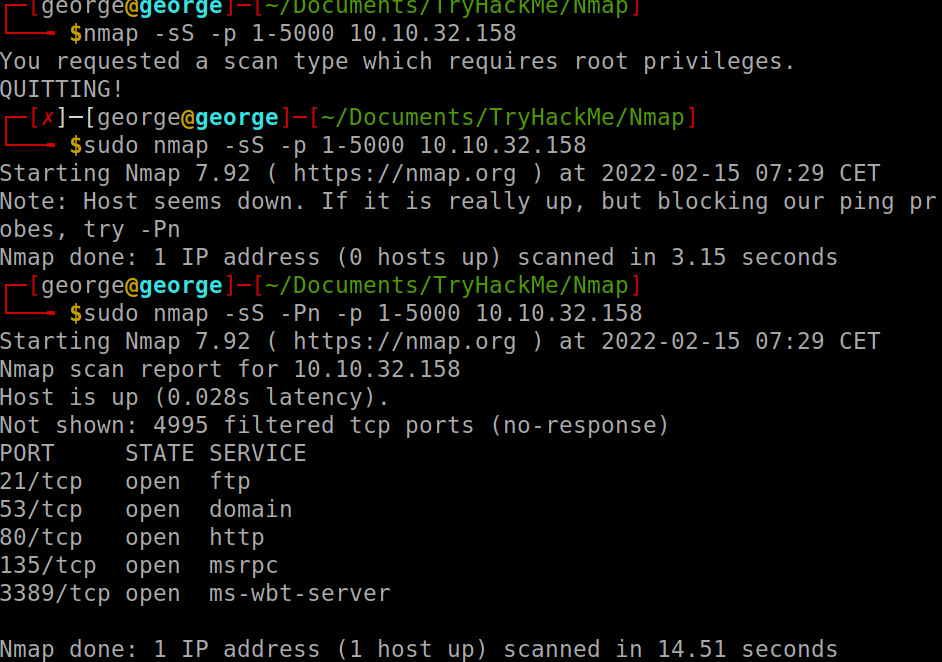
A: 5
-
Open Wireshark (see Cryillic’s Wireshark Room for instructions) and perform a TCP Connect scan against port 80 on the target, monitoring the results. Make sure you understand what’s going on.
-
Deploy the ftp-anon script against the box. Can Nmap login successfully to the FTP server on port 21? (Y/N)
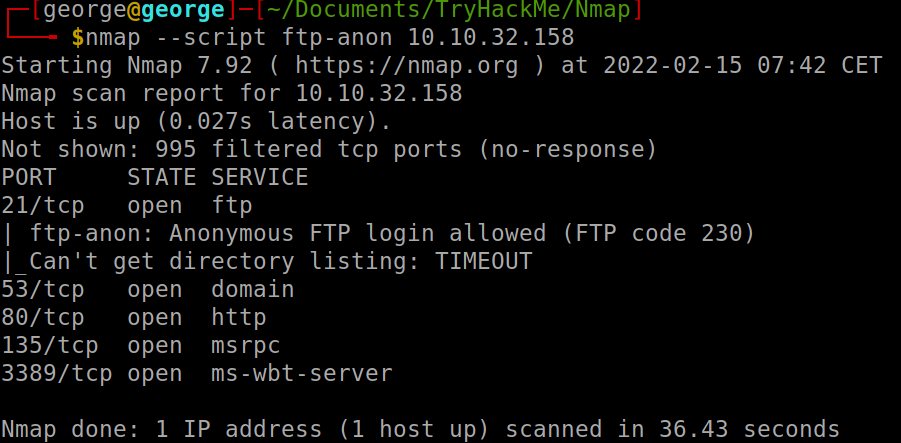
A: Y