Nmap Live Host Discovery
Intro
-
When we target a network and we want to know:
- Which systems are up?
- What services are running on these systems?
-
we use Nmap.
-
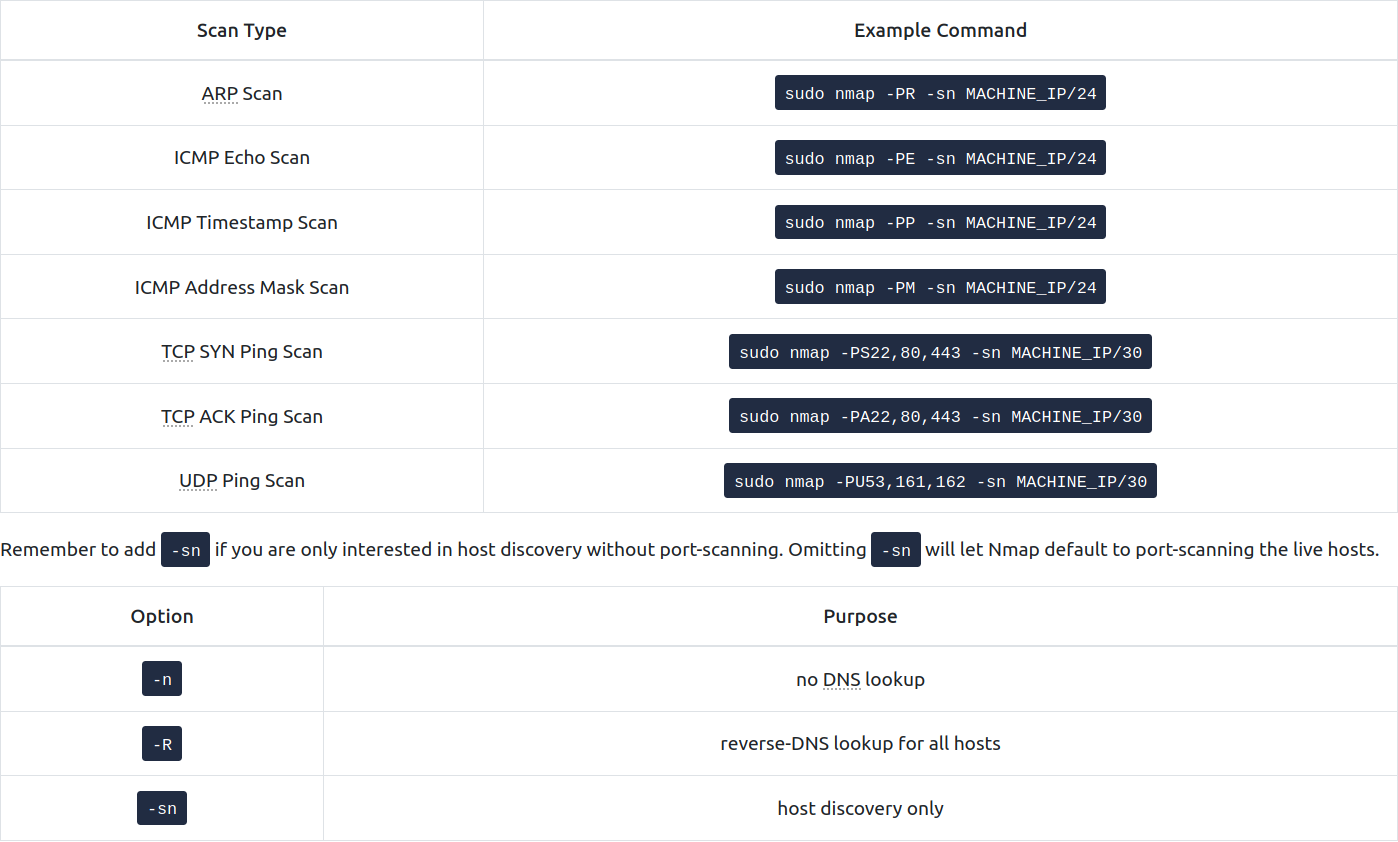
this room covers the different approaches that Nmap uses to discover live hosts:
-
ARP scan: using ARP requests to discover live hosts
-
ICMP scan: using ICMP to identify live hosts.
-
TCP/UDP ping scan: sends packets to TCP ports and UDP ports to determine live hosts.
-
-
Nmap is short for Network Mapper
-
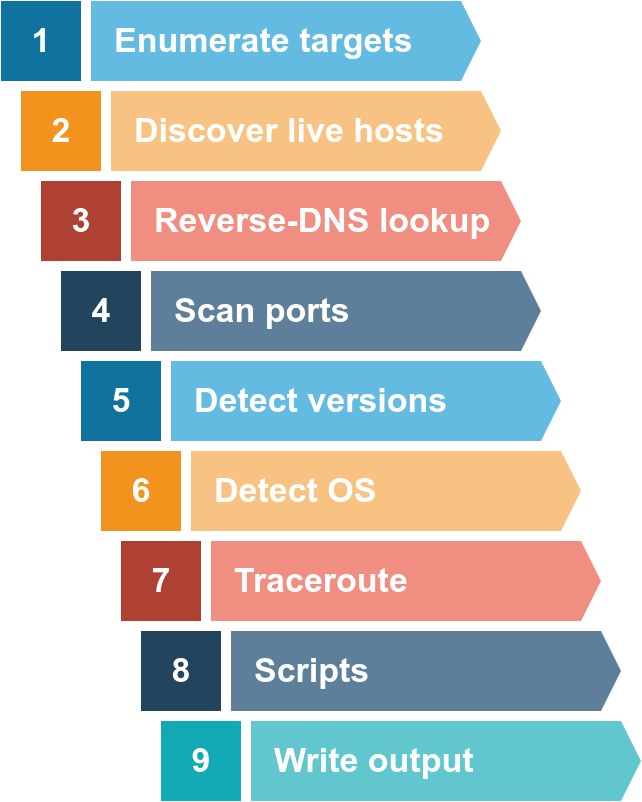
An Nmap scan usually goes through these steps:
Subnetworks
-
network segment = group of computers connected using a shared medium (the medium can be the Ethernet switch or Wifi access Point)
-
subnetwork = one or more network segments connected together and configured to use the same router.
-
the network segment reffers to a physical connection, while a subnetwork to a logical connection.
-
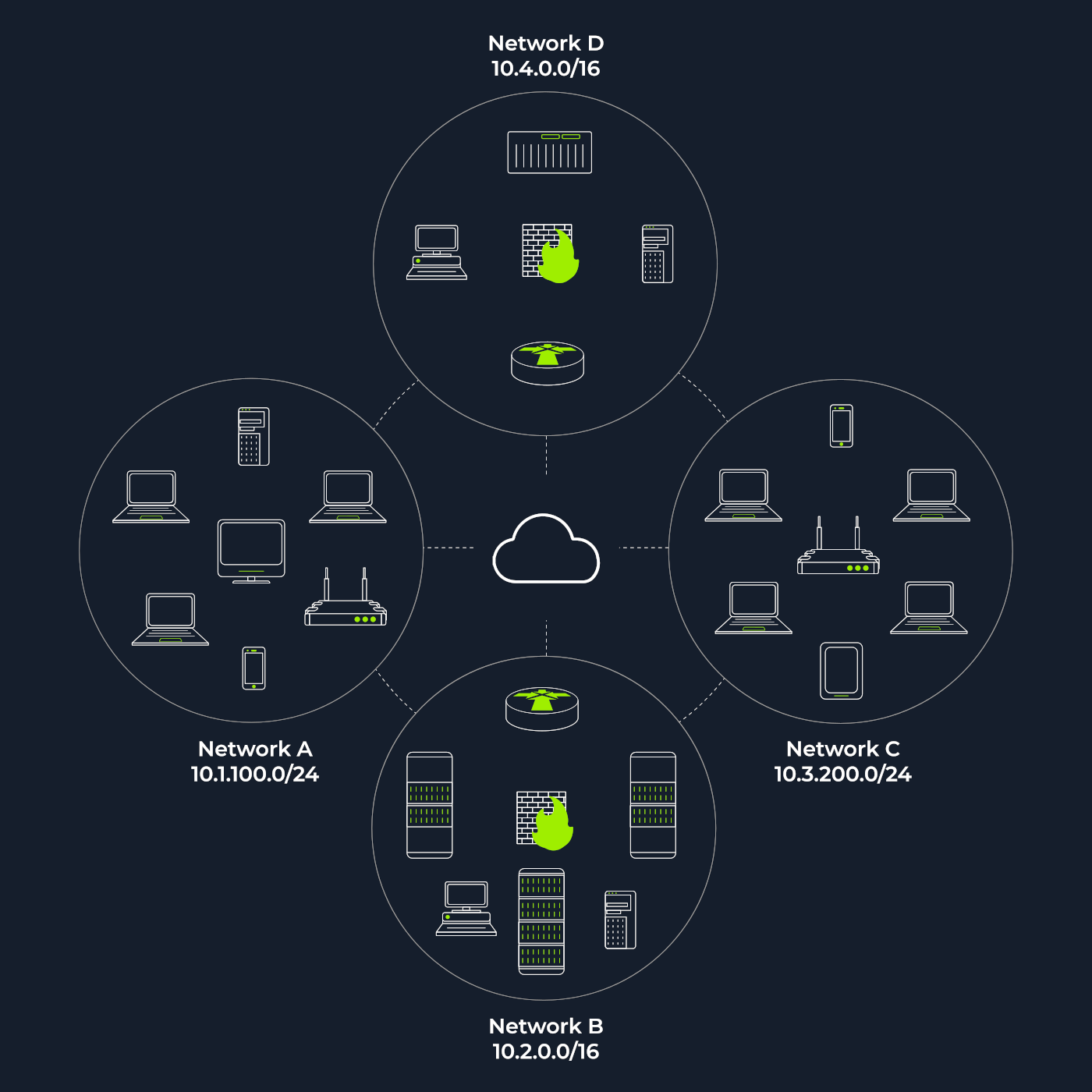
in the diagram we have four nework segments or subnetworks.
- a subnetwork, or simply a subnet has its own IP address range and is connected to a more extensive network via a router.
-
Subnets with /16 have the subnet mask 255.255.0.0 and can have around 65k hosts.
-
Subnets with /24 have subnet mask expressed like this 255.255.255.0 and it can have around 250 hosts.
-
If we are connected to the same subnet as the targeted group of hosts, your scanner will rely on ARP (Address Resolution Protocol) queries to discover live hosts.
- An ARP query aims to get the hardware / MAC address so that communication over the link-layer is possible.
-
But if, instead, the targets are on a different subnet, the packets generated will go through the default gateway (router)
- however, ARP queries will not get routed, as they are bound to their subnet.
Questions
- How many devices can see the ARP Request?
R: 4
- Did computer6 receive the ARP Request? (Y/N)
R: N
- How many devices can see the ARP Request?
R: 4
- Did computer6 reply to the ARP Request? (Y/N)
R: Y
Enumerating Targets
-
we need to specify our targets and this can be done in 3 ways:
-
list of IPs or domain names: MACHINE_IP scanme.nmap.org example.com will can 3 IP addresses
-
range: 10.11.12.15-20 will scan 6 IP adresses
-
subnet: MACHINE_IP/30 will scan 4 IP addresses
-
provide a file:
nmap -iL list_of_hosts.txt -
-
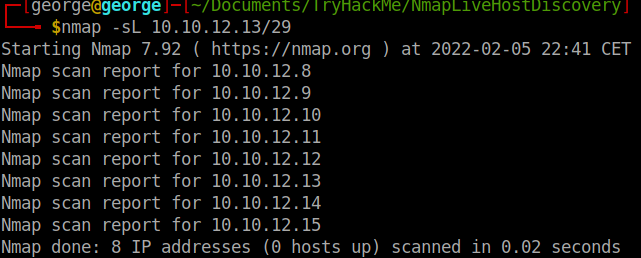
check the list of targets that nmap scans:
nmap -sL TARGETS
- nmap automatically tries a reverse DNS lookup. To disable this, use the -n flag.
Questions
- What is the first IP address Nmap would scan if you provided 10.10.12.13/29 as your target?
R: 10.10.12.8
- How many IP addresses will Nmap scan if you provide the following range 10.10.0-255.101-125?
R: 256 * 25 = 6400
Discovering Live Hosts
-
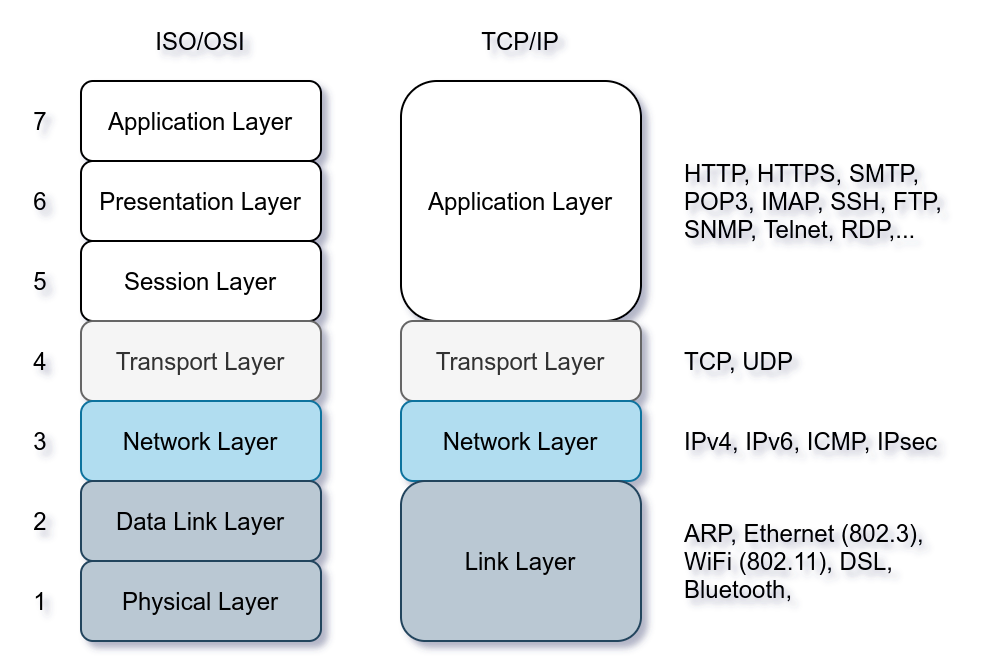
we make use of the protocols in the TCP/IP layers:
-
ARP from Link Layer: sends a frame to the broadcast address on the network segment and asking the computer with a specific IP address to respond by providing its MAC address
-
ICMP from Network Layer, using Type 8 (Echo) and Type 0 (Echo Reply)
-
TCP and UDP from Transport Layer
-
Questions
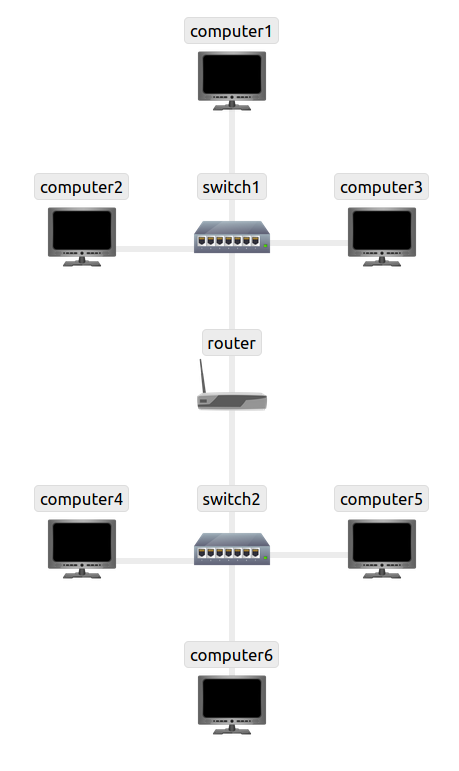
Send a packet with the following:
From computer1
To computer3
Packet Type: “Ping Request”
- What is the type of packet that computer1 sent before the ping?
R: ARP Request
- What is the type of packet that computer1 received before being able to send the ping?
R: ARP Response
- How many computers responded to the ping request?
R: 1
Send a packet with the following:
From computer2
To computer5
Packet Type: “Ping Request”
- What is the name of the first device that responded to the first ARP Request?
R: Router
- What is the name of the first device that responded to the second ARP Request?
R: computer5
- Send another Ping Request. Did it require new ARP Requests? (Y/N)
R: N
Nmap Host Discovery Using ARP
-
How would you know which hosts are up and running?
- It is essential to avoid wasting our time port-scanning an offline host or an IP address not in use.
-
When no option regarding host discovery is provided, nmap uses the following procedure:
-
when a privileged user (root, or a user that is part of sudoers and can run sudo) scans targets on a local network, nmap uses ARP requests.
-
when a privileged user scans for targets outside the network, Nmap uses ICMP echo requests, TCP ACK to port 80, TCP SYN to port 443 and ICMP timestamp Request.
-
when an unprivileged user scans for targets outside the network, nmap uses TCP 3-way handshake by sending SYN packets to port 80 and 443.
-
-
use Nmap to discover live hosts without port-scanning the live systems:
nmap -sn TARGETS
-
ARP scans are possible only if the targets are on the same subnet as you.
-
Perform only an ARP scan without port-scanning
nmap -sn -PR TARGETS # -PR indicates you only want ARP scan
- scanner built around ARP queries: arp-scan
arp-scan --localnet # -i to choose interface
Questions
We will be sending broadcast ARP Requests packets with the following options:
From computer1
To computer1 (to indicate it is broadcast)
Packet Type: “ARP Request”
Data: try all the possible eight devices (other than computer1) in the network: computer2, computer3, computer4, computer5, computer6, switch1, switch2, and router.
- How many devices are you able to discover using ARP requests?
R: 3 (computer 2, computer 3 and router)
Nmap Host Discovery Using ICMP
-
Even though ping requests seem the most straightforward approach, it is not always reliable, as many firewalls block ICMP echo.
- new versions of MS Windows are configured with a firewall that block ICMP Echo by default.
-
to use ICMP echo requests to discover live hosts, add the option -PE (Echo):
nmap -sn -PE TARGETS
-
As ICMP echo tend to be blocked, we can use ICMP Timestamp or ICMP Address Mask to tell if a system is online
- Nmap uses a timestamp request (ICMP TYPE 13) and checks if it receives a Timestamp reply (ICMP Type 14) with the use of the flag -PP (Timestamp)
nmap -PP -sn TARGETS
-
Nmap can use also address mask queries (ICMP type 17) and checks if it receives address mask reply (ICMP Type 18)
- use flag -PM (Mask)
Questions
- What is the option required to tell Nmap to use ICMP Timestamp to discover live hosts?
R: -PP
- What is the option required to tell Nmap to use ICMP Address Mask to discover live hosts?
R: -PM
- What is the option required to tell Nmap to use ICMP Echo to discover life hosts?
R: -PE
Nmap Host Discovery Using TCP and UDP
TCP SYN Ping
-
we send a TCP SYN Ping to a TCP port, 80 by default, and wait for a response
- if the host is up, we get a SYN ACK otherwise we get RST (Reset)
-
to use TCP SYN ping, use the flag -PS followed by a port, a range of ports or a list of ports (-PS21; -PS21-25; -PS 80,443,8080)
-
privileged users don’t need to complete the 3-way handshake even if the port is open
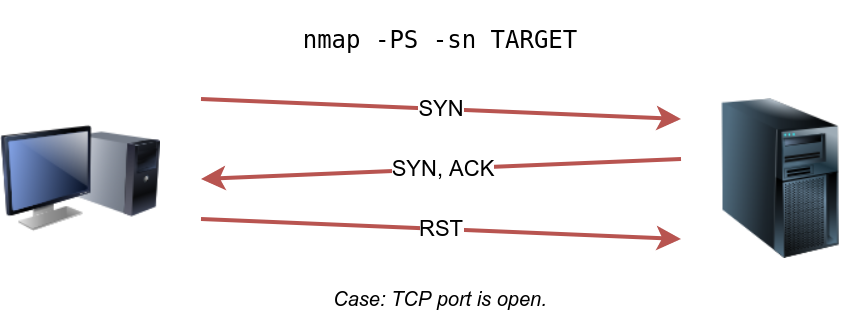
- however, unprivileged users have to complete the 3-way handshake if the port is open.
TCP ACK Ping
-
you can do this only if you are a privileged user
- unprivileged need to complete the 3-way handshake
-
by default, port 80 will be used
- syntax is similar to TCP SYN Ping: -PA with a port, a list of ports or a range of ports
-
if the host is online, it will respond with RST, as the TCP packet with the ACK flag is not part of a connection.


UDP Ping
-
contrary to TCP packets, sending a UDP packet to an open port is not expected to return any response.
- however, if we send one to a closed UDP port, we expect to get an ICMP port unreachable packet

- syntax: -PU
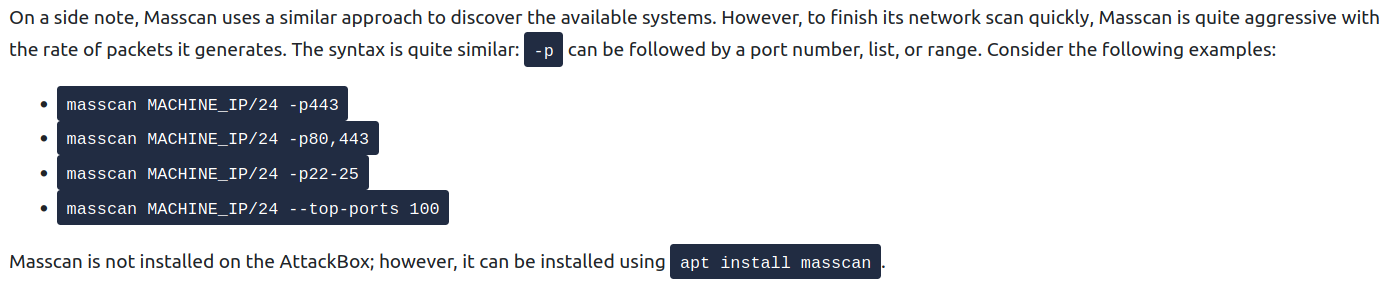
Masscan
Questions
- Which TCP ping scan does not require a privileged account?
R: TCP SYN ping
- Which TCP ping scan requires a privileged account?
R: TCP ACK Ping
- What option do you need to add to Nmap to run a TCP SYN ping scan on the telnet port?
R: -PS23
Using Reverse-DNS Lookup
-
skip this step using the falg -n
-
query even offline hosts: -R
-
use a specific DNS server: –dns-servers 8.8.4.4
Questions
- We want Nmap to issue a reverse DNS lookup for all the possibles hosts on a subnet, hoping to get some insights from the names. What option should we add?
R: -R