Linux Strength Training
Finding a way around linux
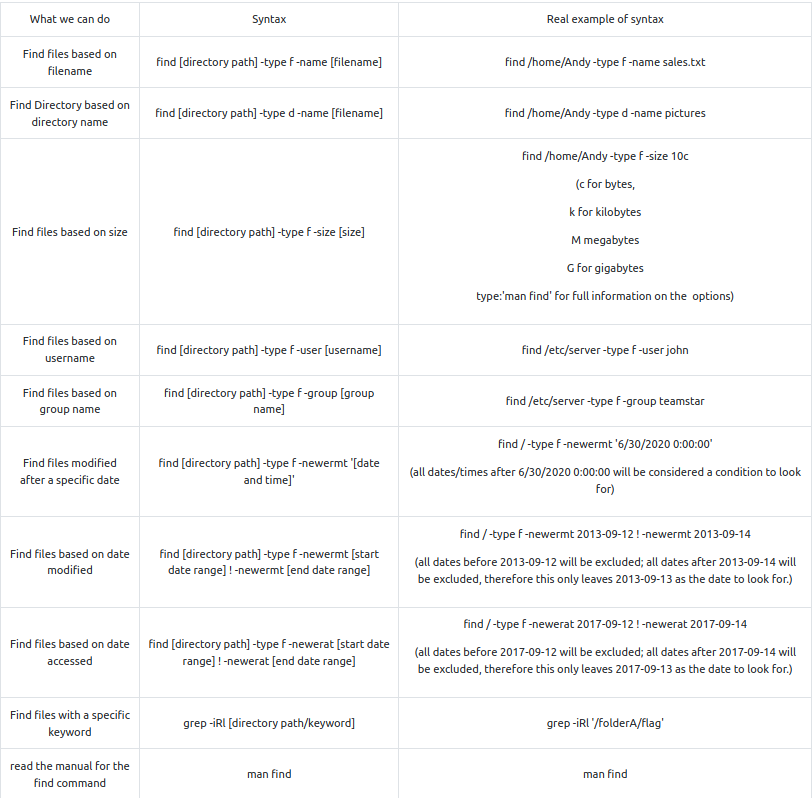
Questions
- What is the correct option for finding files based on group
R: -group
- What is format for finding a file with the user named Francis and with a size of 52 kilobytes in the directory /home/francis/
R: find /home/francis -type f user Francis -size 52k
- SSH as topson using his password topson. Go to the /home/topson/chatlogs directory and type the following: grep -iRl ‘keyword’. What is the name of the file that you found using this command?
R: 2019-10-11
- What are the characters subsequent to the word you found?
R: ttitor
- Read the file named ‘ReadMeIfStuck.txt’. What is the Flag?
R: had to find a file called additionalHint which I did by enering the command:
find . -type f -name additionalHINT
- The output: “try to find a directory called telephone numbers… Oh wait.. it contains a space.. I wonder how we can find that….”
find . -type d -name "telephone numbers"
- Output: use the Find command to find a file with a modified date of 2016-09-12 from the /workflows directory
find /home/topson/workflows -type f -newermt 2016-09-11 ! -newermt 2016-09-12
/home/topson/workflows/xft/eBQRhHvx
volFlag{81726350827fe53g}
Working with files
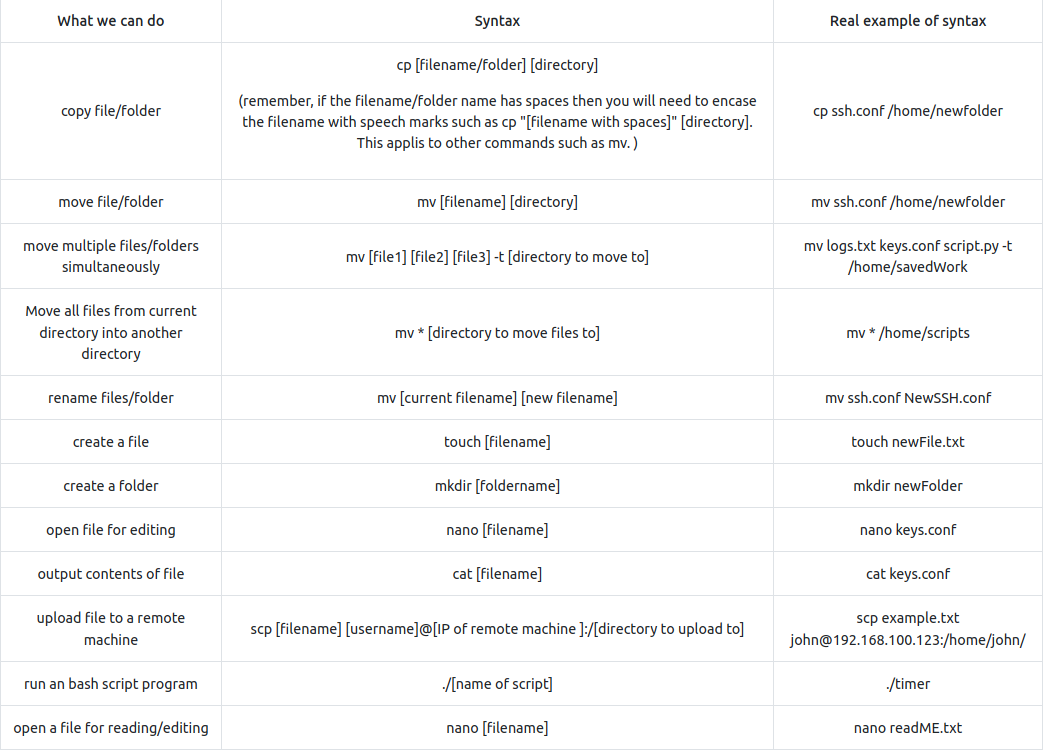
- Move mulltiple files into a directory:
mv [file1] [file2] [file3] -t [directory to move to]
- A few additional things to remember is that occasionally you may encounter files/folders with special characters such as - (dash). Just remember that if you try to copy or move these files you will encounter errors because Linux interprets the - as a type of argument, therefore you will have to place – just before the filename. For example:
cp -- -filename.txt /home/folderExample.
Questions
- Hypothetically, you find yourself in a directory with many files and want to move all these files to the directory of /home/francis/logs. What is the correct command to do this?
R: mv * /home/francis/logs
- Hypothetically, you want to transfer a file from your /home/james/Desktop/ with the name script.py to the remote machine (192.168.10.5) directory of /home/john/scripts using the username of john. What would be the full command to do this?
R: scp /home/james/Desktop/script.py john@192.168.10.5:/home/john/scripts
- How would you rename a folder named -logs to -newlogs
R: mv – -logs – -newlogs
- How would you copy the file named encryption keys to the directory of /home/john/logs
R: mv “encryption keys” /home/john/logs
- Find a file named readME_hint.txt inside topson’s directory and read it. Using the instructions it gives you, get the second flag.
cd -- -march\ folder/
./-runME.sh
Hashing
- Hash Craking using John The Ripper example:

- Hash identifier tool (hash-identifier or a modern alternative: haiti:

Questions
- Download the hash file attached to this task and attempt to crack the MD5 hash. What is the password?
cat hash1.txt | hash-identifier # md5
john --format=raw-md5 --wordlist=rockyou.txt hash1.txt
R: secret123
- SSH as sarah using: sarah@[10.10.78.207] and use the password: rainbowtree1230x
What is the hash type stored in the file hashA.txt
find -type f -name hashA.txt # ./system AB/server_mail/server settings/hashA.txt -> f9d4049dd6a4dc35d40e5265954b2a46
R: md4
- Crack hashA.txt using john the ripper, what is the password?
john --format=raw-md4 --wordlist=rockyou.txt hash1.txt
R: admin
- What is the hash type stored in the file hashB.txt
find -type f -name hashB.txt # /oldLogs/settings/craft/hashB.txt -> b7a875fc1ea228b9061041b7cec4bd3c52ab3ce3
hash-identifier b7a875fc1ea228b9061041b7cec4bd3c52ab3ce3 # -> SHA-1
R: SHA-1
- Find a wordlist with the file extention of ‘.mnf’ and use it to crack the hash with the filename hashC.txt. What is the password?
john --format=Raw-SHA256 --wordlist=ww.mnf hash1.txt
R: unacvaolipatnuggi
- Crack hashB.txt using john the ripper, what is the password?
john --format=Raw-SHA1-AxCrypt --wordlist=rockyou.txt hash1.txt
R: letmein
Base64
SOME THEORY
- Encoding is for maintaining data usability and can be reversed by employing the same algorithm that encoded the content, i.e. no key is used.
- Encryption is for maintaining data confidentiality and requires the use of a key (kept secret) in order to return to plaintext.
- Hashing is for validating the integrity of content by detecting all modification thereof via obvious changes to the hash output.
- Obfuscation is used to prevent people from understanding the meaning of something, and is often used with computer code to help prevent successful reverse engineering and/or theft of a product’s functionality.
- Special Answer
john --show --format=Raw-MD4 hash1.txt
R: john
## Encryption with gpg
- Encrypt:

- Decrypt:

Questions
- You wish to encrypt a file called history_logs.txt using the AES-128 scheme. What is the full command to do this?
R: gpg –cipher-algo AES-128 –symmetric history_logs.txt
- What is the command to decrypt the file you just encrypted?
R: gpg history_logs.txt.gpg
Cracking encrypted gpg files
-
you are using Kali linux or Parrot OS, you should have a binary add on called gpg2john.
-
This binary program allows us to convert the gpg file into a hash string that john the ripper can understand when it comes to brute-forcing the password against a wordlist.
-
Next, type the following command below to generate the hash for John the Ripper:
gpg2john [encrypted gpg file] > [filename of the hash you want to create]

Questions
- Find an encrypted file called personal.txt.gpg and find a wordlist called data.txt. Use tac to reverse the wordlist before brute-forcing it against the encrypted file. What is the password to the encrypted file?
gpg2john personal.txt.gpg > gpg_hash
john --format=gpg --wordlist=wordlist gpg_hash
R: valamanezivonia
Reading SQL Databases
- Reading a sql database of a local mysql workspace:
service mysql start
- Connect to a remote SQL database:
mysql -u [username] -p -h [host ip]
mysql -u [username] -p # or this on local machine
-
Open SQL database file locally:
-
To open mysql file/files locally, simply change to the directory of the mysql file and type mysql as shown below. You’ll be taken to a specialised command prompt for mysql.
-
Note: In some cases you may have to run mysql -p [password] if the mysql system was configured to require authenticiation.
-
Load a database:
source employees.sql
- See all relational databases:
SHOW DATABASES;
- Use a database:
USE employees;
- Display tables:
SHOW TABLES;
- Table structure:
DESCRIBE employees;
Questions
- Find a file called employees.sql and read the SQL database. (Sarah and Sameer can log both into mysql using the password: password). Find the flag contained in one of the tables. What is the flag?
mysql -u sarah -p show databases; source employees; use employees; describe employees; SELECT * FROM employees WHERE first_name=’Lobel’;
R:Flag{13490AB8}
Final challenge
- Used the log files to get the ssh password for Sameer:
- thegreatestpasswordever000
- Found the 50M conf file which I opened with less:
Wordlist directory: aG9tZS9zYW1lZXIvSGlzdG9yeSBMQi9sYWJtaW5kL2xhdGVzdEJ1aWxkL2NvbmZpZ0JEQgo= # home/sameer/History LB/labmind/latestBuild/configBDB - From the logs, I know the password starts with “ebq”:
grep -iRl "^ebq"
# it returned 3 files: pLmjwi LmqAQl Ulpsmt
- Made one file from all 3 with possible passwords that started with ebq:
grep '^ebq' pLmjwi > newfile
grep '^ebq' LmqAQl >> newfile
grep '^ebq' Ulpsmt >> newfile
- Transfered the file using a python http server (although I could have used scp !!) to download the gpg file to my computer:
scp sameer@<IP>:/home/shared/sql/2020-08-13.zip.gpg .
-
Ran gpg2john but it did not work as the file was too big. I used a [[crackgpg.sh.md script]] found online that does that and used it to find the password:
./crackgpg.sh 2020-08-13.zip.gpg gpgwordlist # ebqattle
- Opened the sql database employees.sql using sarah’s credentials from an earlier task (pw: password) and ran the following sql query:
select * from employees where first_name = 'James' -- last_name: vuimaxcullings
- Then:
su james # vuimaxcullings
su -i
cat root.txt # Flag{6$8$hyJSJ3KDJ3881}