Intro to x86-64
Introduction
-
we will take a look on Intel’s x86-64 version of assembly.
-
before an executable file is produced, the source code is first compiled into assembly (.s files), after which the assembler converts it into an object program(.o files), and operations with a linker finally make it an executable.
-
run
radare2in debug mode:r2 -d executable_file -
ask r2 to analyze the program:
aa -
set syntax to at&t:
e asm.sytax=att -
get help:
? -
find list of functions:
afl -
get the assembly code for a function (*print disassembly function):
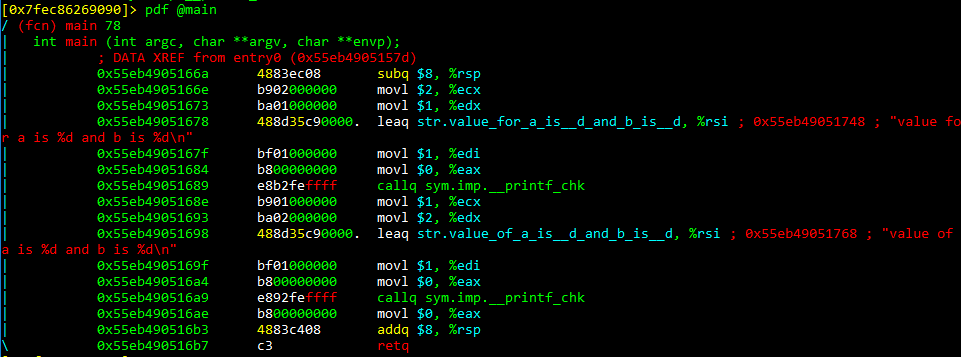
pdf @main
-
the values on the complete left column are memory addresses of the instructions, and these are usually stored in a structure called the stack
-
The middle column contains the instructions encoded in bytes (what is usually the machine code)
-
the last column actually contains the human readable instructions.
-
The core of assembly language involves using registers to do the following:
-
Transfer data between memory and register, and vice versa
-
Perform arithmetic operations on registers and data
-
Transfer control to other parts of the program
-
-
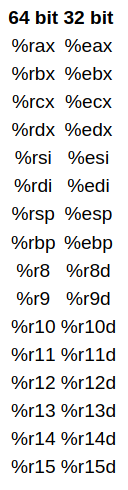
Since the architecture is x86-64, the registers are 64 bit and Intel has a list of 16 registers:
-
the first 6 registers are known as general purpose registers.
-
The %rsp is the stack pointer and it points to the top of the stack which contains the most recent memory address.
- The stack is a data structure that manages memory for programs.
-
%rbp is a frame pointer and points to the frame of the function currently being executed - every function is executed in a new frame.
-
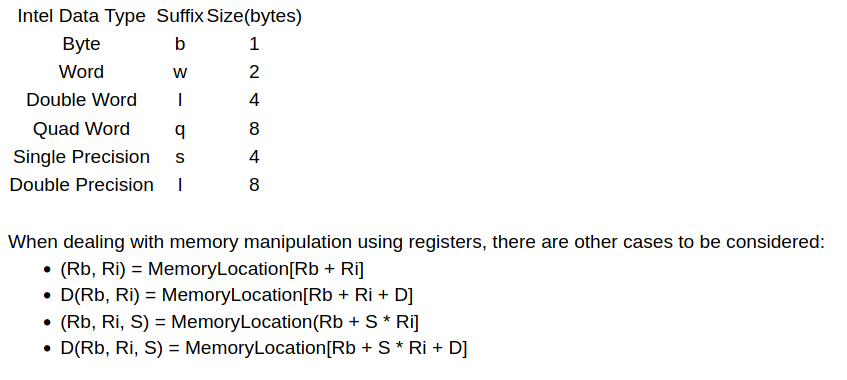
we can move constants, values of registers or transferring values from memory, using brackets: movq $3 (%rax) -> moving constant 3 to memory address represented by rax.
-
the q represents the size of the data:
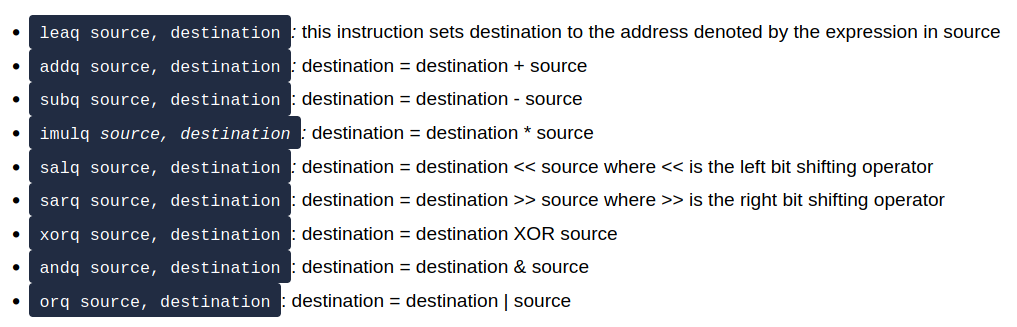
- Instructions:
If Statements
-
If statements use 3 important instructions in assembly:
cmpq s2, s1-> doing s2-s1 without updating the result to s1.testq s2, s1-> doing s1 & s2 without updating the result to destination (s1)
-
in order to transfer control to different instructions, we use jumps:
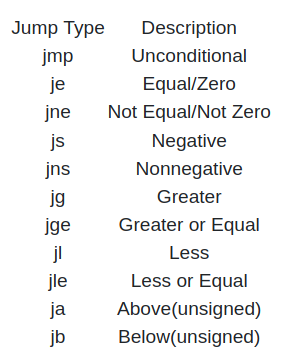
If Statements cnt.
-
add breakpoint:
db <memory_address> -
start executing the program:
dc -
view value of registers:
dr -
move to the next instr.:
ds(seek) -
rip -> current instruction pointer
-
The
popqinstruction involves popping a value of the stack and reading it, and the return instruction sets this popped value to the current instruction pointer.
Questions
- SSH to the machine and open if2 file using radare2.
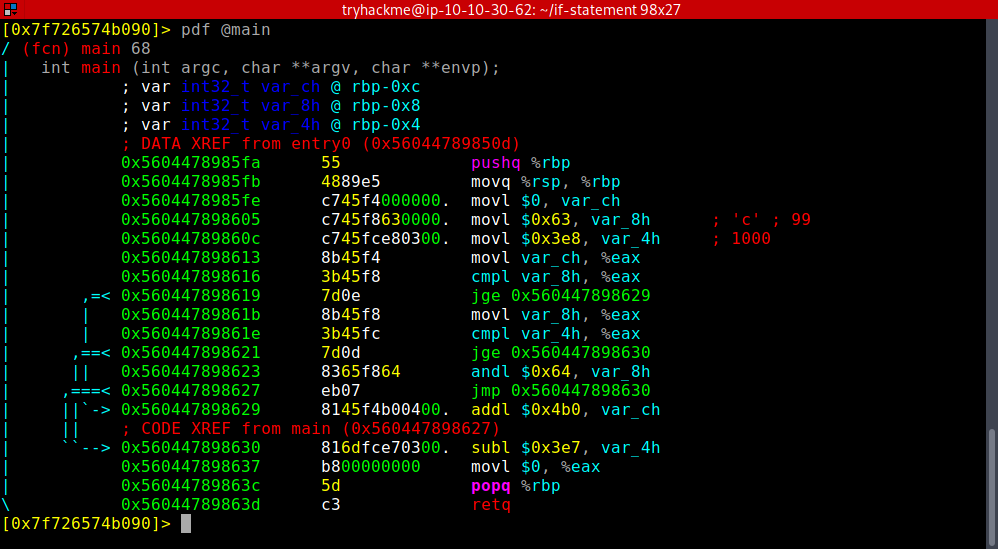
- What is the value of var_8h before the popq and ret instructions?
- we do 100 & 99. To get the result, convert these into binary and do a logical AND.
A: 96
- What is the value of var_ch before the popq and ret instructions?
- it is not modified during the execution
A: 0
- What is the value of var_4h before the popq and ret instructions?
- 1000 - 999
A: 1
-
What operator is used to change the value of var_8h, input the symbol as your answer(symbols include +, -, *, /, &, ):
- As explained in the first question
A: &
Loops
Questions
- What is the value of var_8h on the second iteration of the loop?
- var8 is gettind halved in every loop
A: 5
- What is the value of var_ch on the second iteration of the loop?
- var_ch does not contain a 1 in the second position (2 in decimal), hence ANDing it with a 2 will result in a 0 in the first itteration. Hence, in the second, the result will be also 0.
A: 0
- What is the value of var_8h at the end of the program?
- the loop has 3 itterations, as var_4h is tripled every time (4 -> 12 -> 36 -> 108 > 99) until the value is greater than 99.
A: 2 (5/2)
- What is the value of var_ch at the end of the program?
- As we had said, the value does not change starting from the 2nd itteration
A: 0
Crack1
- localhost address
A: 127.0.0.1