Operating System Security
Introduction to Operating System Security
- Computer hardware refers to all the computer parts and peripherals that you can touch with your hand.
- The Operating System (OS) is the layer sitting between the hardware and the applications and programs you are running.
-
operating systems intended for servers; examples include MS Windows Server 2022, IBM AIX, and Oracle Solaris.
- When we talk about security, we should think of protecting three things:
- Confidentiality: You want to ensure that secret and private files and information are only available to intended persons.
- Integrity: It is crucial that no one can tamper with the files stored on your system or while being transferred on the network.
- Availability: You want your laptop or smartphone to be available to use anytime you decide to use it.
Questions
Which of the following is not an operating system?
- AIX
- Android
- Chrome OS
- Solaris
-
Thunderbird
A: Thunderbird
Common examples of OS Security
- Authentication is the act of verifying your identity, be it a local or a remote system. Authentication can be achieved via three main ways:
- Something you know, such as a password or a PIN code.
- Something you are, such as a fingerprint.
- Something you have, such as a phone number via which you can receive an SMS message.
- Weak file permissions make it easy for the adversary to attack confidentiality and integrity.
Questions
Which of the following is a strong password, in your opinion?
- iloveyou
- 1q2w3e4r5t
- LearnM00r
-
qwertyuiop
A: - LearnM00r
Practical Example of Operating System Security
ssh sammie@10.10.50.61su - johnnyhistorysu - root
Questions
Based on the top 7 passwords, let’s try to find Johnny’s password. What is the password for the user johnny?
`A: abc123`
Once you are logged in as Johnny, use the command history to check the commands that Johnny has typed. We expect Johnny to have mistakenly typed the root password instead of a command. What is the root password?
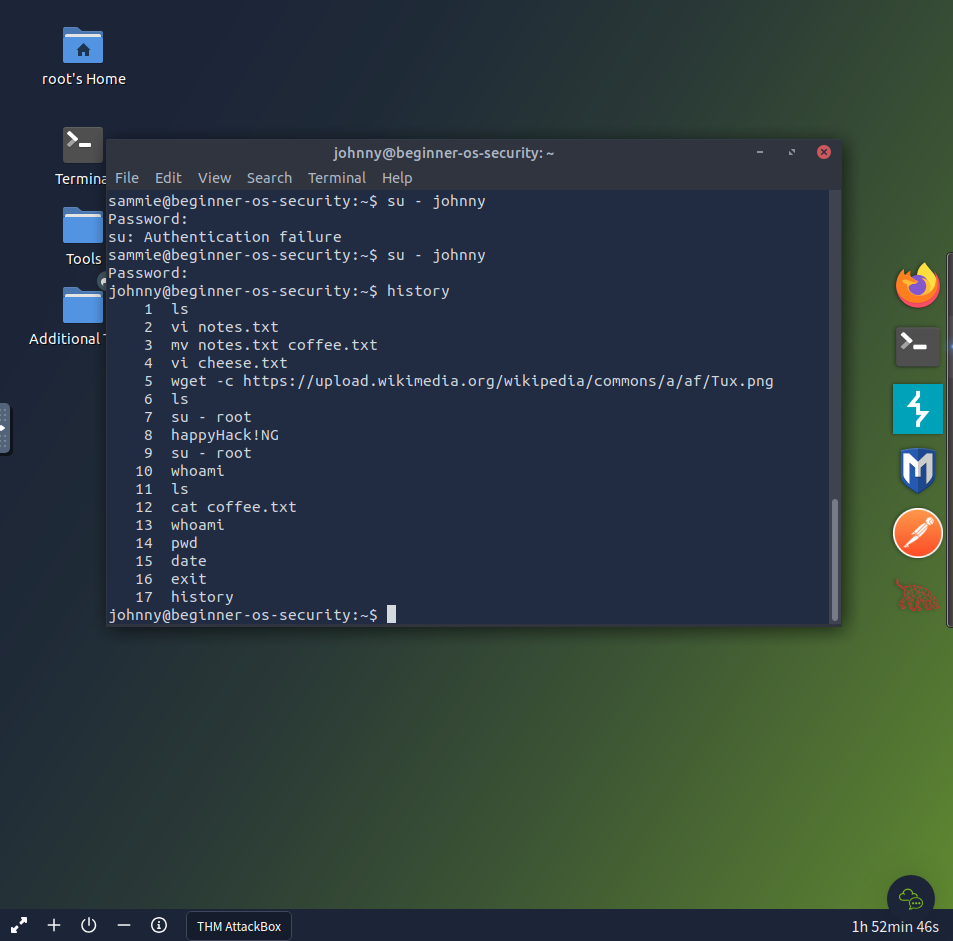
`A: happyHack!NG`
While logged in as Johnny, use the command su - root to switch to the root account. Display the contents of the file flag.txt in the root directory. What is the content of the file?
`A: THM{YouGotRoot}`