Google Dorking
Crawlers
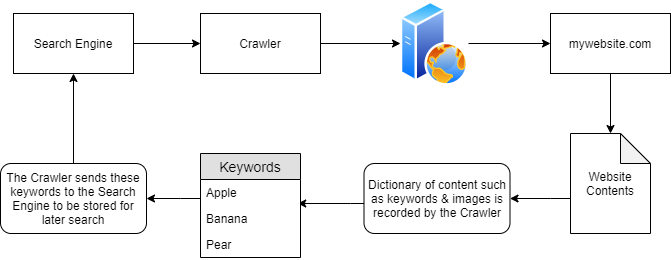
- they discover content through various means such as pure discovery or by using any or all URLs found from previous crawled websites.
-
In the diagram above, “mywebsite.com” has been scraped as having the keywords as “Apple” “Banana” and “Pear”.
-
These keywords are stored in a dictionary by the crawler, who then returns these to the search engine i.e. Google.
-
Because of this persistence, Google now knows that the domain “mywebsite.com” has the keywords “Apple”, “Banana” and “Pear”.
-
As only one website has been crawled, if a user was to search for “Apple”…“mywebsite.com” would appear.
-
-
However, as we previously mentioned, crawlers attempt to traverse, termed as crawling, every URL and file that they can find!
- Say if “mywebsite.com” had the same keywords as before (“Apple”, “Banana” and “Pear”), but also had a URL to another website “anotherwebsite.com”, the crawler will then attempt to traverse everything on that URL (anotherwebsite.com) and retrieve the contents of everything within that domain respectively.
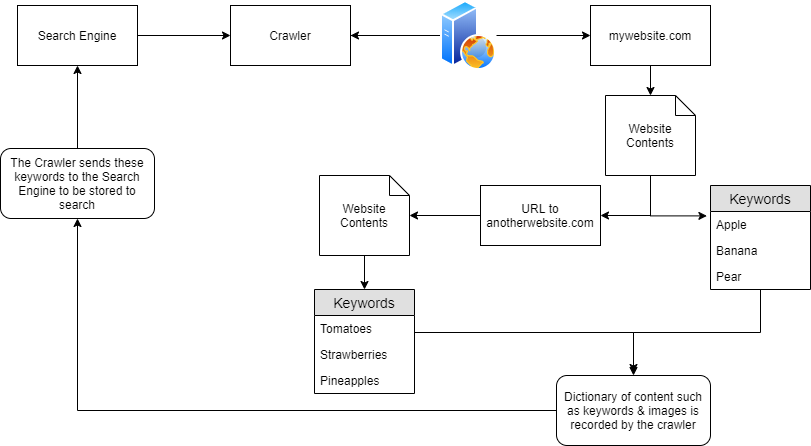
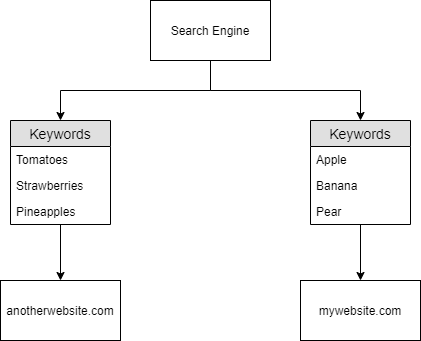
- now the search engine know this:
Questions
- Name the key term of what a “Crawler” is used to do
A: Index
- What is the name of the technique that “Search Engines” use to retrieve this information about websites?
A: Crawling
- What is an example of the type of contents that could be gathered from a website?
A: Keywords
Search Engine Optimisation (SEO)
-
search engines will ‘prioritise’ those domains that are easier to index.
-
websites gain something similar to a point-scoring system, which is influenced by:
-
how responsive is your website to the different browser types
-
how easy is to crawl your website (or if this is even allowed) through the use of Sitemaps
-
What kind of keywords the website has.
-
-
tools that show how optimised your domain is:
-
the crawlers want to index everything on our websites, but sometimes we don’t want all of the contents indexed:
-
a secret administration page, maybe?
-
We don’t want anyone to find that, especially through a google search
-
Robots.txt
-
this is the first thing indexed by Crawlers when visiting a website.
-
this file must be located in the root directory
-
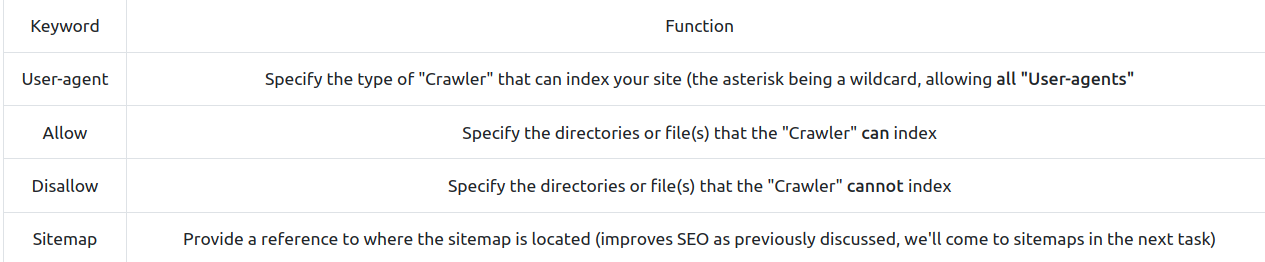
it defines the permissions a Crawler has on the website
-
user agents
-
files or directories
-
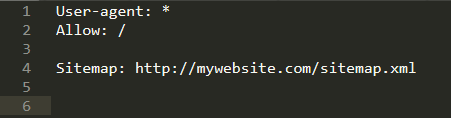
- Keywords:
- Example:
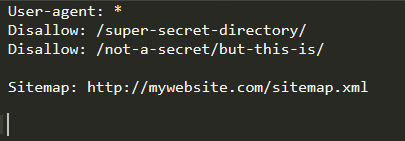
-
Crawlers will not index anything contained within /super-secret-directory
-
Crawlers will index anything contained within /not-a-secret, but will not index anything contained within the sub-directory /but-this-is
-
Example:
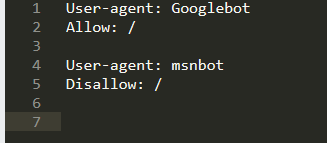
-
Here, the crawler “msnbot” is not allowed to index the website
-
if you have a huge website, it can be difficult to index all of the sensitive files by including every path and every filename for each. Hence, we can use regex:
- Here, the crawlers cannot index any file with the extension .ini contained in any directory or subdirectory using (“$”) of the site.
Questions
- Where would “robots.txt” be located on the domain “ablog.com”
A: ablog/robots.txt
- If a website was to have a sitemap, where would that be located?
A: /sitemap.xml
- How would we only allow “Bingbot” to index the website?
A: User-agent: Bingbot
- How would we prevent a “Crawler” from indexing the directory “/dont-index-me/”?
A: Disallow: /dont-index-me/
- What is the extension of a Unix/Linux system configuration file that we might want to hide from “Crawlers”?
A: .conf
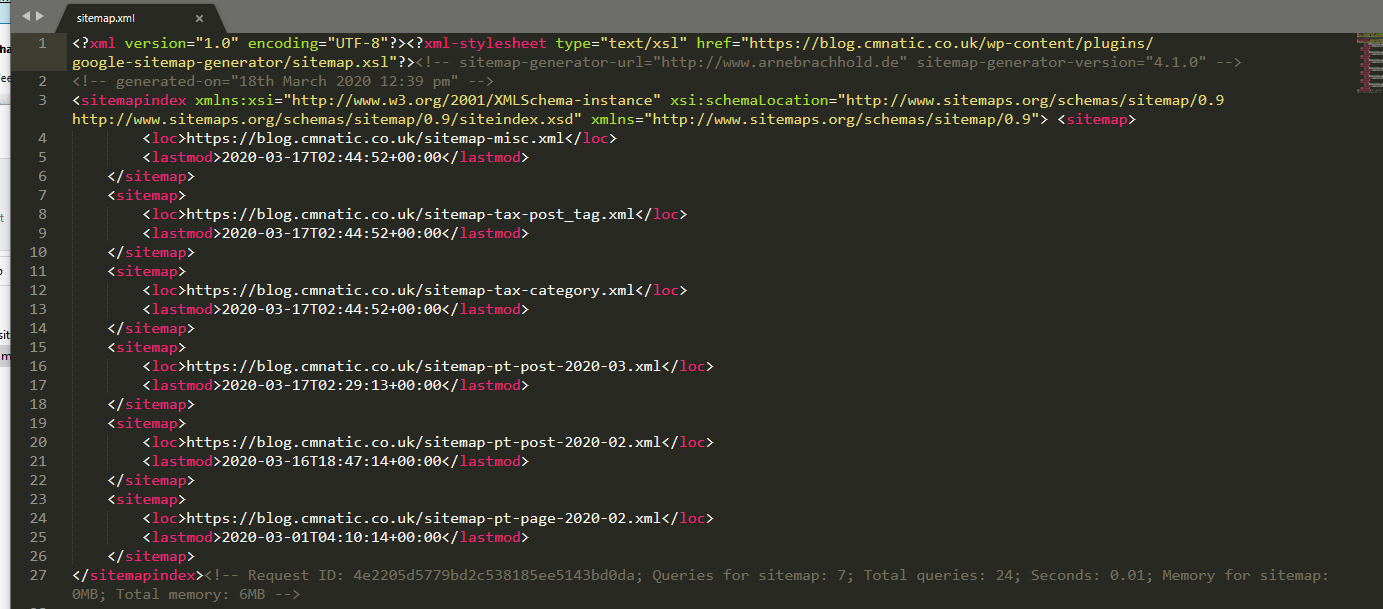
Sitemaps
-
comparable to geographical maps in real life, except that they are used for websites!
-
they specify the routes to find content on the domain
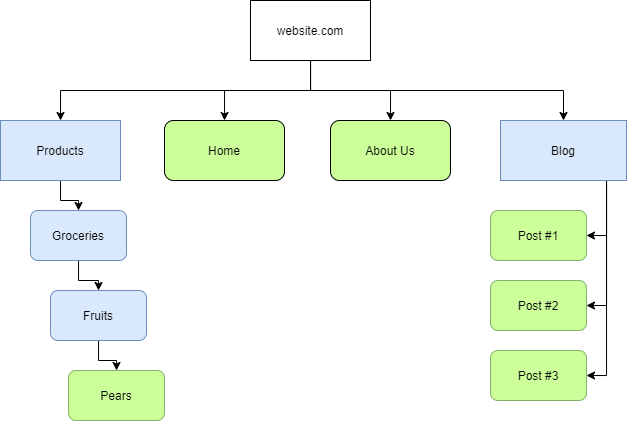
- Or more realistically:
-
it influences the SEO of a website quite drastically
-
Why? Because they have a lot of data to process and these sitemaps help them just scrape the content, instead of going manually through the process of finding and scraping them
-
it is like using a wordlist instead of randomly guessing
-
-
the easier a website is to crawl, the more optimised it is for the Search Engines.
Questions
- What is the typical file structure of a “Sitemap”?
A: xml
- What real life example can “Sitemaps” be compared to?
A: map
- Name the keyword for the path taken for content on a website
A: route
Google Dorking
-
use “site:” to search for a query only on that website
-
filetype: -> search for a file by its extension
-
cache: -> view Google’s cached version of the website
-
intitle: -> the specified words must appear in the title of the page
-
Questions
- What would be the format used to query the site bbc.co.uk about flood defences
A: site:bbc.co.uk flood defences
- What term would you use to search by file type?
A: filetype:
- What term can we use to look for login pages?
A: intitle:login