Public Key Cryptography Basics
Let’s say you are meeting a business partner over coffee and discussing somewhat confidential business plans. Let’s break down the meeting from the security perspective.
- You can see and hear the other person. Consequently, it is easy to be sure of their identity. That’s authentication, i.e., you are confirming the identity of who you are talking with.
- You can also confirm that what you are “hearing” is coming from your business partner. You can tell what words and sentences are coming from your business partner and what is coming from others. That’s authenticity, i.e., you verify that the message genuinely comes from a specific sender. Moreover, you know that what they are saying is reaching you, and there is no chance of anything changing the other party’s words across the table. That’s integrity, i.e., ensuring that the data has not been altered or tampered with.
- Finally, you can pick a seat away from the other customers and keep your voice low so that only your business partner can hear you. That’s confidentiality, i.e., only the authorised parties can access the data.
Let’s quickly compare this with correspondence in the cyber realm. When someone sends you a text message, how can you be sure they are who they claim to be? How can you be sure that nothing changed the text as it travelled across various network links? When you are communicating with your business partner over an online messaging platform, you need to be sure of the following:
- Authentication: You want to be sure you communicate with the right person, not someone else pretending.
- Authenticity: You can verify that the information comes from the claimed source.
- Integrity: You must ensure that no one changes the data you exchange.
- Confidentiality: You want to prevent an unauthorised party from eavesdropping on your conversations.
Cryptography can provide solutions to satisfy the above requirements, among many others. Private key cryptography, i.e., symmetric encryption, mainly protects confidentiality. However, public key cryptography, i.e., asymmetric cryptography, plays a significant role in authentication, authenticity, and integrity. This room will show various examples of how public key cryptography achieves that.
Common Use of Asymmetric Encryption
Exchanging keys for symmetric encryption is a widespread use of asymmetric cryptography. Asymmetric encryption is relatively slow compared to symmetric encryption; therefore, we rely on asymmetric encryption to negotiate and agree on symmetric encryption ciphers and keys.
But the question is, how do you agree on a key with the server without transmitting the key for people snooping to see?
Analogy
Imagine you have a secret code for communicating and instructions for using the secret code. The question is how you can send these instructions to your friend without anyone else being able to read them. The answer is more straightforward than it seems; you could ask your friend for a lock. Only your friend has the key for this lock, and we’ll assume you have an indestructible box you can lock with it.
If you send the instructions in a locked box to your friend, they can unlock it once it reaches them and read the instructions. After that, you can communicate using the secret code without the risk of people snooping.
In this metaphor, the secret code represents a symmetric encryption cipher and key, the lock represents the server’s public key, and the key represents the server’s private key.
| Analogy | Cryptographic System |
|---|---|
| Secret Code | Symmetric Encryption Cipher and Key |
| Lock | Public Key |
| Lock’s Key | Private Key |
Consequently, you would only need to use asymmetric cryptography once so that it won’t affect the speed, and then you can communicate privately using symmetric encryption.
The Real World
In reality, you need more cryptography to verify that the person you’re talking to is who they say they are. This is achieved using digital signatures and certificates
Questions
Q: In the analogy presented, what real object is analogous to the public key?
A: lock
RSA
RSA is a public-key encryption algorithm that enables secure data transmission over insecure channels. With an insecure channel, we expect adversaries to eavesdrop on it.
RSA is based on the mathematically difficult problem of factoring a large number. Multiplying two large prime numbers is a straightforward operation; however, finding the factors of a huge number takes much more computing power.
It’s simple to multiply two prime numbers together even on paper, say 113 × 127 = 14351. Even for larger prime numbers, it would still be a feasible job, even by hand. Consider the following numeric example:
- Prime number 1: 982451653031
- Prime number 2: 169743212279
- Their product: 982451653031 × 169743212279 = 166764499494295486767649
On the other hand, it’s pretty tricky to determine what two prime numbers multiply together to make 14351 and even more challenging to find the factors of 166764499494295486767649.
In real-world examples, the prime numbers would be much bigger than the ones in this example. A computer can easily factorise 166764499494295486767649; however, it cannot factorise a number with more than 600 digits. And you would agree that the multiplication of the two huge prime numbers, each around 300 digits, would be easier than the factorisation of their product.
In the following simplified numerical example, we see the RSA algorithm in action:
- Bob chooses two prime numbers: p = 157 and q = 199. He calculates n = p × q = 31243.
- With ϕ(n) = n − p − q + 1 = 31243 − 157 − 199 + 1 = 30888, Bob selects e = 163 such that e is relatively prime to ϕ(n); moreover, he selects d = 379, where e × d = 1 mod ϕ(n), i.e., e × d = 163 × 379 = 61777 and 61777 mod 30888 = 1. The public key is (n,e), i.e., (31243,163) and the private key is $(n,d), i.e., (31243,379).
- Let’s say that the value they want to encrypt is x = 13, then Alice would calculate and send y = x__e mod n = 13163 mod 31243 = 16341.
- Bob will decrypt the received value by calculating x = y__d mod n = 16341379 mod 31243 = 13. This way, Bob recovers the value that Alice sent.
The proof that the above algorithm works can be found in modular arithmetic and is beyond the scope of this module. It is worth repeating that in this example, we picked a three-digit prime number, while in an actual application, p and q would be at least a 300-digit prime number each.
RSA in CTFs
The math behind RSA comes up relatively often in CTFs, requiring you to calculate variables or break some encryption based on them. Many good articles online explain RSA, and they will give you almost all of the information you need to complete the challenges. One good example of an RSA CTF challenge is the Breaking RSA room.
There are some excellent tools for defeating RSA challenges in CTFs. My favourite is RsaCtfTool, which has worked well for me. I’ve also had some success with rsatool.
You need to know the main variables for RSA in CTFs: p, q, m, n, e, d, and c. As per our numerical example:
- p and q are large prime numbers
- n is the product of p and q
- The public key is n and e
- The private key is n and d
- m is used to represent the original message, i.e., plaintext
- c represents the encrypted text, i.e., ciphertext
Crypto CTF challenges often present you with a set of these values, and you need to break the encryption and decrypt a message to retrieve the flag.
Questions
Q: Knowing that p = 4391 and q = 6659. What is n?
A: 29239669
Q: Knowing that p = 4391 and q = 6659. What is ϕ(n)?
A: 29228620
Diffie-Hellman Key Exchange
One of the challenges of using symmetric encryption is sharing the secret key.
Diffie-Hellman Key Exchange
Key exchange aims to establish a shared secret between two parties. It is a method that allows two parties to establish a shared secret over an insecure communication channel without requiring a pre-existing shared secret and without an observer being able to get this key. Consequently, this shared key can be used for symmetric encryption in subsequent communications.
Consider the following scenario. Alice and Bob want to talk securely. They want to establish a shared key for symmetric cryptography but don’t want to use asymmetric cryptography for the key exchange. This is where the Diffie-Hellman Key Exchange comes in.
Alice and Bob generate secrets independently; let’s call these secrets A and B. They also have some public common material; let’s call this C.
We need to make some assumptions. Firstly, whenever we combine secrets, they’re practically impossible to separate. Secondly, the order in which they’re combined doesn’t matter. Alice and Bob will combine their secrets with the common material to form AC and BC. They will then send these to each other and combine the received part with their secret to create two identical keys, both ABC. Now, they can use this key to communicate.
If you found the previous paragraphs too abstract, let’s investigate the exact process.
- Alice and Bob agree on the public variables: a large prime number p and a generator g, where 0 < g < p. These values will be disclosed publicly over the communication channel. Although insecurely small, we will choose p = 29 and g = 3 to simplify our calculations.
- Each party chooses a private integer. As a numerical example, Alice chooses a = 13, and Bob chooses b = 15. Each of these values represents a private key and must not be disclosed.
- It is time for each party to calculate their public key using their private key from step 2 and the agreed-upon public variables from step 1. Alice calculates A = g__a mod p = 313 mod 29 = 19 and Bob calculates B = g__b mod p = 315 mod 29 = 26. These are the public keys.
- Alice and Bob send the keys to each other. Bob receives A = g__a mod p = 19, i.e., Alice’s public key. And Alice receives B = g__b mod p = 26, i.e., Bob’s public key. This step is called the key exchange.
- Alice and Bob can finally calculate the shared secret using the received public key and their own private key. Alice calculates B__a mod p = 2613 mod 29 = 10 and Bob calculates A__b mod p = 1915 mod 29 = 10. Both calculations yield the same result, g__a__b mod p = 10, the shared secret key.

The chosen numbers are too small to provide any security, and in real-life applications, we would consider much bigger numbers.
Diffie-Hellman Key Exchange is often used alongside RSA public key cryptography. Diffie-Hellman is used for key agreement, while RSA is used for digital signatures, key transport, and authentication, among many others. For instance, RSA helps prove the identity of the person you’re talking to via digital signing, as you can confirm based on their public key. This would prevent someone from attacking the connection with a man-in-the-middle attack against Alice by pretending to be Bob. In brief, Diffie-Hellman and RSA are incorporated into many security protocols and standards to provide a comprehensive security solution.
Questions
Q: Consider p = 29, g = 5, a = 12. What is A?
5^12 mod 29
A: 7
Q: Consider p = 29, g = 5, b = 17. What is B?
5^17 mod 29
A: 9
Q: Knowing that p = 29, a = 12, and you have B from the second question, what is the key calculated by Bob? (key = B__a mod p)
A: 24
Q: Knowing that p = 29, b = 17, and you have A from the first question, what is the key calculated by Alice? (key = A__b mod p)
A: ``
SSH
Authenticating the Server
If you have used an SSH client before, you would know the confirmation prompt in the terminal output below.
ssh 10.10.244.173
The authenticity of host '10.10.244.173 (10.10.244.173)' can't be established. ED25519 key fingerprint is SHA256:lLzhZc7YzRBDchm02qTX0qsLqeeiTCJg5ipOT0E/YM8. This key is not known by any other name. Are you sure you want to continue connecting (yes/no/[fingerprint])? yes Warning: Permanently added '10.10.244.173' (ED25519) to the list of known hosts.
In the above interaction, the SSH client confirms whether we recognise the server’s public key fingerprint. ED25519 is the public-key algorithm used for digital signature generation and verification in this example. Our SSH client didn’t recognise this key and is asking us to confirm whether we want to continue with the connection. This warning is because a man-in-the-middle attack is probable; a malicious server might have intercepted the connection and replied, pretending to be the target server.
In this case, the user must authenticate the server, i.e., confirm the server’s identity by checking the public key signature. Once you answer with “yes”, the SSH client will record this public key signature for this host. In the future, it will connect you silently unless this host replies with a different public key.
Authenticating the Client
Now that we have confirmed that we are talking with the correct server, we need to identify ourselves and get authenticated. In many cases, SSH users are authenticated using usernames and passwords like you would log in to a physical machine. However, considering the inherent issues with passwords, this does not fall within the best security practices.
At some point, one will surely hit a machine with SSH configured with key authentication instead. This authentication uses public and private keys to prove the client is a valid and authorised user on the server. By default, SSH keys are RSA keys. You can choose which algorithm to generate and add a passphrase to encrypt the SSH key.
ssh-keygen is the program usually used to generate key pairs
The following is just for your information. At this stage, we recommend that you recognise their names only.
- DSA (Digital Signature Algorithm) is a public-key cryptography algorithm specifically designed for digital signatures.
- ECDSA (Elliptic Curve Digital Signature Algorithm) is a variant of DSA that uses elliptic curve cryptography to provide smaller key sizes for equivalent security.
- ECDSA-SK (ECDSA with Security Key) is an extension of ECDSA. It incorporates hardware-based security keys for enhanced private key protection.
- Ed25519 is a public-key signature system using EdDSA (Edwards-curve Digital Signature Algorithm) with Curve25519.
- Ed25519-SK (Ed25519 with Security Key) is a variant of Ed25519. Similar to ECDSA-SK, it uses a hardware-based security key for improved private key protection.
SSH Private Keys
As just mentioned, you should treat your private SSH keys like passwords. Never share them under any circumstances; they’re called private keys for a reason. Someone with your private key can log in to servers that accept it, i.e., include it among the authorised keys, unless the key is encrypted with a passphrase.
It’s very important to mention that the passphrase used to decrypt the private key doesn’t identify you to the server at all; it only decrypts the SSH private key. The passphrase is never transmitted and never leaves your system.
Using tools like John the Ripper, you can attack an encrypted SSH key to attempt to find the passphrase, highlighting the importance of using a complex passphrase and keeping your private key private.
When generating an SSH key to log in to a remote machine, you should generate the keys on your machine and then copy the public key over, as this means the private key never exists on the target machine using ssh-copy-id. However, this doesn’t matter as much for temporary keys generated to access CTF boxes.
The permissions must be set up correctly to use a private SSH key; otherwise, your SSH client will ignore the file with a warning. Only the owner should be able to read or write to the private key (600 or stricter). ssh -i privateKeyFileName user@host is how you specify a key for the standard Linux OpenSSH client.
Keys Trusted by the Remote Host
The ~/.ssh folder is the default place to store these keys for OpenSSH. The authorized_keys (note the US English spelling) file in this directory holds public keys that are allowed access to the server if key authentication is enabled. By default on many Linux distributions, key authentication is enabled as it is more secure than using a password to authenticate. Only key authentication should be accepted if you want to allow SSH access for the root user.
Using SSH Keys to Get a “Better Shell”
During CTFs, penetration testing, and red teaming exercises, SSH keys are an excellent way to “upgrade” a reverse shell, assuming the user has login enabled. Note that www-data usually does not allow this, but regular users and root will work. Leaving an SSH key in the authorized_keys file on a machine can be a useful backdoor, and you don’t need to deal with any of the issues of unstabilised reverse shells like Control-C or lack of tab completion.
Questions
Q: Check the SSH Private Key in ~/Public-Crypto-Basics/Task-5. What algorithm does the key use?

A: RSA
Digital Signatures and Certificates
In the “analogue” world, you are asked to sign a paper now and then. When you visit the bank to open a savings account, you are most likely asked to sign several documents. When you want to create an account at the local library, you will be asked to fill out and sign the application. The purpose can vary depending on the situation. For example, it can confirm that you agree to the terms and conditions, authorise a transaction, or acknowledge receiving an item. In the “digital” world, you cannot use your signature, stamp or fingerprint; you need a digital signature.
What’s a Digital Signature?
Digital signatures provide a way to verify the authenticity and integrity of a digital message or document. Proving the authenticity of files means we know who created or modified them. Using asymmetric cryptography, you produce a signature with your private key, which can be verified using your public key. Only you should have access to your private key, which proves you signed the file. In many modern countries, digital and physical signatures have the same legal value.
The simplest form of digital signature is encrypting the document with your private key. If someone wants to verify this signature, they would decrypt it with your public key and check if the files match.
we use the term digital signature to refer to signing a document using a private key or a certificate.
This process is similar to the scenario when Bob encrypts a hash of his document and shares it with Alice, along with the original document. Alice can decrypt the encrypted hash and compare it with the hash of the file she received. This approach proves the document’s integrity, unlike pasting a fancy image of a signature.
Certificates: Prove Who You Are!
Certificates are an essential application of public key cryptography, and they are also linked to digital signatures. A common place where they’re used is for HTTPS. How does your web browser know that the server you’re talking to is the real tryhackme.com?
The answer lies in certificates. The web server has a certificate that says it is the real tryhackme.com. The certificates have a chain of trust, starting with a root CA (Certificate Authority). From install time, your device, operating system, and web browser automatically trust various root CAs. Certificates are trusted only when the Root CAs say they trust the organisation that signed them. In a way, it is a chain; for example, the certificate is signed by an organisation, the organisation is trusted by a CA, and the CA is trusted by your browser. Therefore, your browser trusts the certificate. In general, there are long chains of trust. You can take a look at the certificate authorities trusted by Mozilla Firefox here and by Google Chrome here.
Let’s say you have a website and want to use HTTPS. This step requires having a TLS certificate. You can get one from the various certificate authorities for an annual fee. Furthermore, you can get your own TLS certificates for domains you own using Let’s Encrypt for free
Questions
Q: What does a remote web server use to prove itself to the client?
A: Certificate
Q: What would you use to get a free TLS certificate for your website?
A: Let's Encrypt
PGP and GPG
PGP stands for Pretty Good Privacy. It’s software that implements encryption for encrypting files, performing digital signing, and more. GnuPG or GPG is an open-source implementation of the OpenPGP standard.
GPG is commonly used in email to protect the confidentiality of the email messages. Furthermore, it can be used to sign an email message and confirm its integrity.
Below is an example of generating GPG. You are asked about the purpose of using gpg, whether signing only or signing and encrypting. Besides selecting the cryptographic algorithm, we needed to choose an expiry date for the generated key. Finally, we provided some information about us: our name, email address, and a comment usually about the purpose of this key.
gpg --full-gen-key
gpg (GnuPG) 2.4.4; Copyright (C) 2024 g10 Code GmbH
This is free software: you are free to change and redistribute it.
There is NO WARRANTY, to the extent permitted by law.
Please select what kind of key you want:
(1) RSA and RSA
(2) DSA and Elgamal
(3) DSA (sign only)
(4) RSA (sign only)
(9) ECC (sign and encrypt) *default*
(10) ECC (sign only)
(14) Existing key from card Your selection? 9
Please select which elliptic curve you want:
(1) Curve 25519 *default*
(4) NIST P-384
(6) Brainpool P-256
Your selection? 1
Please specify how long the key should be valid.
0 = key does not expire
<n>  = key expires in n days
<n>w = key expires in n weeks
<n>m = key expires in n months
<n>y = key expires in n years
Key is valid for? (0)
Key does not expire at all
Is this correct? (y/N) y

GnuPG needs to construct a user ID to identify your key.

Real name: strategos
Email address: strategos@tryhackme.thm
[...]
pub   ed25519 2024-08-29 [SC]
      AB7E6AA87B6A8E0D159CA7FFE5E63DBD5F83D5ED
uid                      Strategos <strategos@tryhackme.thm>
sub   cv25519 2024-08-29 [E]
You may need to use GPG to decrypt files in CTFs. With PGP/GPG, private keys can be protected with passphrases in a similar way that we protect SSH private keys. If the key is passphrase protected, you can attempt to crack it using John the Ripper and gpg2john.
Practical Example
Now that you have your GPG key pair, you can share the public key with your contacts. Whenever your contacts want to communicate securely, they encrypt their messages to you using your public key. To decrypt the message, you will have to use your private key. Due to the importance of the GPG keys, it is vital that you keep a backup copy in a secure location.
Let’s say you got a new computer. All you need to do is import your key, and you can start decrypting your received messages again:
- You would use
gpg --import backup.keyto import your key from backup.key - To decrypt your messages, you need to issue
gpg --decrypt confidential_message.gpg
Questions
Q: Use GPG to decrypt the message in ~/Public-Crypto-Basics/Task-7. What secret word does the message hold?
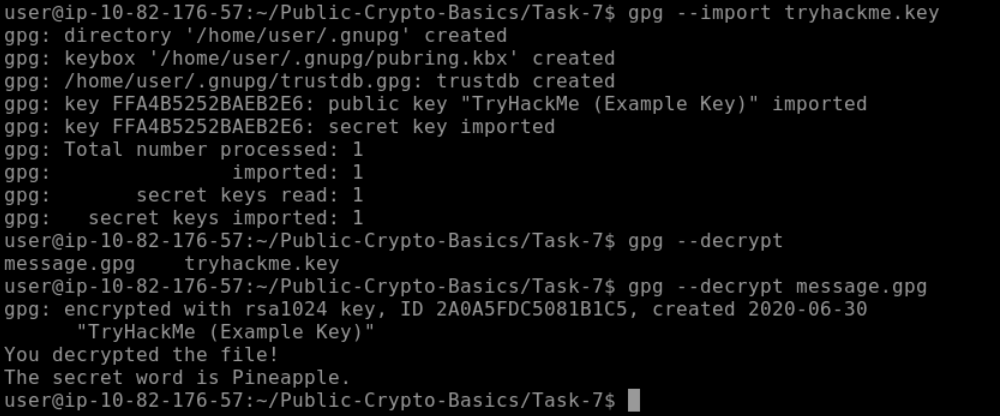
A: Pineapple
Conclusion
We have defined cryptography as the science of securing communication in the presence of adversaries. Another important science that studies how to break or bypass cryptographic systems is cryptanalysis. As for trying every possible password combination, we call that a brute-force attack. However, when we know that the password is most likely a dictionary word, it will make more sense to try words from a dictionary instead of every possible password combination; this is called a dictionary attack.
- Cryptography is the science of securing communication and data using codes and ciphers.
- Cryptanalysis is the study of methods to break or bypass cryptographic security systems without knowing the key.
- Brute-Force Attack is an attack method that involves trying every possible key or password to decrypt a message.
- Dictionary Attack is an attack method where the attacker tries dictionary words or combinations of them.